Time and Date
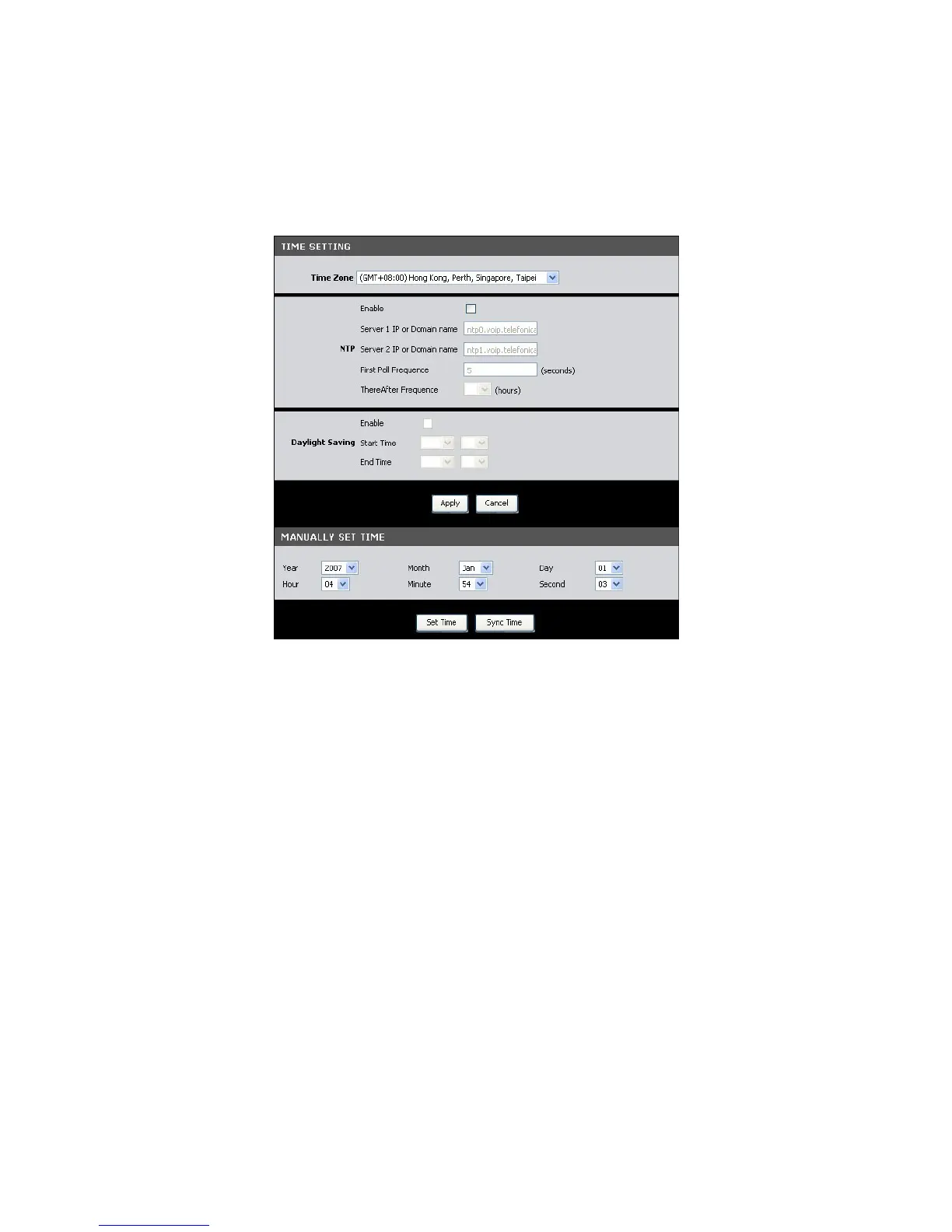
The Time and Date page allows you to manually configure the time and date of your
network or to synchronize with a Network Time Protocol (NTP) server.
To access the Time and Date page, click SETUP > Time and Date.
Time Zone — Select the time zone in your location. To set the network time and
date according to the selected time zone, click the Sync Time button.
NTP (Network Time Protocol) — Check the Enable box to synchronize the network
time and date with an NTP server.
• Server 1 IP or Domain name: Enter the IP address or the domain name of
the NTP server to synchronize your network with.
• Server 2 IP or Domain name: Enter the IP address or the domain name of
another NTP server to synchronize your network with in case Server 1 is
not available.
• First Poll Frequency: Enter the number in seconds of the first poll.
• ThereAfter Frequency: Select the succeeding frequency from the drop-
down list.
Daylight Saving — Check the Enable box to enable daylight saving time.
• Start Time: Select the month and the day to start the daylight saving time.
• End Time: Select the month and the day to end the daylight saving time.
Click the Apply button to save your changes or click the Cancel button to discard
your changes.


 To Next Page