NAT
Virtual Server
A virtual server allows remote devices accessing the Web or FTP services via a public
IP address be redirected to local servers in the LAN. Depending on the requested
service (TCP/UDP port number), your Modem Router redirects the external service
request to the appropriate server in the LAN.
To access the Virtual Server page, click Advanced > NAT > Virtual Server or click the
Virtual Server button.
The table displays the virtual servers on your network. To edit an entry, click the
corresponding
icon. To delete an entry, click the corresponding button.
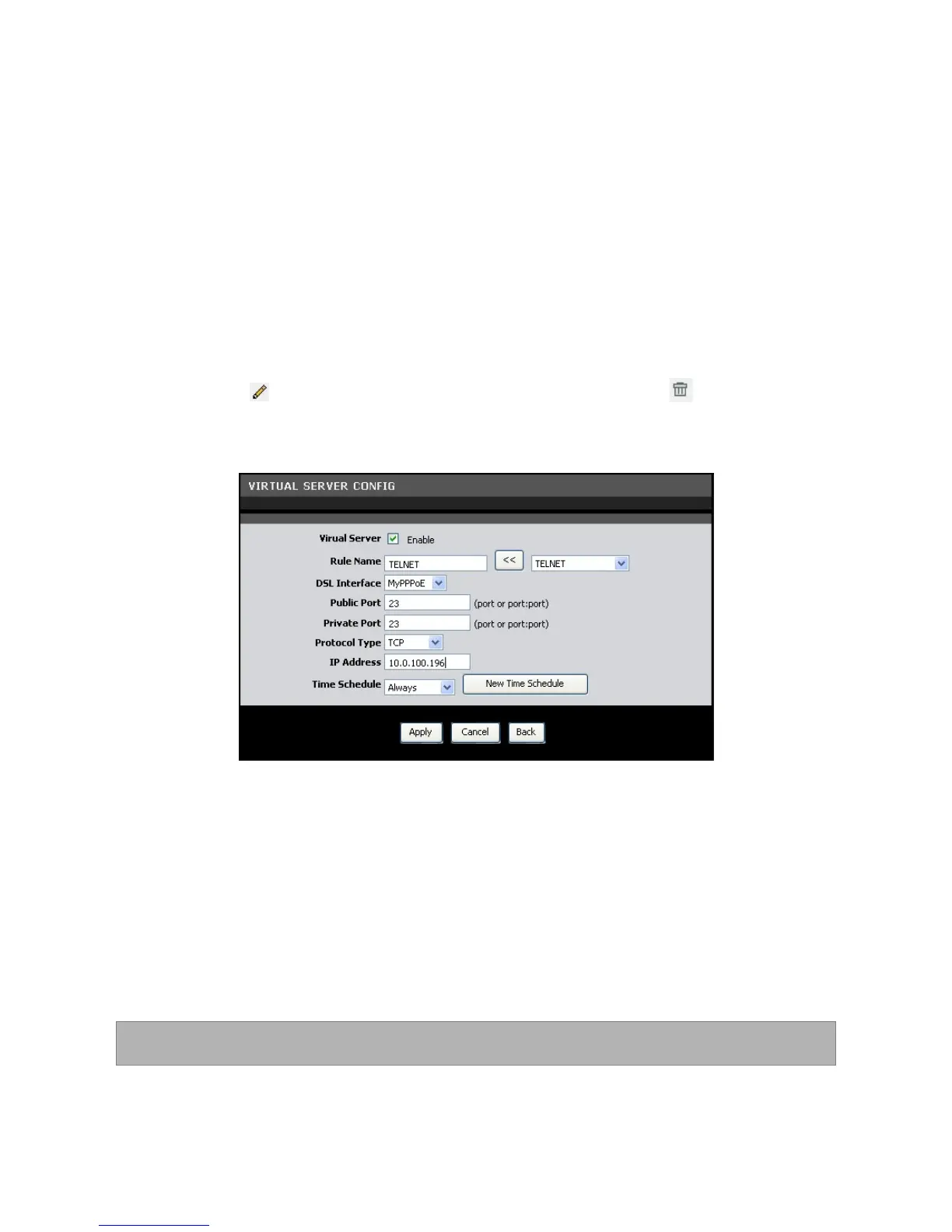
To add virtual servers, click the Add button. The Virtual Server Config screen is
displayed.
Virtual Server — Check this box to enable the virtual server function.
Rule Name — Enter a rule name or select an application name from the drop-down
list on the right, then click the << button. If you select a predefined application
name, the Public Port, Private Port, and Protocol Type are automatically configured.
DSL Interface — Select a DSL interface from the drop-down list.
Public Port — Enter the public port. This is the port seen from the WAN side.
Private Port — Enter the private port. This is the port being used by applications
within your local network.
NOTE: The public and private ports are usually the same.
Protocol Type — Select the protocol from the drop-down list.
IP Address — Enter the local network IP address of the system hosting the server.



 To Next Page