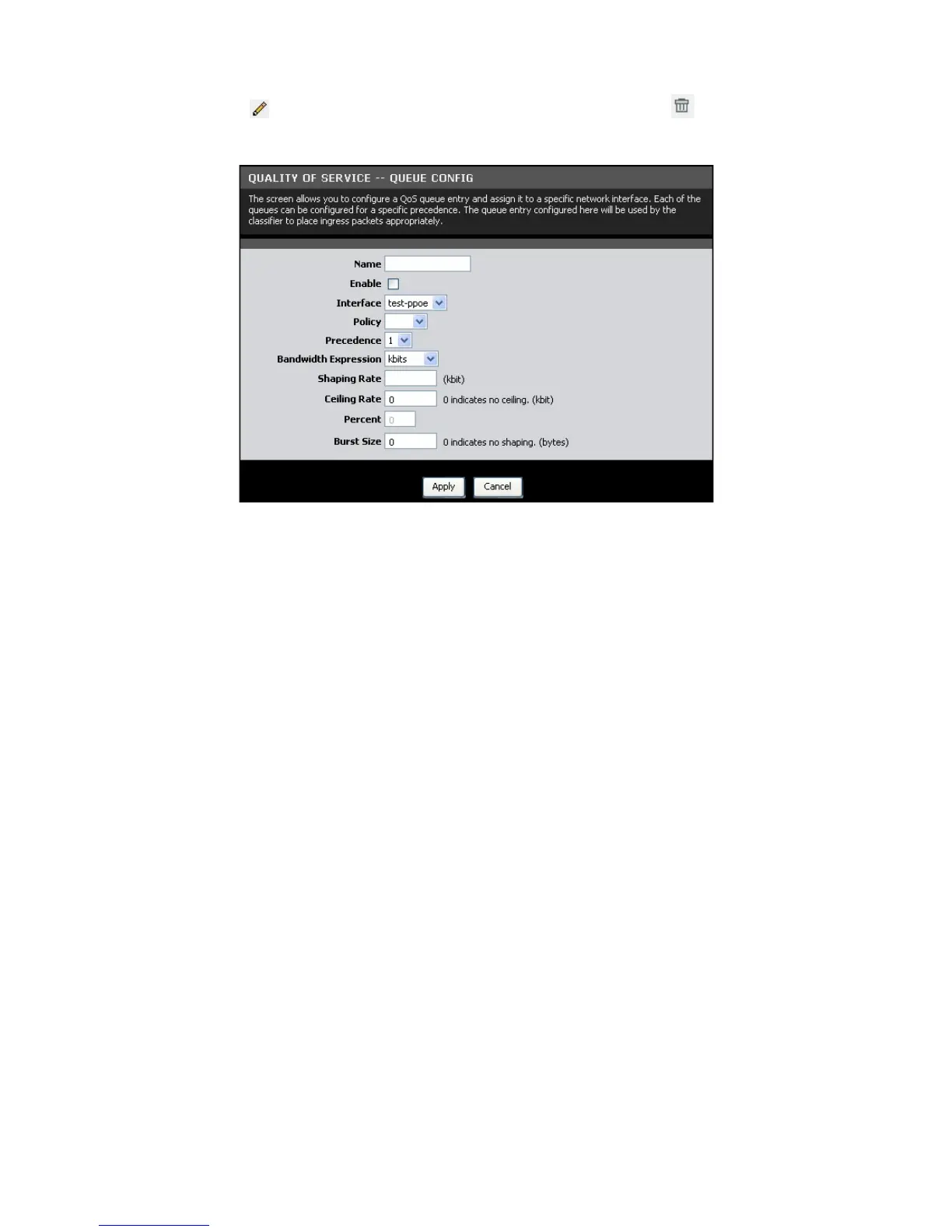
The table displays QoS queue configurations. To edit an entry, click the
corresponding
icon. To delete an entry, click the corresponding icon.
To configure QoS queue entries, click the Add button.
Name — Enter a QoS queue entry name.
Enable — Check this box to enable this queue.
Interface — Select the interface to implement this QoS queue.
Policy — Select the queue policy. Options are:
• SP: In Strict Priority (SP), packets with a high priority are processed first.
Not until the first queue is empty will another queue be processed.
• WFQ: In Weighted Fair Queuing (WFQ), each queue can be given a
different priority level. Each traffic is assigned to a class and each class is
given its own queue.
Precedence — Select the precedence from the drop-down list.
Bandwidth Expression — Select one of the following options:
• Kbits: Enter the Shaping Rate and Ceiling Rate.
• Percent: Enter the Percent.
Burst Size — Enter burst size.
Click the Apply button to save the queue configuration or click the Cancel button to
discard your changes.
Queue Classification
This page allows you to configure classification rules to classify upstream traffic and
assign queues which define the precedence, interface, and optionally overwrite the
IP header DSCP byte. A rule consists of a class name and at least one condition. All



 To Next Page