TEW-823DRU
36
© Copyright 2014 TRENDnet. All Rights Reserved.
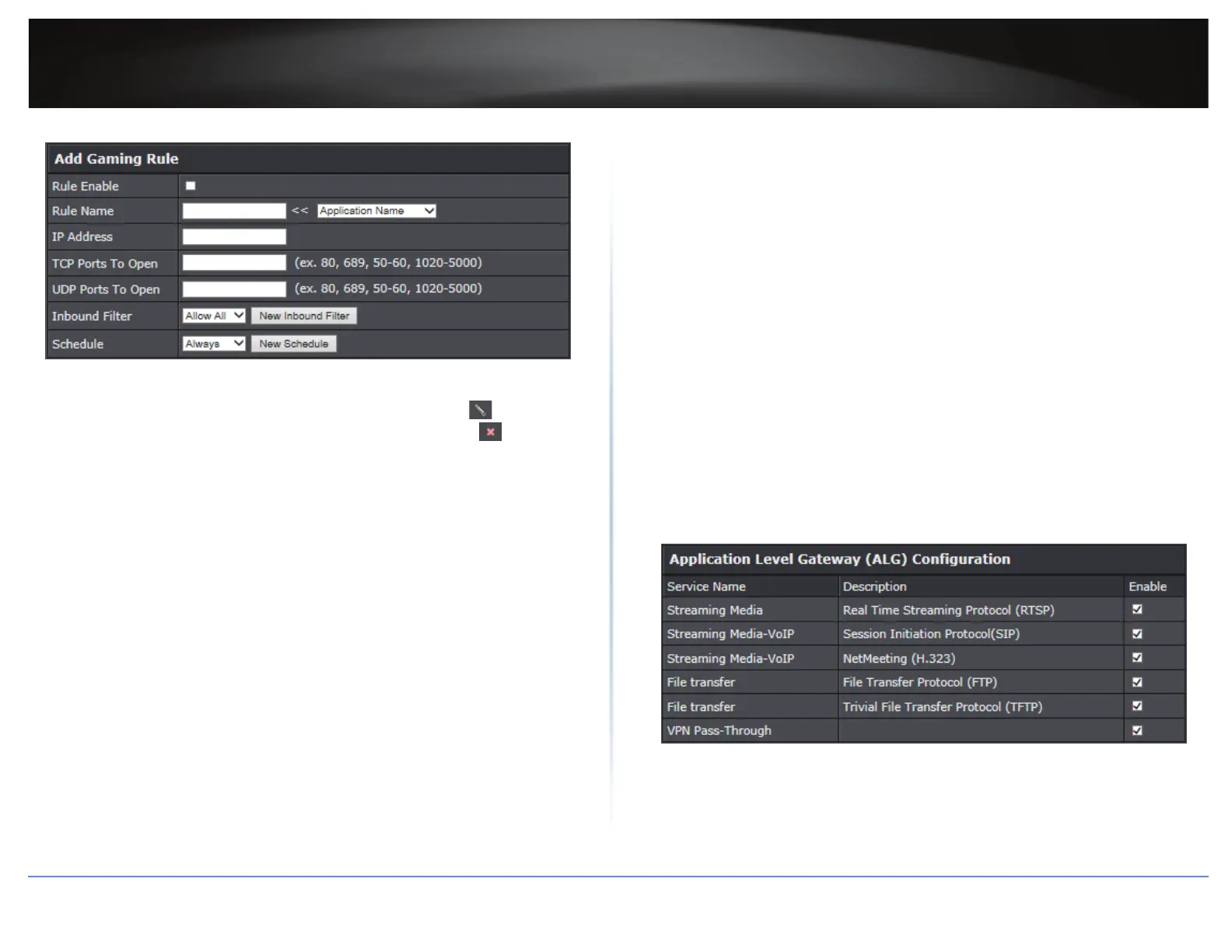
4 Click Add to save the sengs.
ÍNote: In the Gaming Rule List secon, you can edit a rule by clicking in the Edit
column next to the rule you would like to edit. To delete the rule, click in the Delete
column next to the rule you would like to delete.
ALG
Advanced > Firewall > ALG
You may want to congure your router to allow computers the use of specic high layer
applicaons or service sessions to pass through. Applicaon Layer Gateways (ALG) allows
you to easily enable or disable these applicaons to pass through your router.
ÍNote: It is recommended to leave these sengs enabled.
1 Log into your router management page (refer to “Log in to Management Page” on page 8).
2 Click on Advanced > Firewall > ALG.
3 In Applicaon Level Gateway (ALG) Conguraon secon, modify the following values:
Streaming Media: Check this opon to allow RTSP protocol through your router
typically used in streaming media applicaons.
Streaming Media-VoIP: Check this opon to allow SIP protocol through your router
typically used in VoIP applicaons.
Streaming Media-VoIP: Check this opon to allow H.323 protocol through your
router typically used in video/audio conferencing applicaons.
File Transfer: Check this opon to allow FTP protocol through your router used for
le transfer over a network or the Internet.
File Transfer: Check this opon to allow TFTP protocol through your router used for
le transfer over a network or the Internet.
VPN Pass-Through: Check this opon to allow client connecons through your router.
4 Click Save Status to save the sengs.
ÍNote: To discard the changes, click Cancel.





 To Next Page