TEW-823DRU
23
© Copyright 2014 TRENDnet. All Rights Reserved.
Advanced Sengs
Advanced > Wireless (2.4GHz or 5GHz) > Advanced
These sengs are advanced opons that can be congured to change advanced wireless
broadcast specicaons. It is recommended that these sengs remain set to their default
values unless you are knowledgeable about the eects of changing these values. Changing
these sengs incorrectly can degrade performance.
1 Log into your router management page (refer to “Log in to Management Page” on page 8).
2 Click on Advanced > Wireless (2.4GHz or 5GHz) > Advanced.
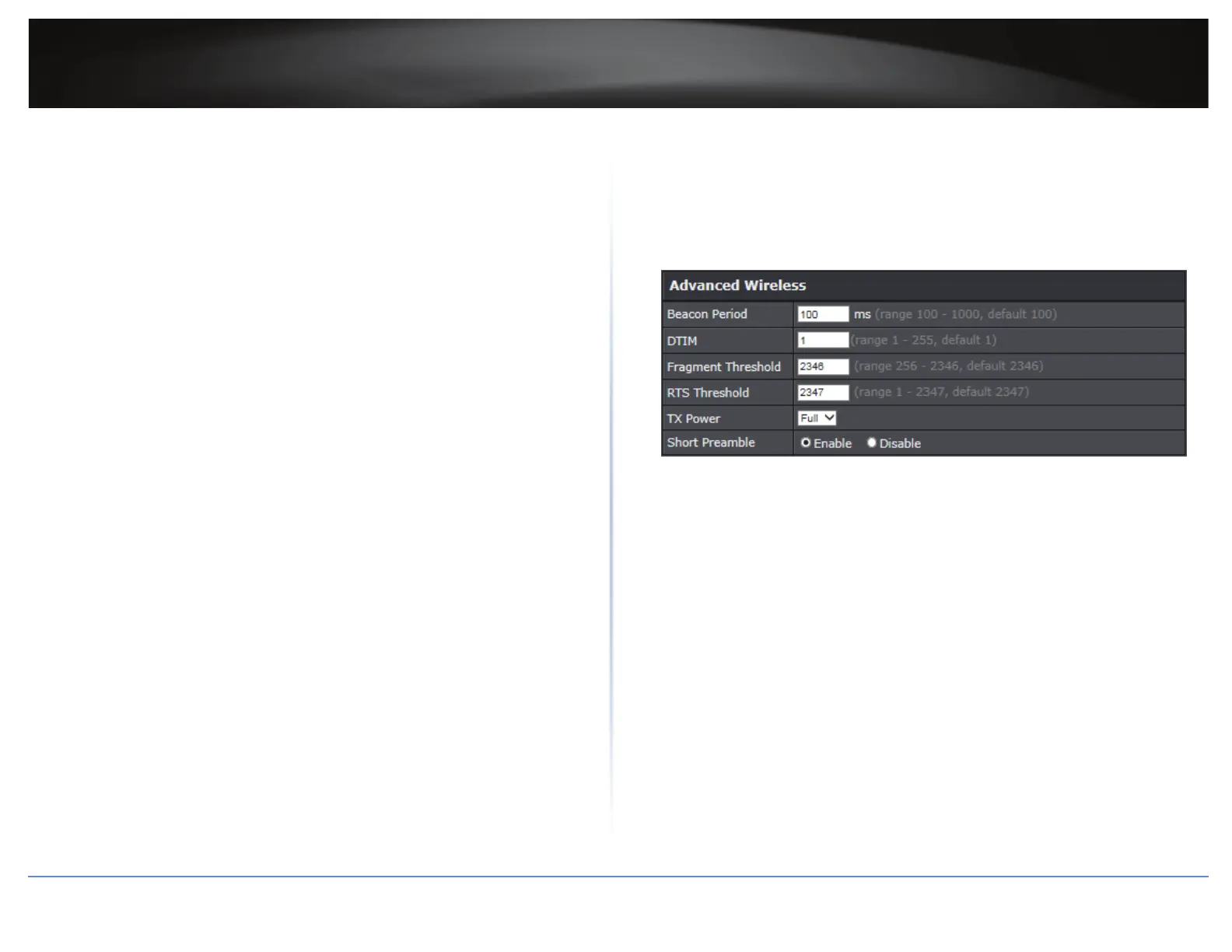
3 In Advanced Wireless secon, congure the following parameters:
Beacon Period: A beacon is a management frame used in wireless networks that
transmied periodically to announce the presence and provide informaon on the
router’s wireless network. The interval is the amount me between each beacon
transmission.
Default Value: 100 milliseconds (range: 100-1000)
DTIM: A DTIM is a countdown informing clients of the next window for listening to
broadcast and mulcast messages. When the wireless router has buered broadcast
or mulcast messages for associated clients, it sends the next DTIM with a DTIM
Interval value. Wireless clients detect the beacons and awaken to receive the
broadcast and mulcast messages. The default value is 1. Valid sengs are between
1 and 255.
Fragment Threshold: Wireless frames can be divided into smaller units (fragments)
to improve performance in the presence of RF interference and at the limits of RF
coverage. Fragmentaon will occur when frame size in bytes is greater than the
Fragmentaon Threshold. This seng should remain at its default value of 2346
bytes. Seng the Fragmentaon value too low may result in poor performance.
RTS Threshold: The Request To Send (RTS) funcon is part of the networking protocol.
A wireless device that needs to send data will send a RTS before sending the data in
queson. The desnaon wireless device will send a response called Clear to Send
(CTS). The RTS Threshold denes the smallest data packet size allowed to iniate the
RTS/CTS funcon.
Default Value: 2347 (range: 1-2347).
TX Power: This seng allows you to adjust the wireless transmit power to a lower
seng. In busy wireless environments, lowering the transmit power may improve
beer performance and connecvity and decrease interference with neighbouring
wireless networks.
Short Preamble: Using a short preamble can potenally increase throughput as the
transfer me is 96 microseconds versus the more commonly used long preamble
192 microseconds. However, using a short preamble is not supported using 802.11b
legacy devices, in some cases cause wireless interoperability issues, and increase
the error rate in some installaons. The preamble is the informaon sent from the
wireless transmier to the receiver indicang when data is incoming.
4 In HT Physical Mode secon, congure the following parameters:
20/40 Coexistence (2.4GHz only): 20/40MHz Coexistence allows for the auto-fallback
from 40MHz to 20MHz channel width operaon when neighbouring 802.11 wireless
networks are detected.
Guard Interval: Using a short (400ns) guard interval can increase throughput.
However, it can also increase error rate in some installaons, due to increased
sensivity to radio-frequency reecons.
MCS: Allows you to lock down the wireless transmission rate.
Extension channel: Allows you to assign either the upper or lower extension channels
to use for channel bonding when establishing connecvity at the higher channel
widths 40MHz and 80MHz.
A-MPDU: Using Aggregate Mulple Protocol Data Unit will allow the all frames
transmied to be aggregated into larger size A-MPDU formaed frames before
sending and receiving potenally increasing the overall throughput.





 To Next Page