TEW-823DRU
41
© Copyright 2014 TRENDnet. All Rights Reserved.
ÍNote:
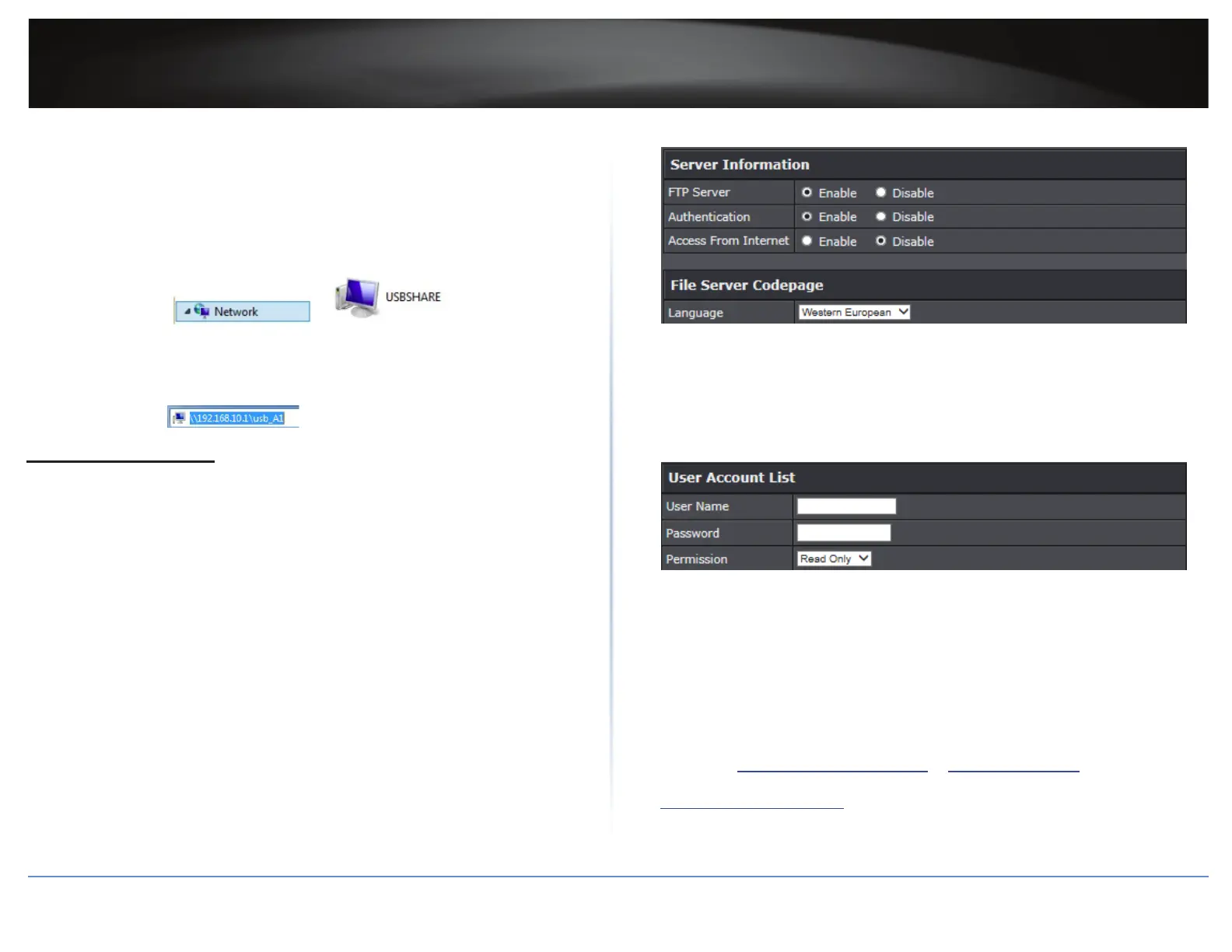
ͳ In Windows® operang system, you can access the USB storage device on your
computer in the following path: Computer > Network > USBSHARE > usb_A1.
ͳ Your computer will only be able to automacally discover the USB storage if you
are set to a workgroup under the default name “WORKGROUP”. Your computer
will not be able to automacally discover the USB storage if it is connected to a
domain or congured with a dierent workgroup name.
ͳ In Windows® operang system, if your computer cannot discover the USB storage
automacally, you can access the les in your server, using the network map or by
typing \\<routerIPaddress>\usb_A1 on your browser’s or le explorer address bar.
For example, .
Congure FTP Server
Advanced > USB > FTP Server
FTP (File Transfer Protocol) is used to access shared les through the Internet. In order to
share les, you will need to plug in a USB storage device on the USB port on the back of
the router.
1 Log into your router management page (refer to “Log in to Management Page” on page 8).
2 Click on Advanced > USB > FTP Server.
3 In Server Informaon secon, modify the following values:
FTP Server: Select enable or disable for the feature.
Authencaon: Select Enable to acvate user name and password authencaon in
order to access the USB storage using FTP. Select Disable to let user to anonymously
access the USB storage using FTP.
Access From Internet: Select Enable to allow access to the USB storage using FTP
over the Internet (WAN) and local (LAN) networks. Select Disable to disable FTP
access over the Internet and allow LAN access only.
4 In File Server Codepage secon, you can dene which character set to use when
transferring data using FTP.
ÍNote: It is recommended to leave these sengs as default “Western European”.
5 Click Apply to save the changes.
6 In User Account List secon, you can add users to your FTP Server.
User Name: Enter the user name to be used to access your les.
Password: Enter the password for the user name.
Permission: Select the permission you will grant to the user. You can allow the user
Read Only or Read-Write access to the USB storage.
7 Click Add to add the account.
ÍNote:
ͳ To discard the changes, click Clear.
ͳ Use Current User Account List to review all the user accounts. Click Delete to
delete the selected user account.
ÍNote: Signing up for a Dynamic DNS service (outlined in “Idenfy Your Network
on the Internet” on page 29) will provide idencaon of the router’s network
from the Internet. You can access your shared les over the Internet by typing,
for example p://<router’sWANIPaddress> or p://myDDNSservice in your web
browser or le explorer address bar. You can access your share les locally by typing
p://<router’sLANIPaddress> in your web browser or le explorer address bar.





 To Next Page