TEW-823DRU
39
© Copyright 2014 TRENDnet. All Rights Reserved.
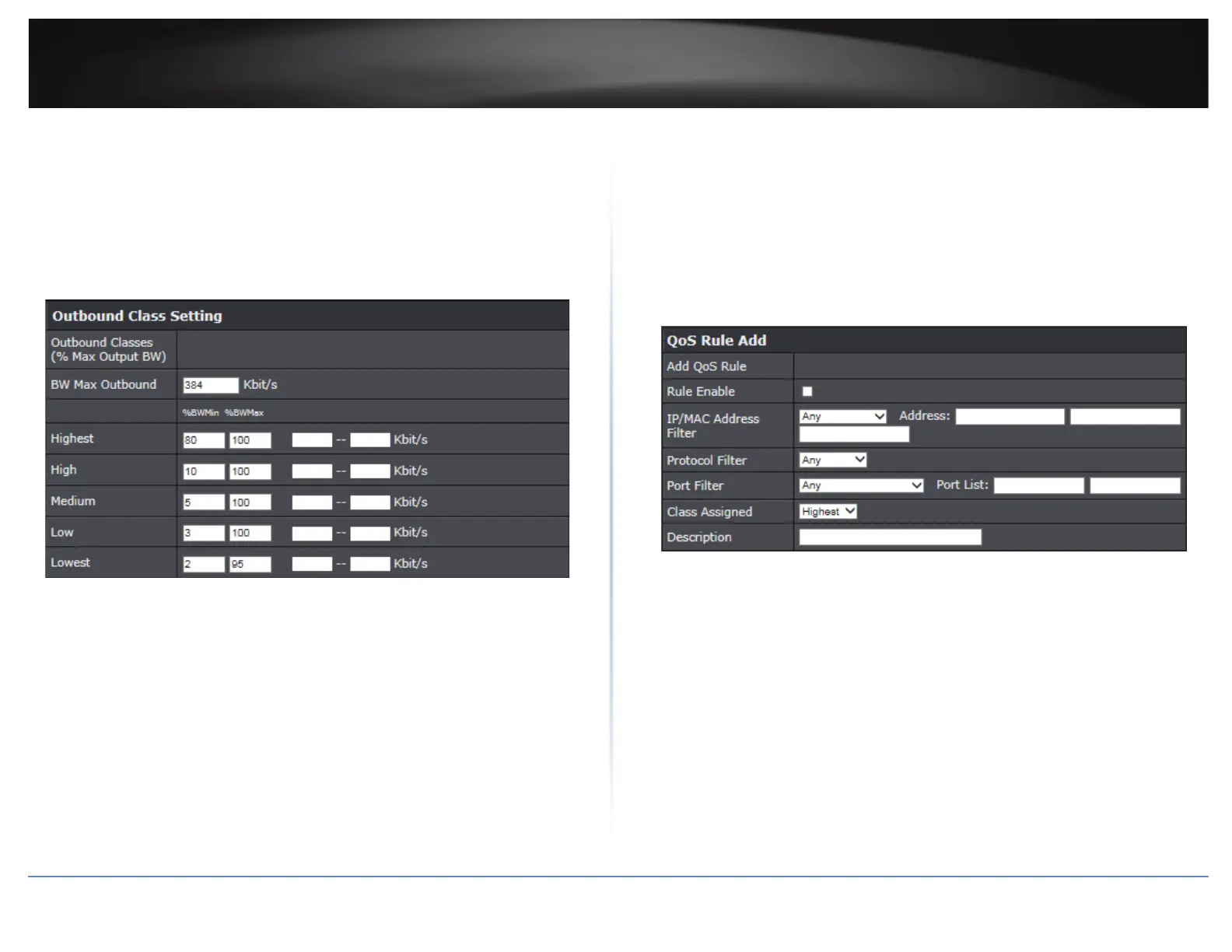
6 In Outbound Class Seng secon, modify the following sengs:
ÍNote: The elds will automacally populate when Inbound Class is congured but
you can also modify the sengs manually.
BW Max Outbound: Enter the maximum upload speed of your ISP (Internet Service
Provider).
Highest/High/Medium/Low/Lowest: Enter the upload speeds you would like to
apply on each state of download speeds. This seng is similar to seng the priority
speeds of each class.
7 Click Apply to save the changes.
ÍNote: To discard the changes, click Cancel.
8 In QoS Rule Add secon, modify the following values:
Rule Enable: Check this opon to enable the QoS rule.
IP/MAC Address Filter: Click on the drop-down menu and choose the type of the
IP address or MAC address. Then enter the IP address and/or MAC address to the
Address eld(s).
Protocol Filter: Select the protocol you would like to apply on the QoS rule.
Port Filter: Select the port from the drop-down menu you would like to assign on the
QoS rule. Then enter the port number to the Port List eld.
Class Assigned: Select the class that you have assigned to the QoS rule.
Descripon: Enter the QoS descripon that best describes the rule.
9 Click Add to save the sengs.
ÍNote: To discard the changes, click Clear.





 To Next Page