25
General Information
TPMS Sensor ID Number
An ID number for each tyre pressure sensor
is printed on a label which is on the sensor.
This number may be required by the dealer
for service or diagnostics.
If the TPMS has been fitted at the factory,
labels identifying the front and rear TPMS
sensor ID numbers will be affixed to the
spaces below.
If the TPMS is being fitted to the motorcycle
as an accessory, ensure that the dealer
records the front and rear TPMS sensor
ID numbers in the spaces provided below.
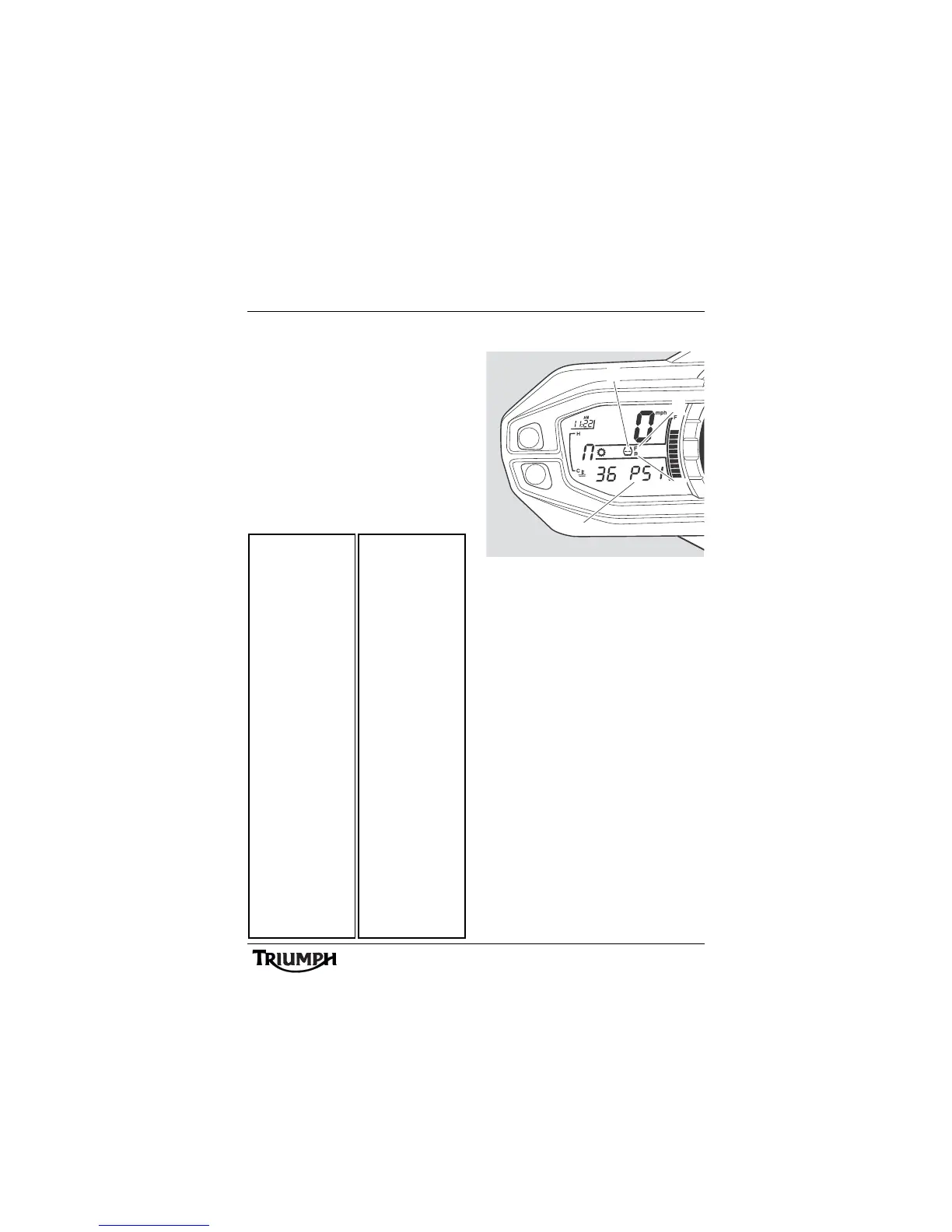
System Display
1. TPMS symbol
2. Tyre pressure display
3. Front tyre, identified
4. Rear tyre, identified
To access the tyre pressure display, turn the
ignition to the ON position.
Press and release the set button on the left
hand switch cube until 'PSI' or 'bAr' is visible
in the display screen.
Press and release the scroll button to select
the front or rear tyre pressure.
When the tyre pressure monitoring system
has been selected, — — 'PSI' or 'bAr' will be
visible in the display screen until the
motorcycle is travelling at a speed greater
than 12 mph (20 km) and the tyre pressure
signal is received.
To exit the tyre pressure display, press and
release the home button and the odometer in
trip 1 menu will be displayed.






 To Next Page