46
General Information
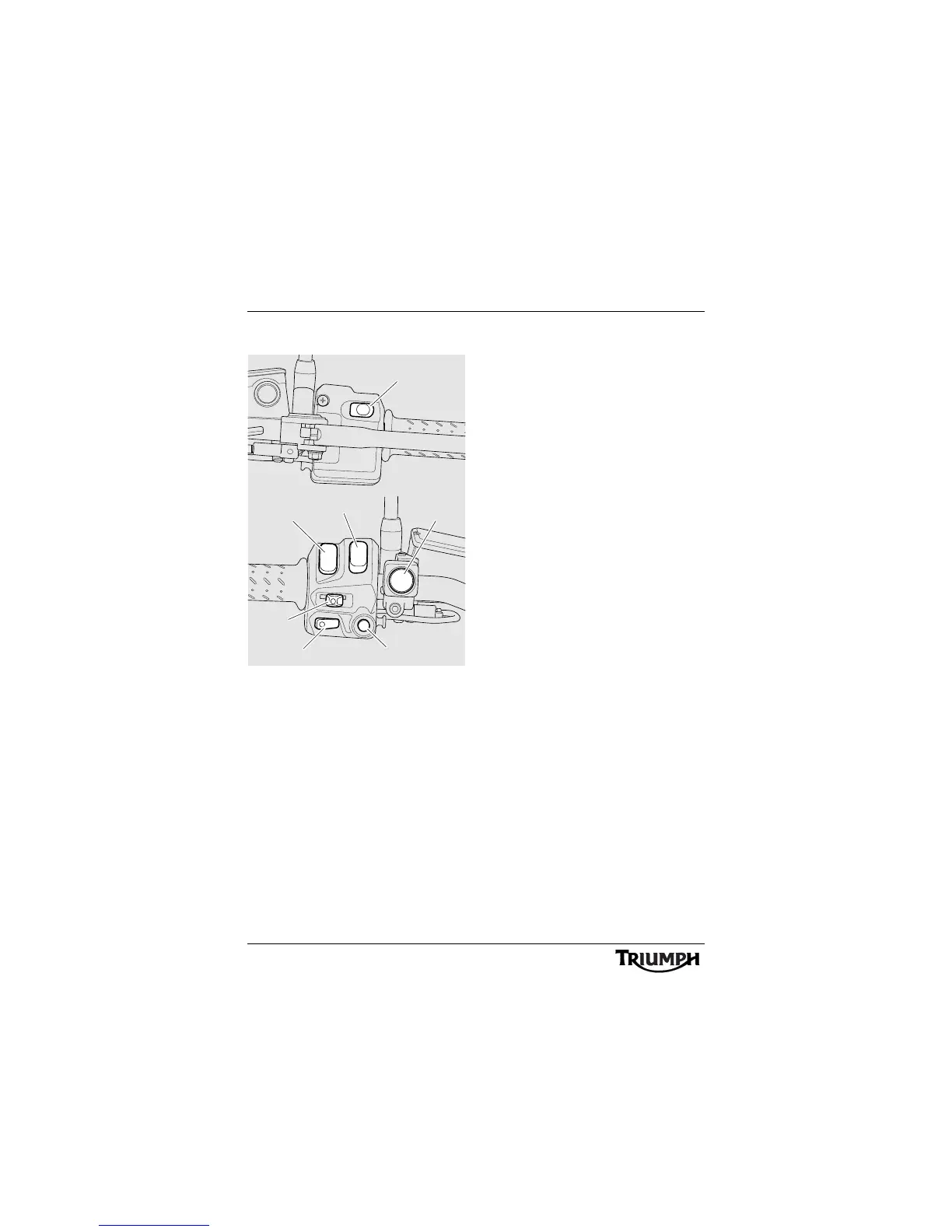
Left Handlebar Switches
1. Headlight dip switch
2. Direction indicator switch
3. Horn button
4. Pass button
5. Instrument's scroll button
6. Instrument's set button
7. Front fog lights switch, if fitted
Headlight Dip Switch
High or low beam can be selected with the
headlight dip switch. To select high beam,
push the switch forward. To select low beam,
push the switch rearwards. When the high
beam is turned on, the high beam indicator
light will illuminate.
Note:
• A lighting on/off switch is not fitted
to this model. The position light, rear
light and licence plate light all
function automatically when the
ignition is turned to the ON position.
• The headlight will only function
when the ignition switch is turned to
the ON position and the engine is
running.
An alternate way to turn on the
headlight, without the engine
running, is to pull in the clutch lever
then turn the ignition to the ON
position. The headlight will be on
and remain on when the clutch lever
is released.
The headlight will go off while
pressing the starter button until the
engine starts.










 To Next Page