TrojanTwo User Guide v3.8
9 Changing label material
The process of changing the material is described in chapter 4 “Threading the machine”.
10 Printing modes
The TrojanTwo press supports three printing modes: Continuous, Diecut or Blackmark depending on the
type of label material applied.
10.1 Continuous printing mode
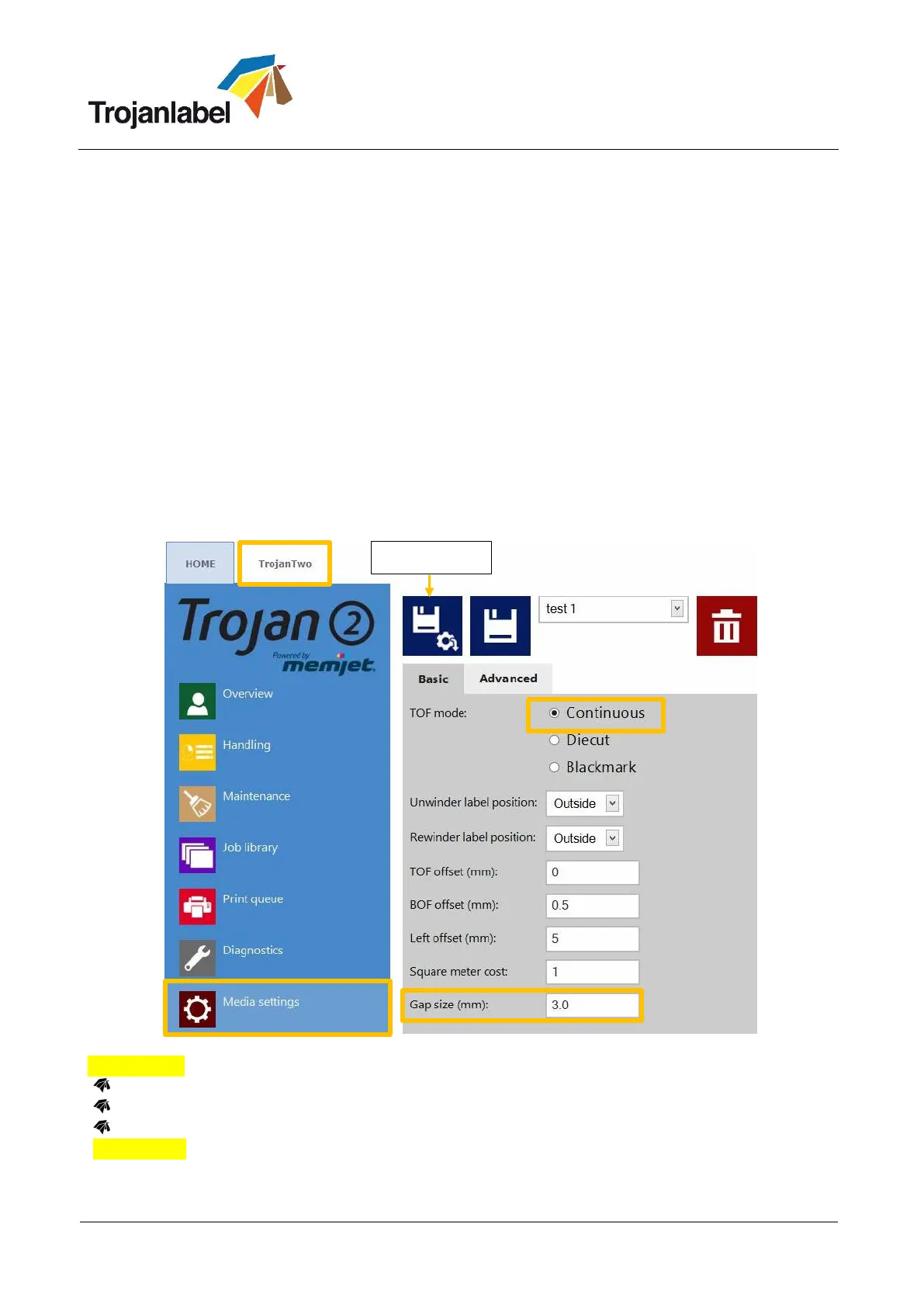
To select continuous printing mode go to TrojanTwo -> Media Settings menu and choose
‘Continuous’ as TOF mode (TOF = Top of Form) to describe the top of form algorithm (how to
detect the top of the next label). Press ‘Save & Apply’ button to apply changes.
Continuous label material has no gaps or blackmarks between the labels.
In continuous mode the label gap/ blackmark sensor is ignored.
The gap between the labels can be set at TrojanTwo -> Media settings menu.
IMPORTANT: Because of inter-page actions the printed labels have to have:
Minimum 2.2 mm gap at 6IPS mode
Minimum 3 mm gap at 12IPS mode.
Maximum gap size is 65 mm
IMPORTANT: Setting label gap outside the minimum and maximum range can result to label skipping or
enormously high label gaps.



 To Next Page