TIP:
• Voice Texting is not compatible with iPhone, but if your
vehicle is equipped with Siri Eyes Free, you can use your
voice to send a text message.
• Messages are limited to 140 characters.
• The Messaging button on the touchscreen must be
illuminated to use the feature.
Yelp
Once registered with Uconnect Access, you can use your
voice to search for the most popular places or things
around you.
1. Press the “Apps
” button on the touchscreen.
2. Press the “Yelp” button on the touchscreen.
3. Once the YELP home screen appears on the touchscreen,
push the VR button
, then say: “YELP search.”
4. Listen to the system prompts and after the beep, tell
Uconnect the place or business that you’d like Uconnect
to find.
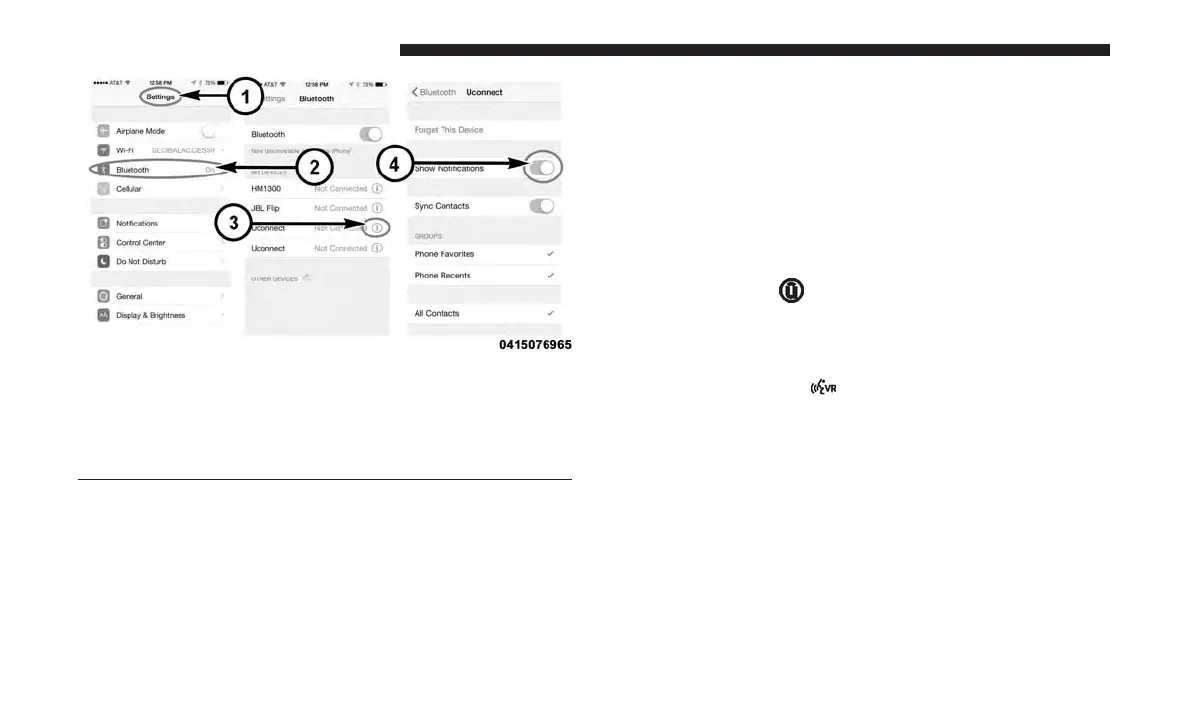
iPhone Notification Setting
1 — Select “Settings”
2 — Select “Bluetooth”
3 — Select the (i) for the paired vehicle
4 — Turn on “Show Notifications”
204 VOICE RECOGNITION QUICK TIPS



 To Next Page