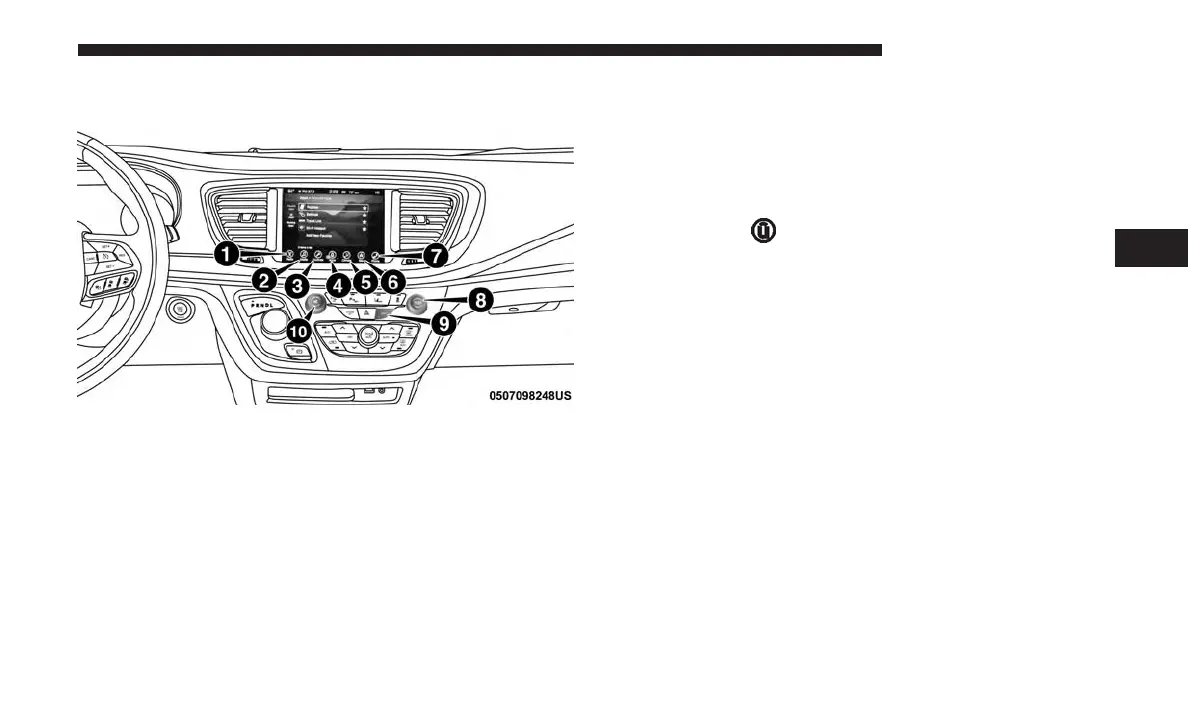
UCONNECT 8.4/8.4 NAV SYSTEM
1. Radio
Press the “Radio” button on the touchscreen to enter Radio
Mode. The different tuner modes; AM, FM and SXM can be
selected by pressing the corresponding buttons on the
touchscreens in Radio Mode.
2. Media
Press the “Media” button on the touchscreen to access
media sources such as: Disc (If Equipped), USB Device,
AUX, Bluetooth, and SD Card (If Equipped) as long as the
requested media is present.
3. Controls
Press the ⬙Controls⬙ button on the touchscreen to adjust the
auto-dimming mirror, heated & vented seats, heated &
vented steering wheel (If Equipped).
4. Apps
Press the “Apps
” button on the touchscreen to access
Smartphone and Connected vehicle options.
5. Climate
Refer to Climate Controls in your vehicle’s Owner’s
Manual for further details.
6. Nav — If Equipped
Press the “Nav” button on the touchscreen to access the
Navigation feature. Refer to the Navigation section in this
manual for further details.
7. Phone
Press the “Phone” button on the touchscreen to access the
Uconnect Phone feature.
4
UCONNECT 8.4/8.4 NAV 75



 To Next Page