39
Using the ProRIP Software (Summary)
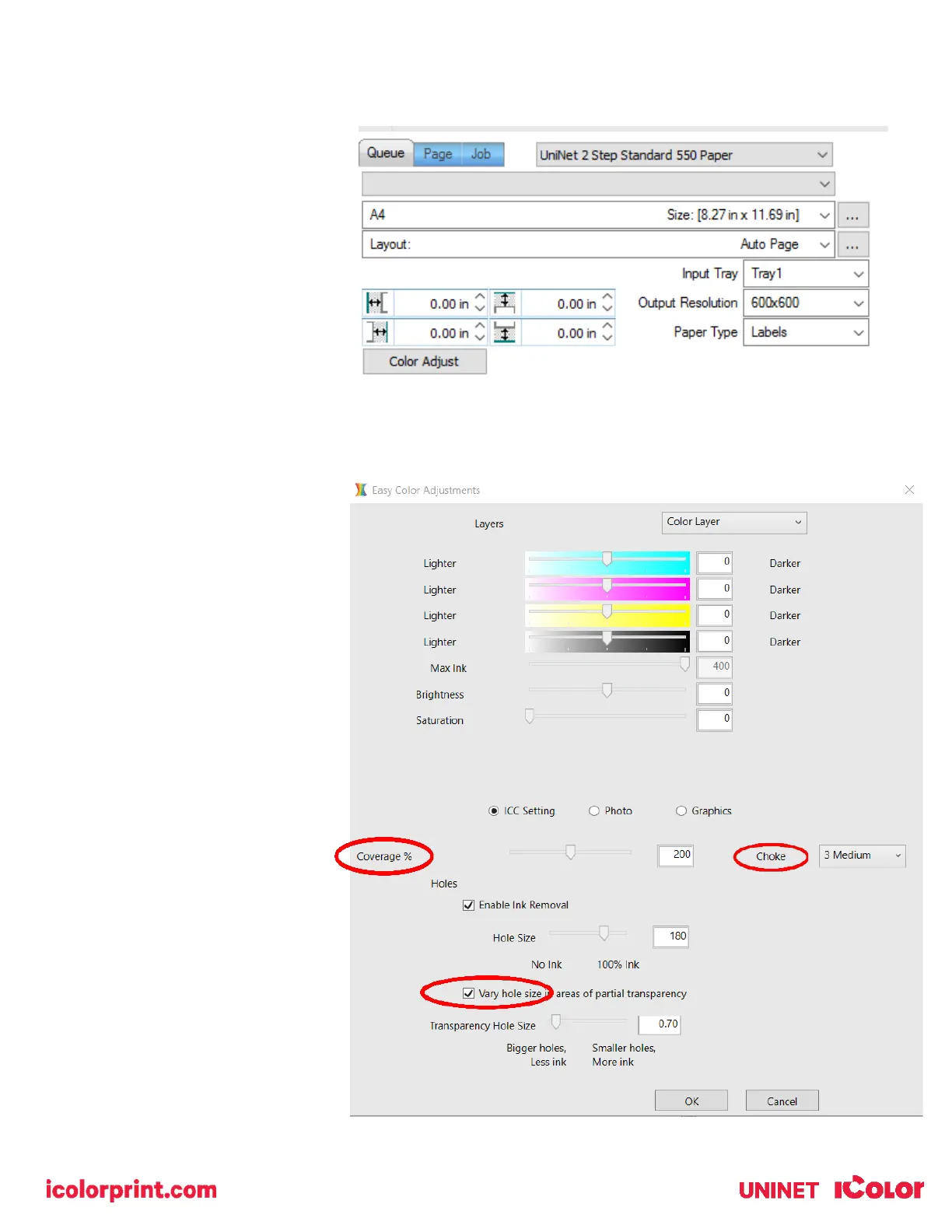
Once your image is loaded, take
note of the preconfigured settings
relating to the media being used in
the printer.
The ‘Queue’ tab shows the size of
the media that will be used, where
to load the media into the printer
and the paper type setting
recommended.
Each media type will contain this
preconfigured data to make your
printing experience as easy as
possible. Overriding these settings
could result in undesirable results.
To alter the color settings,
click on ‘Color Adjust’ and
adjust as needed. ‘Coverage
%’ represents the amount of
white/clear toner overprint or
underprint (depending on
which queue is being used).
The ‘Vary hole size in areas of
transparency’ option allows
for rasterization of colors that
fade into nothing and to
retain partial transparency. It
is suggested that this option
is left on, as it will only apply
itself where it’s needed.
‘Choke’ dictates how much
the overprint white layer is
pulled in under the colors.
The higher the number, to
more it’s pulled in (to avoid a
white outline around your
graphic).



 To Next Page