4
Installation Environment
Install the printer on a flat surface that is wide enough to accommodate the legs of the printer.
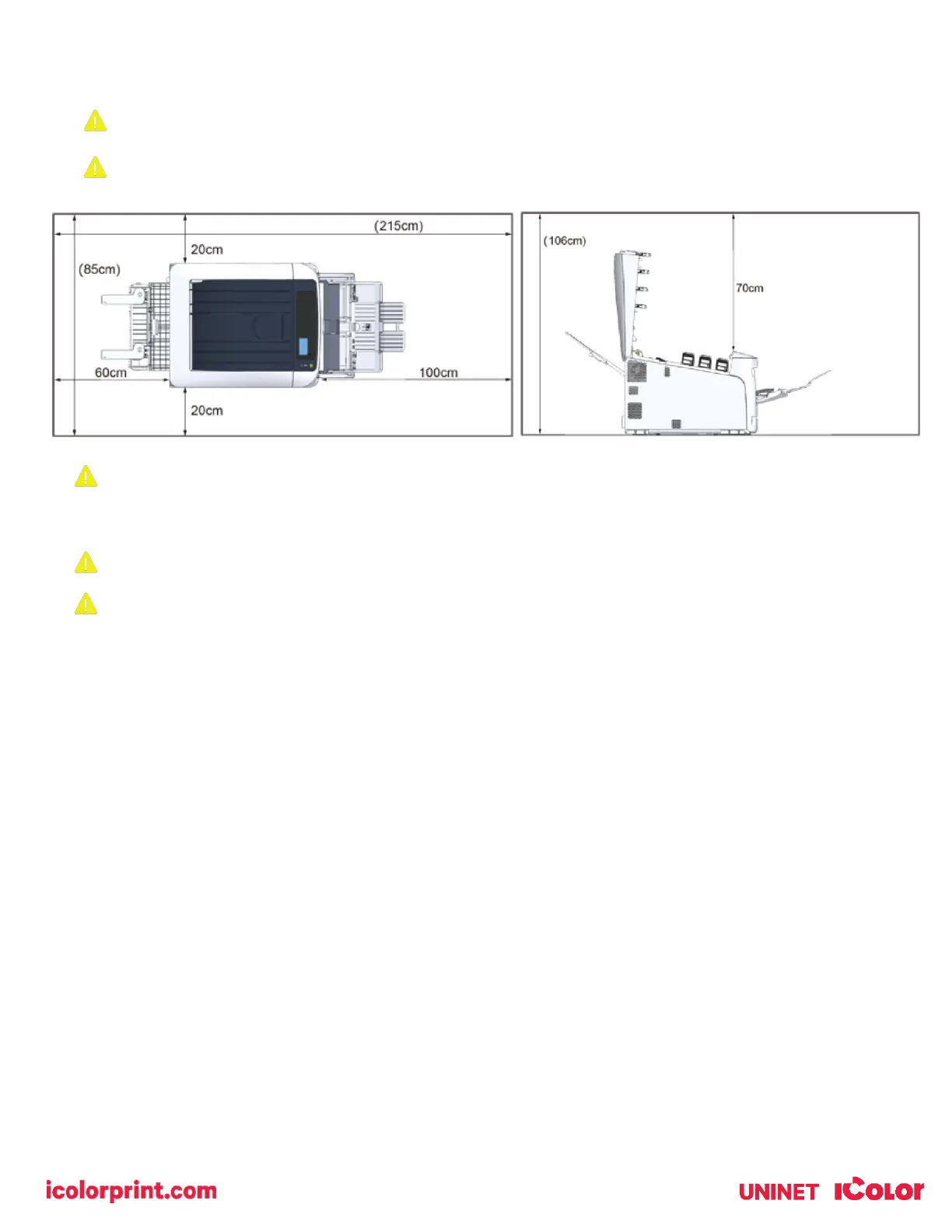
Allow for enough room around the printer as shown in the following figures:
Install the printer in the following environment.
• Optimal Humidity Level: 45% - 65%
• Optimal Temperature Range: 50°F / 10°C - 75°F / 24°C
Operation outside of these recommend parameters may lead to poor results.
The use of a dedicated circuit of at least 15 amps is required to avoid potential fusing issues.
• Do not install the printer in a location subject to high temperatures or in a location near fire.
• Do not install the printer in a location where chemical reactions may occur (such as a laboratory).
• Do not install the printer near alcohol, thinners, or other flammable solvents.
• Do not install the printer in a location within the reach of small children.
• Do not install the printer in an unstable location (such as on an unsteady stand or slanted location).
• Do not install the printer in a location with high level of humidity or dust, or in a location where the printer is
exposed to direct sunlight.
• Do not install the printer in an environment where it is exposed to salty air, NOx, SOx or corrosive gas.
• Do not install the printer in a location where it is exposed to a high level of vibration.
• Do not install the printer in a location where its vent hole is blocked.
• Do not install this printer directly on a thick rug or carpet.
• Do not install this printer in a closed room or other locations with bad circulation and ventilation.
• If you use this printer in a small room continuously for an extended period of time, make sure to ventilate the
room.
• Install this printer away from a source that emits strong magnetic fields or noise.
• Install this printer away from a monitor or television.
• Moving the printer requires that two people stand in front and back of the printer respectively, hold the handles
at the bottom of the printer, and move it.



 To Next Page