VECTOR3MANUAL
MAN‐004REV7.2547/20/2017
METHODC—SPECTRALINES(MICROLINES)(UNFINGERTRAPEDENDS)
Afterthemaincanopyhasbeenproperlyattachedtotherisersandwhileitisstilllyingonitsside,attachthetogglesto
itbyfollowingthesesteps:
1.Startingatthetailofthecanopy,tracetheuppersteeringlinesdown
tothelowersteeringline.Thisistoensurethe
steeringlinesareroutedcorrectly;theyshouldnotwraparoundanysuspensionlines.Theright‐handsteeringline
mustpassthroughtheright‐handrearslidergrommet,andtheleft‐handlinemustpassthroughtheleft‐handrear
slidergrommet.
2.Locatethemarkonthesteeringlinethatindicatesthecorrecttogglelocation.Verifythatthismarkisinthecorrect
locationbyreferringtothemaincanopyowner’smanual.
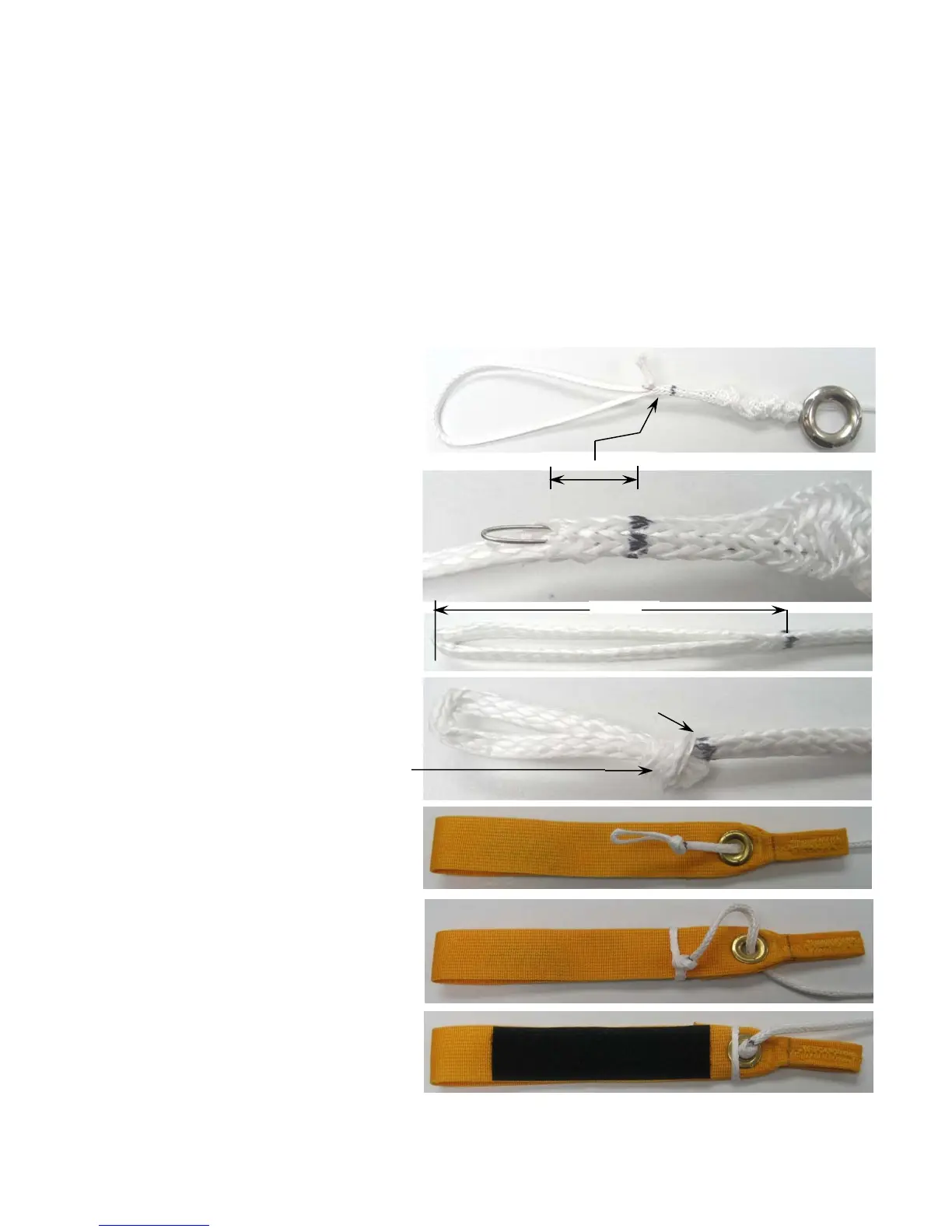
3.Usinganappropriatefingertraptool,Startthe
finger‐trapasshowtotheright.
4.Thefinger‐trapmustbeginfrom3/8”(10mm)
to1/2"(13mm)frommarkasshown.Thiswill
ensurethatthefinger‐trapislockedintheknot.
5.Formafinger‐trappedloop2⅜”(61mm)from
themanufacturersmarktotheendasshow.
6.Tieandadjustanoverhandknotuntilthe
markisjusttotheoutsideofthemark.Theloop
shouldfitcloselyaroundthetoggle.Tightenthe
knot.
Note:
Thefinger‐trapislockedintheknot.
7.Threadtheendofthesteeringlinethrough
theguidering
locatedontheriserthenthrough
thegrommetlocatedontoggle.
8.Pulltheloopovertheendofthetoggleas
shown.
9.Drawthesteeringlinetightandrepeatthe
procedurefortheothertoggle.
10.Inspecttheinstallation.Checktobesurethesteeringlines
areroutedcorrectly.
3/8”to1/2"
2⅜”
Mark



 To Next Page