42 l Smatrix Pulse | Installation and Operation Manual
Network Connectivity
Note
Setting up a system with a Communication
Module requires a mobile device (smartphone/
tablet).
Set up and connect the Controller (C) using the Uponor
Smatrix Pulse App (A) and Communication Module (B) via
multiple connection methods.
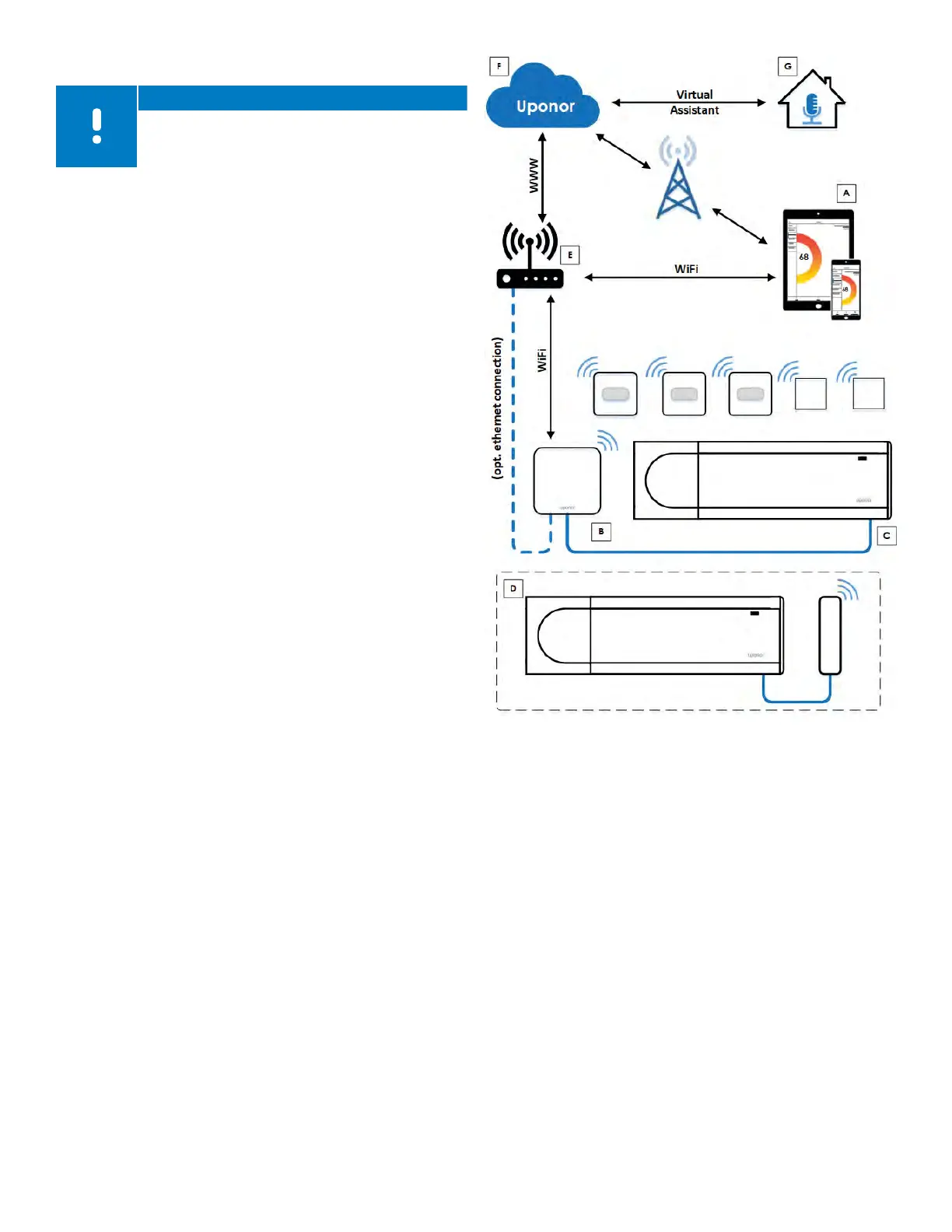
Direct Connection (no Wi-Fi)
For installing and setting up a system and during normal
operation when there is no Wi-Fi network available,
the Uponor Smatrix Pulse App (A) communicates with
the room controller (C) via direct connection to the
Communication Module (B). The sub-Controller (D)
communicates via the Primary Controller (C).
Local Wi-Fi Connection
During normal operation when connected to the same
local Wi-Fi network, the Uponor Smatrix Pulse App (A)
communicates with the Controller (C) and the mobile
device connects to the same Wi-Fi router (E) as the
Communication Module (B). The Communication Module
(B) and Wi-Fi router (E) connect using either Wi-Fi or
Ethernet. The sub-Controller (D) communicates via the
Primary Controller (C).
Remote Connection (outside local Wi-Fi network)
During normal operation outside the local Wi-Fi network,
the Uponor Smatrix Pulse App (A) communicates with the
Controller (C) via a remote connection. The mobile device
connects to Uponor Cloud services (F) over internet (via
local Wi-Fi or mobile network). Uponor Cloud services (F)
connect to the Communication Module (B) via the Wi-
Fi router (E). The Communication Module (B) and Wi-Fi
router (E) are connected using either Wi-Fi or Ethernet.
The sub-Controller (D) communicates via the Primary
Controller (C).
Virtual Assistants (Amazon Alexa or Google Home)
Virtual assistants (G) communicate with the Controller
(C) via an Application Programming Interface (API) to
communicate with Uponor Cloud services (F). Uponor
cloud services (F) connect to the Communication Module
(B) via the Wi-Fi router (E). The Communication Module
(B) and Wi-Fi router (E) are connected using either Wi-Fi
or Ethernet. The sub-Controller (D) communicates via the
Primary Controller (C).
Figure 11-2: Network diagram



 To Next Page