uponor.com l 33
Chapter 9:
System Operation
The Controller operates the underfloor heating/cooling
installation according to customer needs. The user adjusts
temperatures via thermostats located in each room, or
if installed with the Smatrix Pulse App (which requires a
Communication Module).
As soon as the temperature measured at a thermostat
is lower (heating mode) or higher (cooling mode) than
the setpoint temperature, it creates a demand to the
Controller to change the room temperature. The Controller
opens the actuators according to current operating mode
and other settings. Once the thermostats signal that the
set temperature is reached, this information is sent to the
Controller, and the actuators are closed.
The system supports different types of cooling methods
and is setup in the Smatrix Pulse App. Available cooling
methods in the Smatrix Pulse App include:
• Underfloor cooling via hydronic radiant loops
• Fan coils or conventional forced-air heating and cooling
equipment (connected to a relay module registered to a
room thermostat)
Note
Be sure to disable Autobalancing (in Installer
Settings) when air cooling or heating is installed
and configured.
In rooms where radiant cooling is allowed and a fan coil
is installed, radiant cooling is activated depending on the
rate the temperature is rising in the room. Second-stage
cooling (if installed) will activate based on the rate the
room temperature is rising.
Refer to the Smatrix Pulse App for more information about
these individual functions.
Normal Operation without using Schedules
When the system is running in normal mode:
• In Heating mode, the actuators are open when room
temperatures are lower than the temperatures set on
the thermostats.
• In Cooling mode, the actuators are open when room
temperatures are higher than the temperatures set on
the thermostats.
Note
If autobalancing is enabled, actuators could be
closed during a demand.
Operation with Schedules
Scheduling programs provide an option to switch
selected rooms between Comfort and ECO mode using
a 7-day program. This optimizes the installation and
conserves energy. When in the comfort mode, the rooms
/ thermostats will control room temperature based on
the user defined set temperature. When in ECO mode, all
zones or thermostats that are attached or assigned to a
schedule, the set temperature will change based on the
offset value, or ECO setback.
For example, if the ECO setback is set to 5, and the Comfort
set temperature is 68°F, the new room temperature the
system will control to is 63°F (68 – 5 = 63°F). In cooling
mode, the ECO setback would be added to the cooling
room set temperature.
Note
The Communication Module is required to access
the Smatrix Pulse App to create and adjust
schedules.
Controller LED Status
If not using the Smatrix Pulse App, Uponor recommends
occasionally checking the power LED on the Controller
for system status and alarms. The power LED flashes
continuously for general alarms. Determine which
thermostats are issuing alarms by removing the cover. If a
channel LED is indicating an error, check the function and
batteries of the registered thermostat.
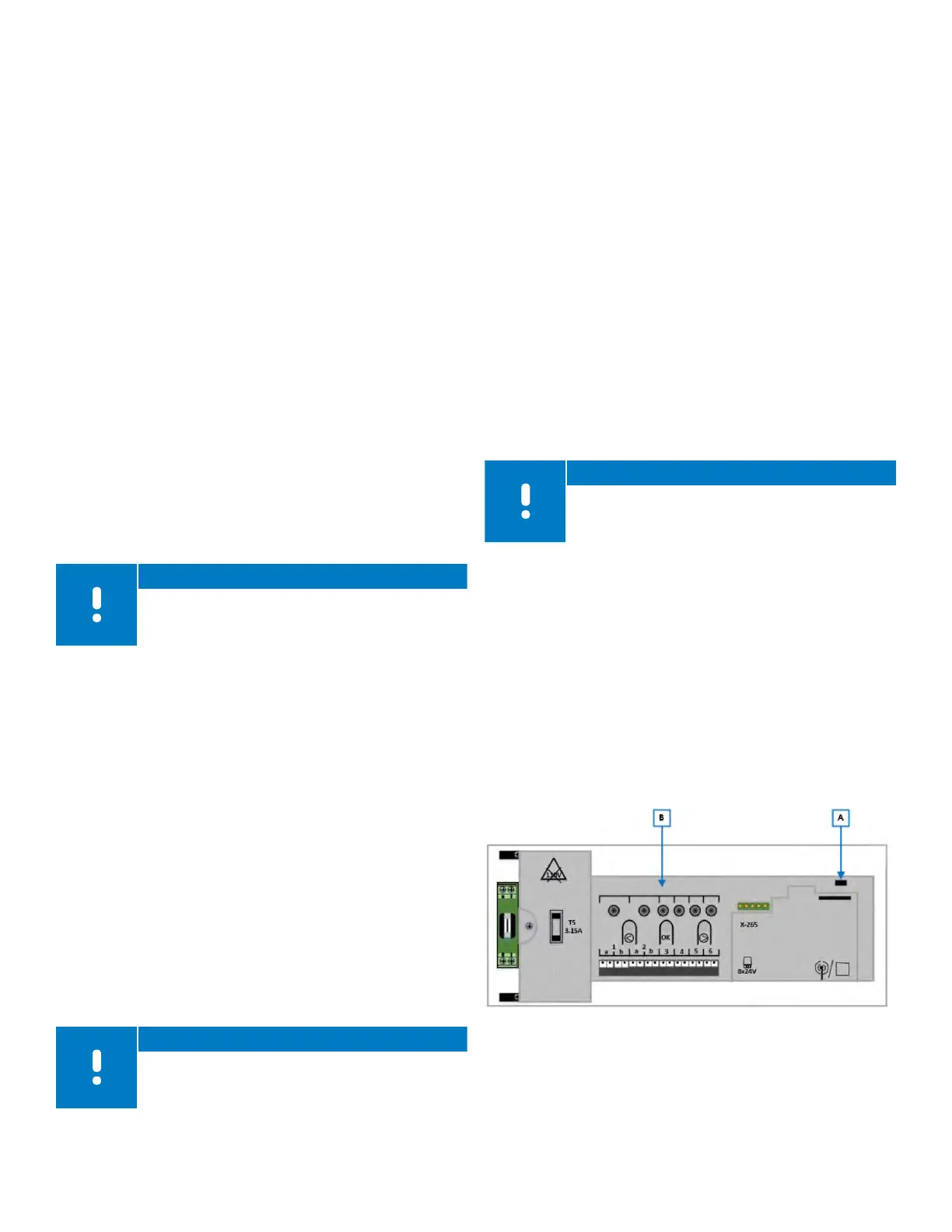
Refer to the following information to determine the LED
status of the power (A) and channel LEDs (B) depending
on the mode of operation.
Figure 9-1: Controller LED locations



 To Next Page