34 l Smatrix Pulse | Installation and Operation Manual
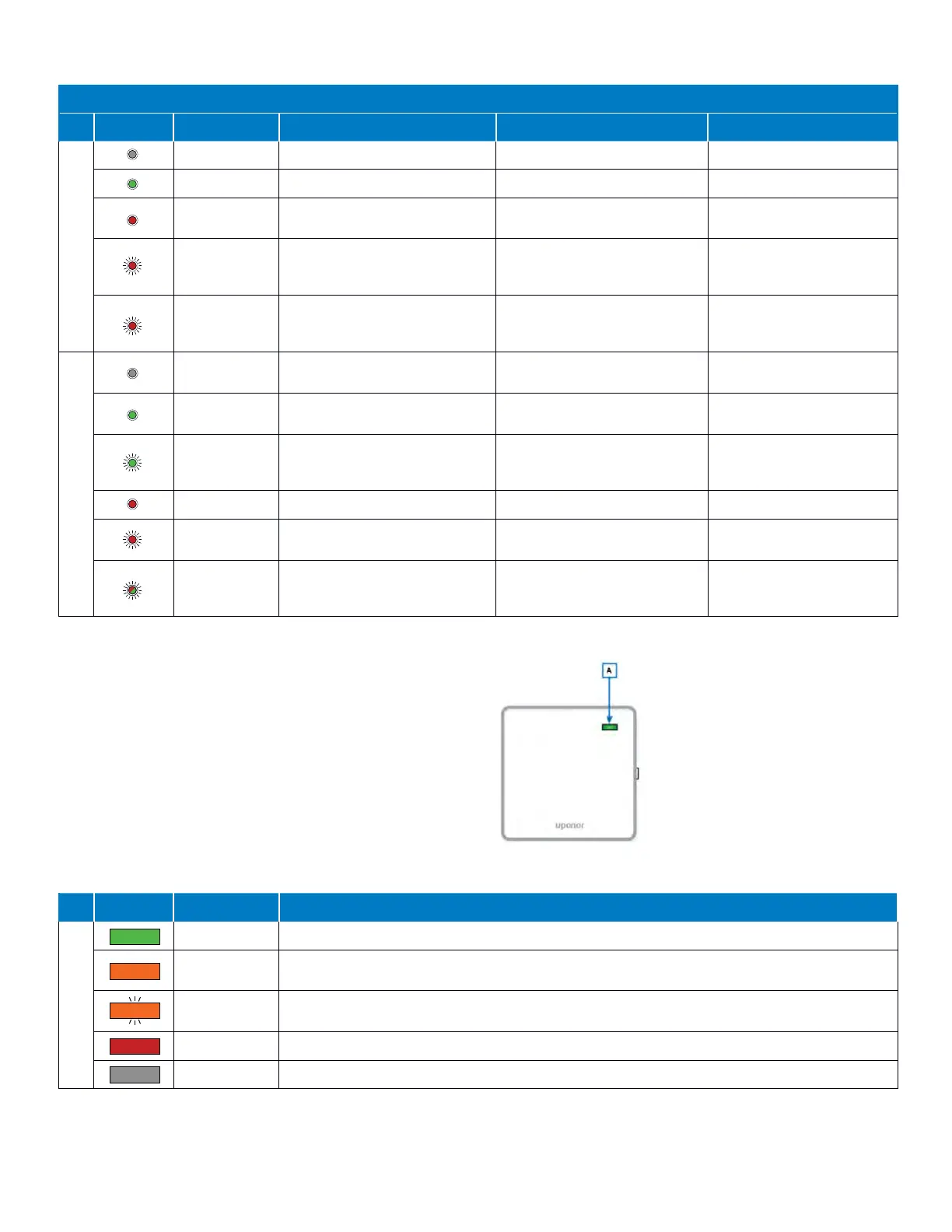
Controller LED Mode of Operation
Primary Controller
LED Status Description Run Registration Actuator Test
Power LED (A)
Dark (unlit) No power – –
Solid Green Controller is powered on – Power is On
Solid Red –
Registration active for linking
thermostats (first layer)
–
Flashing Red
A problem has occurred
(e.g., lost thermostat)
Registration active for linking
Controllers or Relay Module
(second layer)
–
Slow Flashing
Red
–
Registration ready to link
Controllers (Channel 1 LED) or
Relay Module (Channel 2 LED)
–
Channel LED(s) (B)
Dark (unlit) No heating or cooling demand
Selector not pointed at the
channel or not registered
Selector is not pointed at
the channel or activated
Solid Green –
Thermostat is registered
to the channel(s)
–
Flashing Green –
Channel is available and
awaiting for thermostat
registration
–
Solid Red Actuator is activated – The actuator is activated
Flashing Red
Channel waiting to be activated
or thermostat communication
–
Selector is pointed at the
channel
Flashing
Green/Red
–
Selector is pointed at a channel
that is already registered to a
thermostat
–
Table 9-1: Controller LED mode of operation
Communication Module
Like the Controller(s), the Communication Module
incorporates an LED that will provide feedback to the
status of the Smatrix hardware connecting to the Cloud.
Understanding the various colors of the status LED (A)
on the Communication Module will be beneficial in
troubleshooting issues with remote connectivity.
The following table shows the communication status
based on the color and state of the LED (A).
Communication Module LED Mode of Operation
LED Status Description Status
Status Indicator (A)
Solid Green Communication Module cloud connected with the user account created and internet access
Solid Orange
Wi-Fi (or Ethernet) connection is established to the router with no internet access
(no user account created or there is a user account, but no internet access)
Flashing
Orange
The Access Point is open, connected, and communication available connecting phone/tablet
via Wi-Fi.
Solid Red No connection to the router has been established
Dark (unlit) Power is off
Table 9-2: Communication Module LED mode of operation
Figure 9-2: Communication Module LED location



 To Next Page