PC BOARDS Service Manual M4 - M10
22.10.2001 Page 97
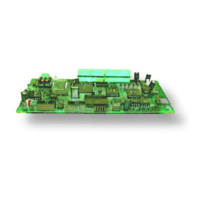
A1
A13
C59
C6 2
D11
H1 H2H4H1 0
R185
V1
V2
V8
V9
V10
V11
V14
V16
V17
V26
V29
V75
V87
X4
X9
3 4 5 6 7 8 9 10 11 12 13
+
OFF
ON
GND
1
Location of
Fastening screw
Location of the fastening screw on Control Board
9. Disconnect wires from connectors X2 and X5.
10. Slide the board along guiding slots machined to standoffs, until the
board is released and can be pulled out from a drive, while the
standoffs slides through keyholes in the board.
Standoff
Keyhole in PCB
Slide the board up for releasing
Slide the board down for locking
Keyhole in PCB
Standoff
Mounting of PCB on standoffs
11. Before to assemble a new Power board into the drive do all the
required settings to the board according to instructions in section 9.2.6.
Assemble the board into drive in reversed order of the procedure
above.
12. Check all the connections and order of the wire harnesses plugged into
connectors for reliable operation.
9.3.7 Spare parts
Control boards.
Detailed information for the spare parts are available from spare parts lists in
section “SPARE PART LIST”.



 To Next Page