RoboSHOT HD Cameras
RoboSHOT HD Cameras - Document Number 342-0796 Rev C Page 10 of 68
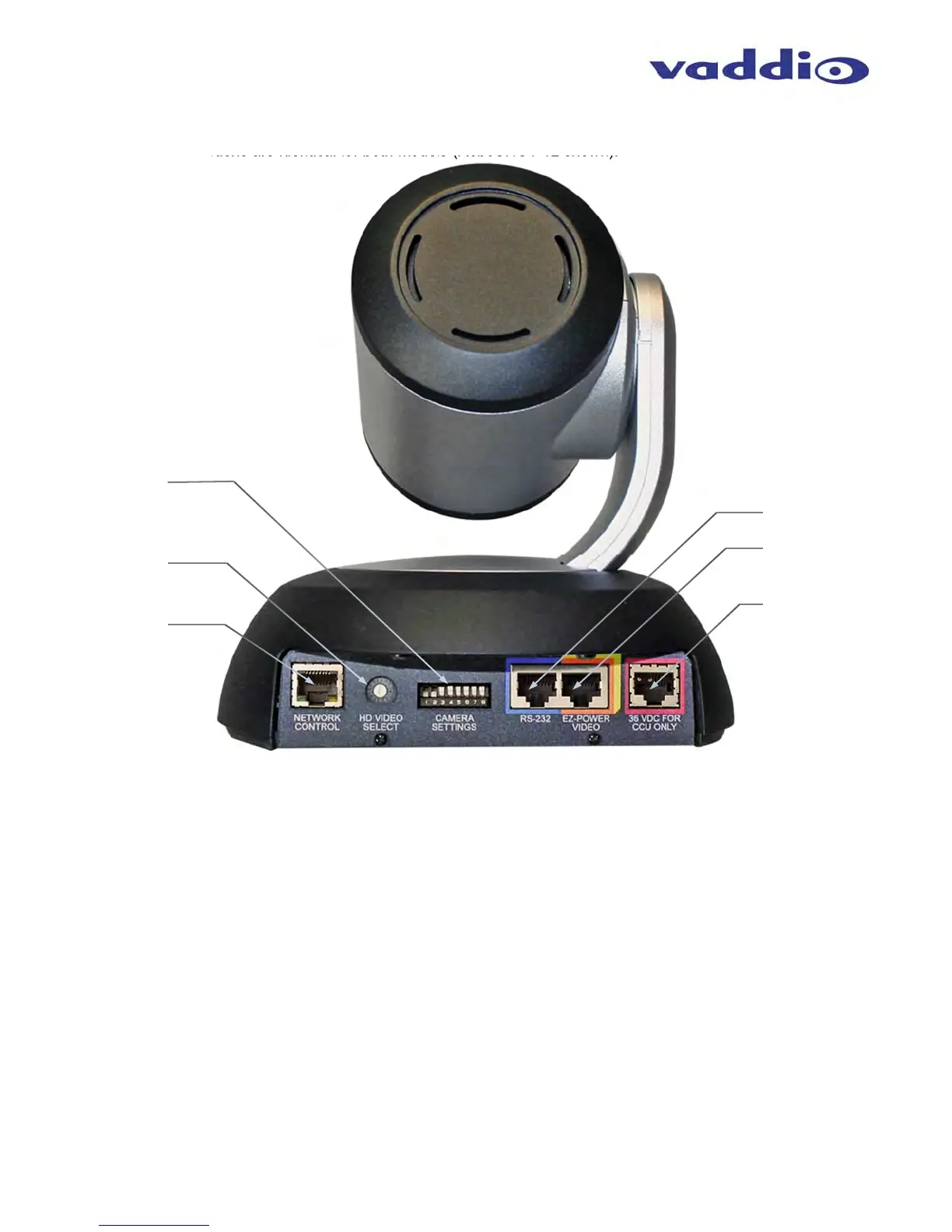
Image: RoboSHOT 12 and 30 Rear Panel Connections
Rear panel connections are identical for both models (RoboSHOT 12 shown).
1) CAMERA SETTINGS: DIP switch settings for IR remote frequency, baud rate and image flip can be configured
on these switches. See the Switch Settings page for additional information.
2) HD VIDEO SELECT: A rotary switch allows the user to choose the HD video output resolution. See the Switch
Settings page for additional information.
3) NETWORK CONTROL Port: The Ethernet 10/100 port allows the camera to be controlled from embedded
web server with a web browser or through Telnet session.
4) RS-232 Port (Color Coded Blue): The RS-232 port accepts modified VISCA protocol for camera control over
a Cat-5e cable. This port also acts as an IR Forwarding port with the Quick-Connect SR or Quick-Connect
DVI/HDMI interfaces, which allows the user to transmit 3
rd
party IR signals through camera to the head-end.
5) EZ-POWER VIDEO Port (Color Coded Orange and Yellow): The EZ-Power Video port supplies 24 VDC
power to the camera and delivers HD video back to the Quick-Connect interface using high speed differential
signaling over Cat-5e cable. Color code orange is for use with Quick-Connect SR, DVI/HDMI-SR, USB and USB
Mini. Color code yellow is for use with the Quick-Connect Universal CCU.
6) 36 VDC FOR CCU ONLY (Color Coded Red): The CCU power port is only used with Quick-Connect Universal
CCU and is shipped with a label over the connectors to remind the installer to “Please test and mark the Cat-
5/5e/6 UTP cable and confirm the connectivity prior to termination”. The RoboSHOT QUSB systems do not
use this connector.
②
③
④
⑤
⑥
①



 To Next Page