RoboSHOT HD Cameras
RoboSHOT HD Cameras - Document Number 342-0796 Rev C Page 16 of 68
Step 5: With camera set to rotary resolution position “0”, the camera should boot up and output the 720p/59.94
out of the HDMI and the YPbPr output connectors On the Quick-Connect USB. Once the video output is achieved,
then setting up the RoboSHOT camera and Quick-Connect USB webpages are next. But first, let’s look at the
abundant methods of control for the camera and interface.
C
ONTROLLING THE
C
AMERA
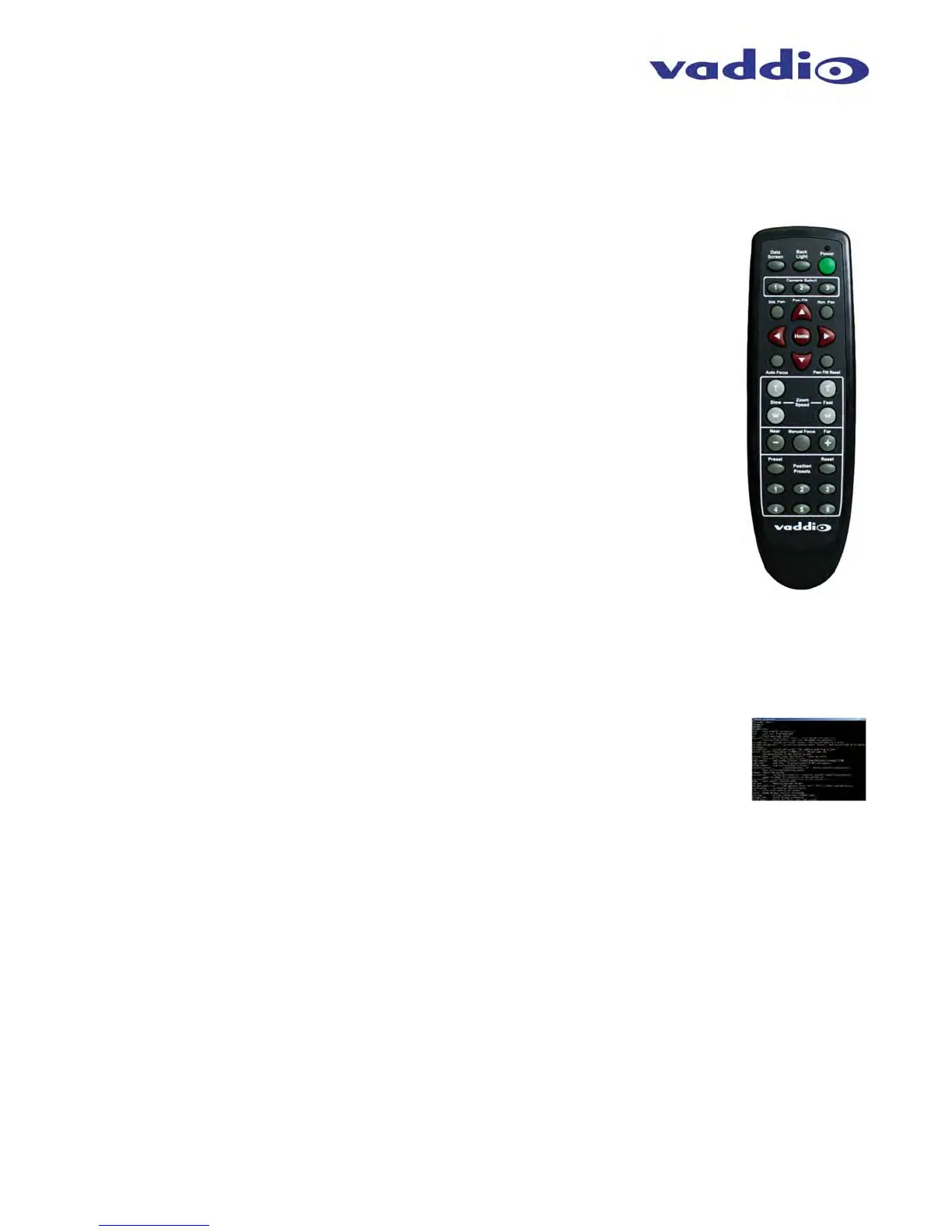
IR Remote Commander
The following functions are accessible with the Vaddio IR remote:
Camera Power On/Off (Toggle on/off same button)
Back Light Compensation (Toggle on/off same button)
Data Screen: Toggle on/off the OSD for the RoboSHOT’s IP/MAC Address
Camera Select (the remote can operate 3 cameras (with 3-IR Freq.)
Pan/Tilt and Home controls with Reverse and Std. Pan direction
Pan/Tilt Reset
Auto Focus (Toggle on/off same button)
Zoom In/Out controls Wide & Telephoto
Fast speed controls (W & T)
Slow speed controls (W & T)
Manual Focus On/Off control (Toggle on/off same button)
Near (-) adjustment
Far (+) adjustment
Six (6) pan/tilt/zoom positioning presets (1 through 6)
Preset Set (store)
Preset Reset (clear)
Red LED that indicates IR Transmission and battery level
The IR Remote operational characteristics are as follows:
Preset Activation: IR Remote is limited to executing Presets 1 through 6.
Tri-Sync Speed on Preset: If a global Tri-Sync speed is stored in the preset in the internal web pages by the
user/admin, then that speed is used. If no Tri-Sync speed is used, then a default medium speed will be used.
Preset Store: IR Remote is limited to positional (PTZ) type presets. To set a preset, position the camera, hold
down the Preset Button and touch the one of the preset numbered buttons 1 through 6.
Telnet Control
The following *Telnet commands are available through the Ethernet Port.
Camera Home
Camera Pan (left, right and speed - real-time operation)
Camera Tilt (up, down and speed - real-time operation)
Camera Zoom (zoom in/out/stop and speed - real-time operation)
Camera Store Preset (Gets or Sets 12 presets with global relative PTZ [Tri-Sync] speed control to destination)
Camera Image (Gets or sets current image control values, sets in 1 of 3 CCU presets)
(AWB or manual w/Red and Blue gain, BLC on/off, Auto Iris or manual with Iris value and Gain, Detail and Chroma)
Camera Sleep (Gets or sets standby power mode - camera has to us less power in this mode)
Exit (ends Telnet session)
Help (displays CLISH syntax)
History (command history)
Network Ping (send ICMP ECHO_REQUEST to network hosts)
Network Settings (Gets MAC address, IP address, Subnet Mask, Gateway and NTP server address)
Network (Gets the current network settings or pings an IP address)
**Streaming Mode - USB or IP needs to be changed to USB and IP (get and set streaming modes, on/off)
**Streaming Quality (gets/sets high/standard/low for IP)
**Streaming Resolution (gets/sets streaming resolution)
**Streaming (gets/sets current streaming settings)
System Factory Reset
System Reboot
Version (system version information)
*Please see the full Telnet command list at the end of this manual.
**Streaming Controls are located within the Quick-Connect USB Interface web server.
Vaddio
IR Remote
Commander



 To Next Page