RoboSHOT HD Cameras
RoboSHOT HD Cameras - Document Number 342-0796 Rev C Page 39 of 68
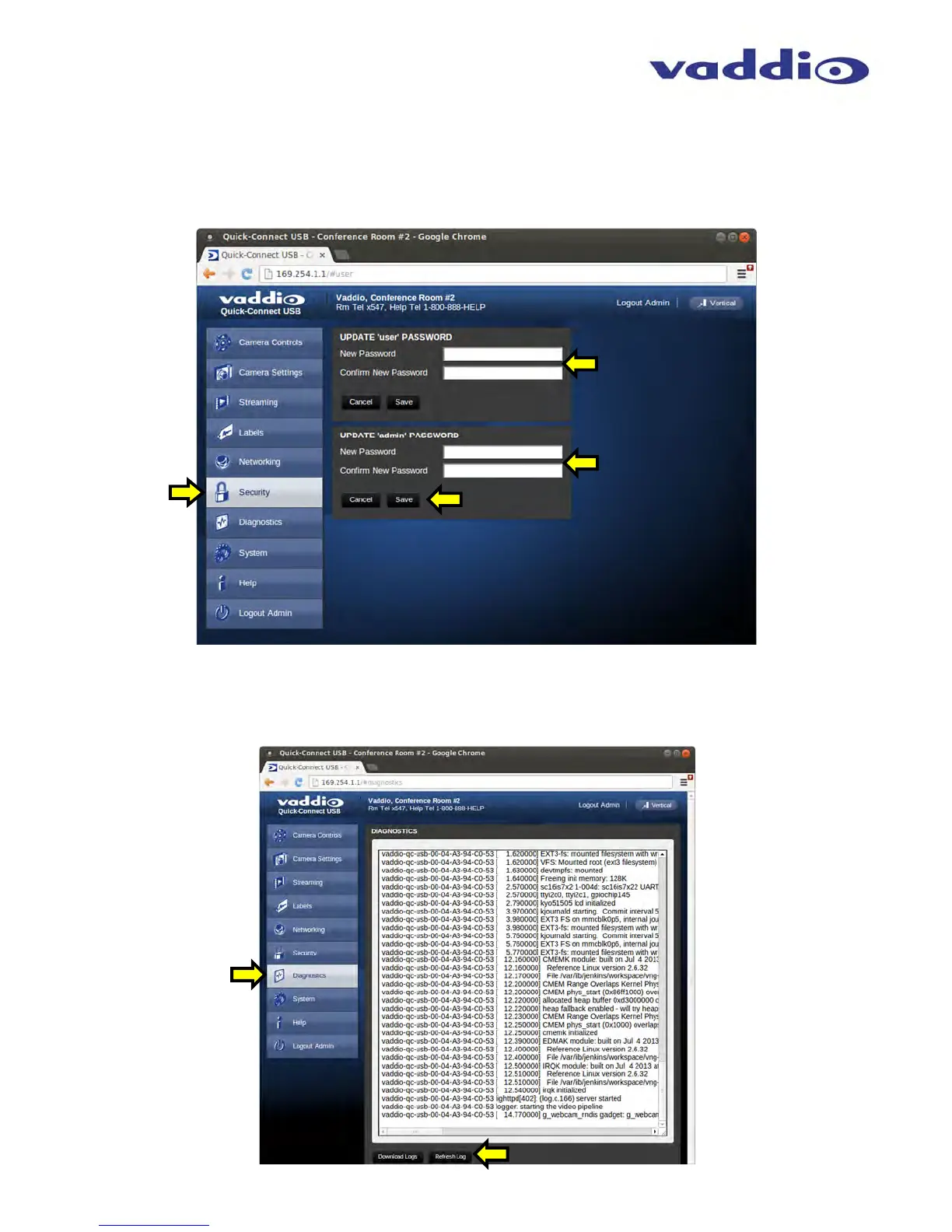
Screen Shot: Admin Menu - Security
The Security menu allows the Admin to UPDATE “user” PASSWORD and UPDATE “admin” PASSWORD. The
default “user” password is: password. The default “admin” password is also: password. The Network
administrator can reassign the user name and password as well as the Admin password. There is only one “user”
password and one “admin” password at any given time. If changes are made, click on Save to store the change.
Screen Shot: Admin Menu - Diagnostics
Diagnostics menu button will display a set of self-diagnostics. These diagnostics may help the Vaddio technical
support team diagnose a problem with the Quick-Connect USB and attached camera. The log can be downloaded
and refreshed at the bottom of the screen.



 To Next Page