RoboSHOT HD Cameras
RoboSHOT HD Cameras - Document Number 342-0796 Rev C Page 41 of 68
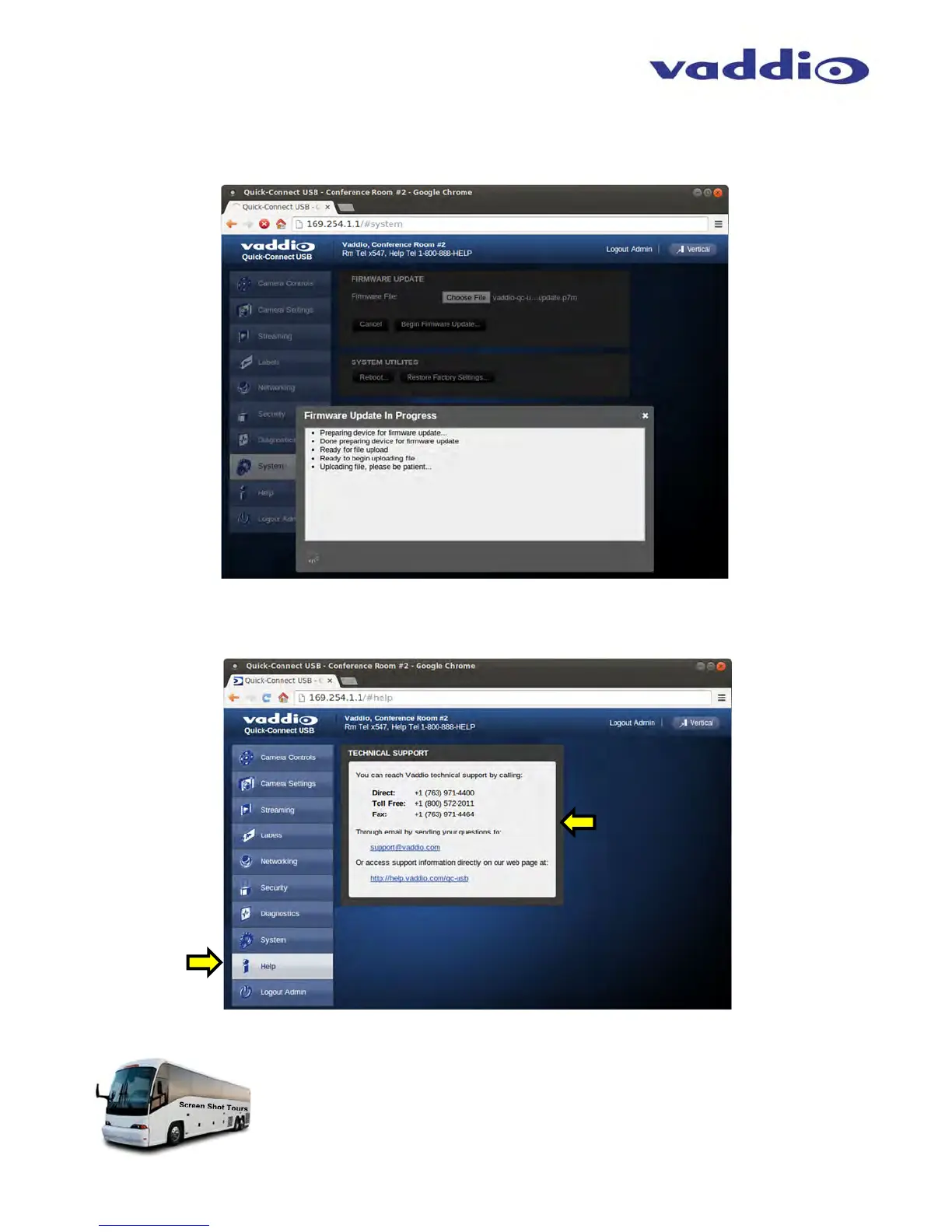
Screen Shot: Admin Menu - Update in Progress
After the firmware load has been started, a pop-up screen will advise patience and notify, in terms of percentage
completed, the progress of the firmware update load. Again, please don’t interrupt the firmware load
Screen Shot: Admin Menu - HELP
Service/Help information can be found under the Help menu. Support phone numbers and e-mail, manuals, FAQ’s
and System information is listed on this page. Have the System page open when calling Vaddio Tech Support.
This concludes the Screen Shot Tour for the Quick-Connect USB. The General
Specifications, Communication Specifications, API, Telnet Command List, Warranty
Information and Declarations of Compliance are breathtaking, stimulating and
provocative as one would expect.



 To Next Page