RoboSHOT HD Cameras
RoboSHOT HD Cameras - Document Number 342-0796 Rev C Page 38 of 68
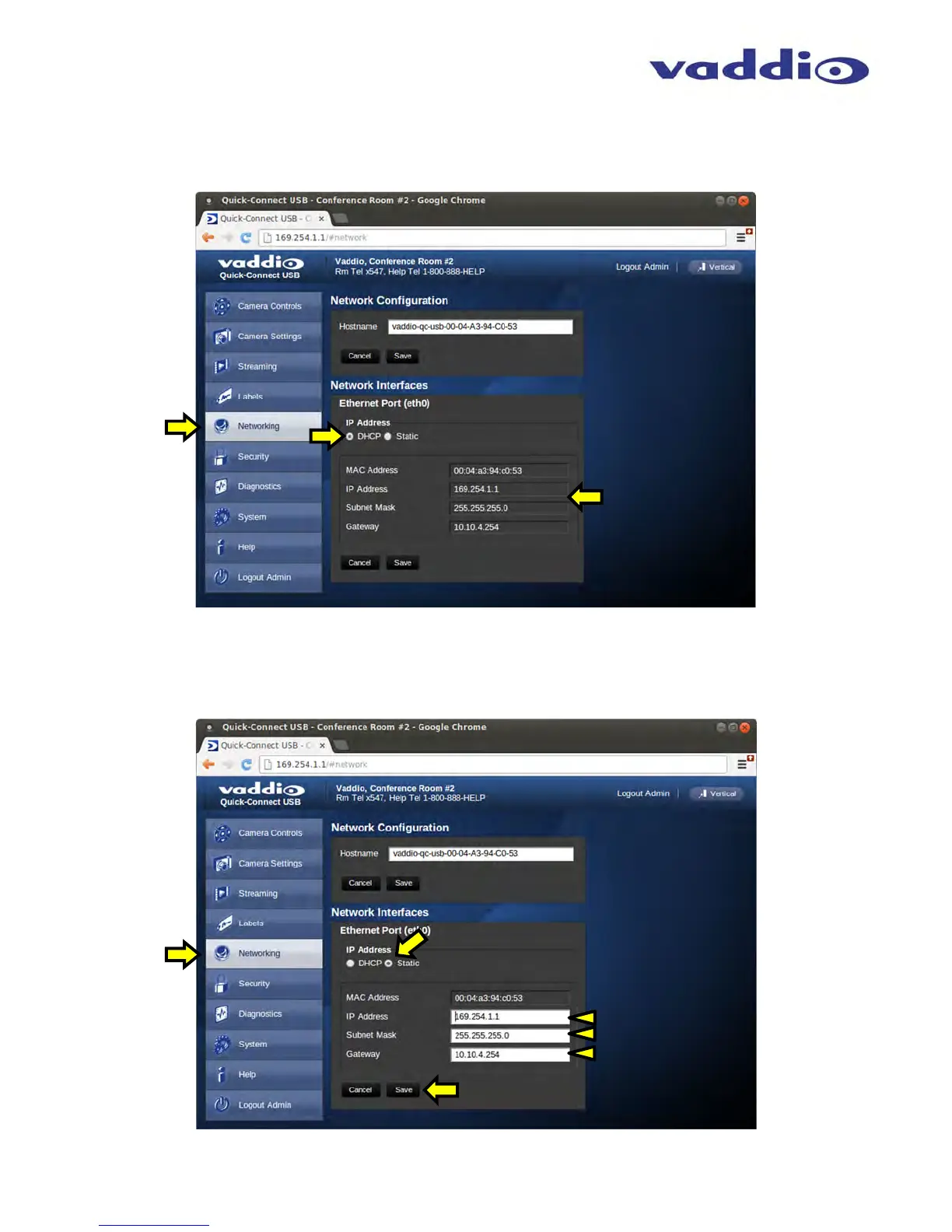
Screen Shot: Admin Menu - DHCP Network Configuration
Under the Networking menu, The Network Configuration and Network Interfaces are displayed. This is where the
Network administrator assigns either DHCP or a Static address and the associated parameters.
Screen Shot: Admin Menu - Static IP Configuration
If Static IP is used, the IP Address, Subnet Mask and Gateway are manually entered. Click on Save to keep the
Static IP information. Click Save after loading in the Static IP information
MAC Address, IP
Address, Subnet Mask
and Gateway will Auto-
fill when in DHCP Mode
IP Address, Subnet
Mask and Gateway are
entered into the system
manually for Static IP



 To Next Page