RoboSHOT HD Cameras
RoboSHOT HD Cameras - Document Number 342-0796 Rev C Page 25 of 68
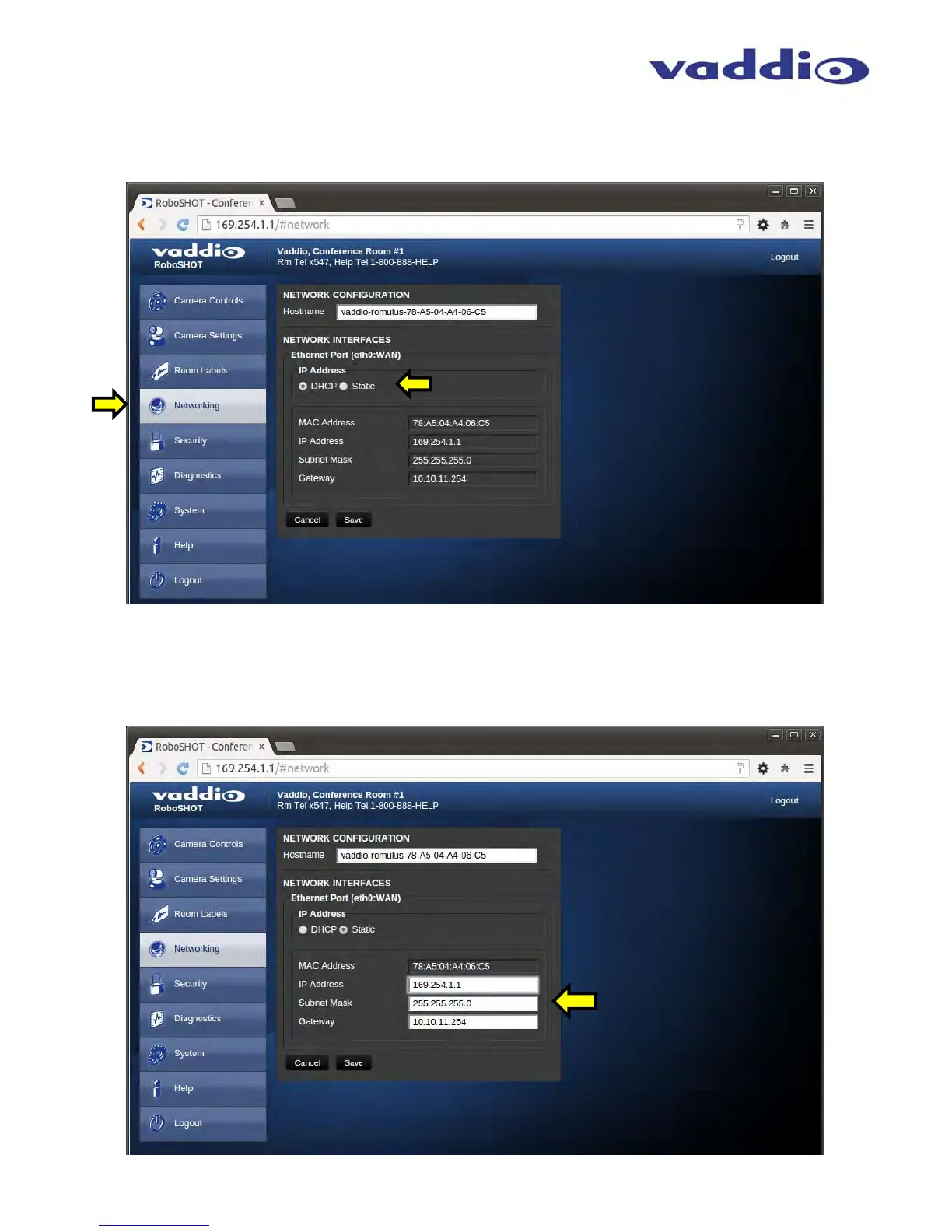
Screen Shot: Admin Menu - DHCP Network Configuration
Under the Networking menu, The Network Configuration and Network Interfaces are displayed. This is where the
Network administrator assigns either DHCP or a Static address and the associated parameters.
Notes: If the LAN has a DHCP (dynamic host configuration protocol) server, then the IP address, gateway and routing information will
automatically be assigned. The software is defaulted to DHCP and will attempt to dynamically obtain an IP address using DHCP, but it will fall
back to the default address of (169.254.1.1) if no DHCP server can be found.
Screen SHOT: Admin Menu - Static IP Configuration
If Static IP is used, the IP Address, Subnet Mask and Gateway are manually entered. Click on Save to keep the
Static IP information.



 To Next Page