44
6 Set up the sensor with the display and adjustment module
VEGAPULS 63 • Modbus and Levelmaster protocol
41364-EN-170711
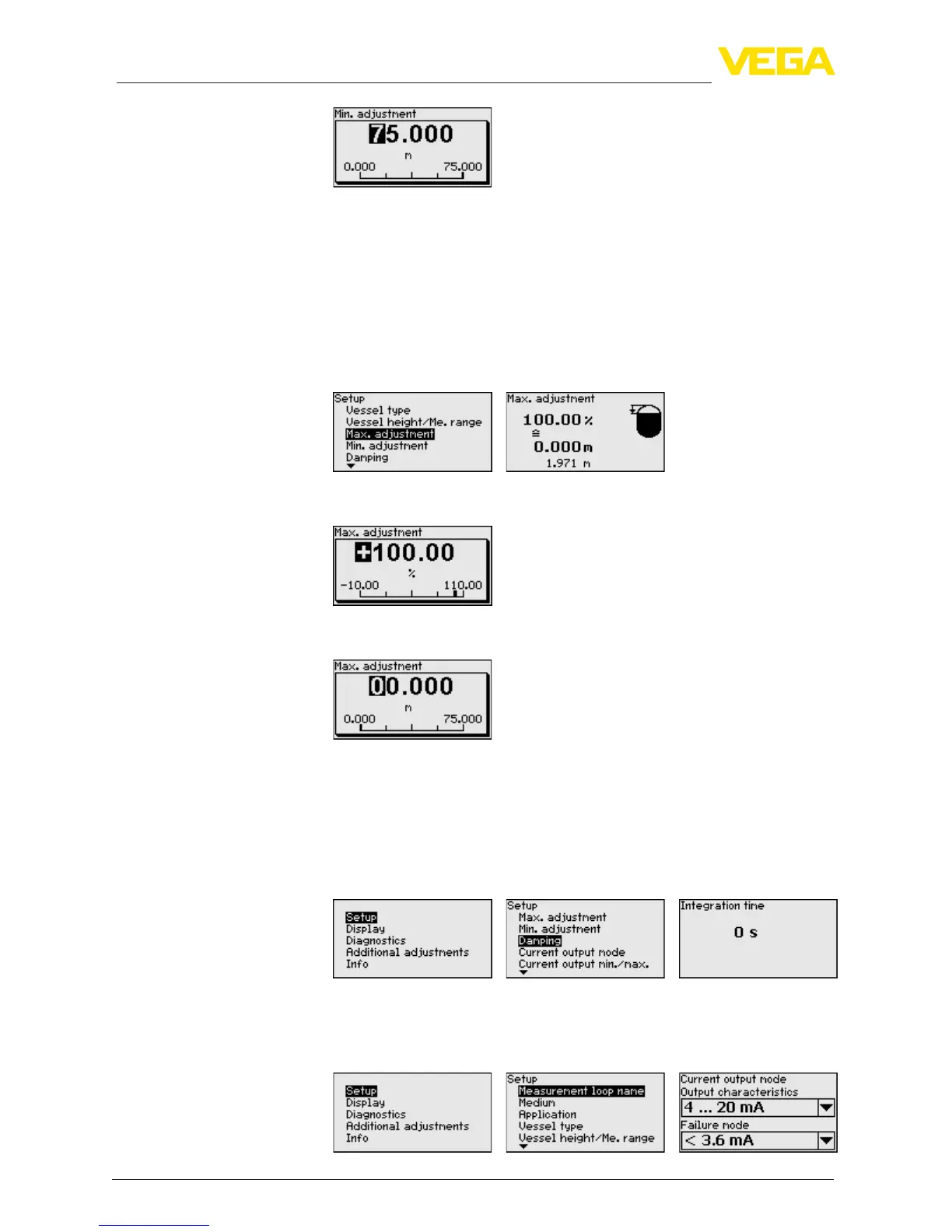
4. Enter the suitable distance value in m for empty vessel (e.g. dis-
tance from the sensor to the vessel bottom) corresponding to the
percentage value.
5. Save settings with [OK] and move with [ESC] and [->] to the max.
adjustment.
Proceed as follows:
1. Select with [->]themenuitemMax.adjustmentandconrmwith
[OK].
2. Prepare the percentage value for editing with [OK] and set the
cursor to the requested position with [->].
3. Set the requested percentage value with [+] and save with [OK].
The cursor jumps now to the distance value.
4. Enter the appropriate distance value in m (corresponding to the
percentage value) for the full vessel. Keep in mind that the max.
level must lie below the min. distance to the antenna edge.
5. Save settings with [OK]
Todampprocess-dependentmeasuredvalueuctuations,setan
integration time of 0 … 999 s in this menu item.
Depending on the sensor type, the factory setting is 0 s or 1 s.
In the menu item "Current output mode" you determine the output
characteristics and reaction of the current output in case of fault.
Setup - Max. adjustment
Setup - Damping
Setup - Current output,
mode










 To Next Page