50
6 Set up the sensor with the display and adjustment module
VEGAPULS 63 • Modbus and Levelmaster protocol
41364-EN-170711
too high a level and not all false signals could be detected. When
selecting "Extend", the distance to the product surface of the created
false signal suppression is displayed. This value can now be changed
and the false signal suppression can be extended to this range.
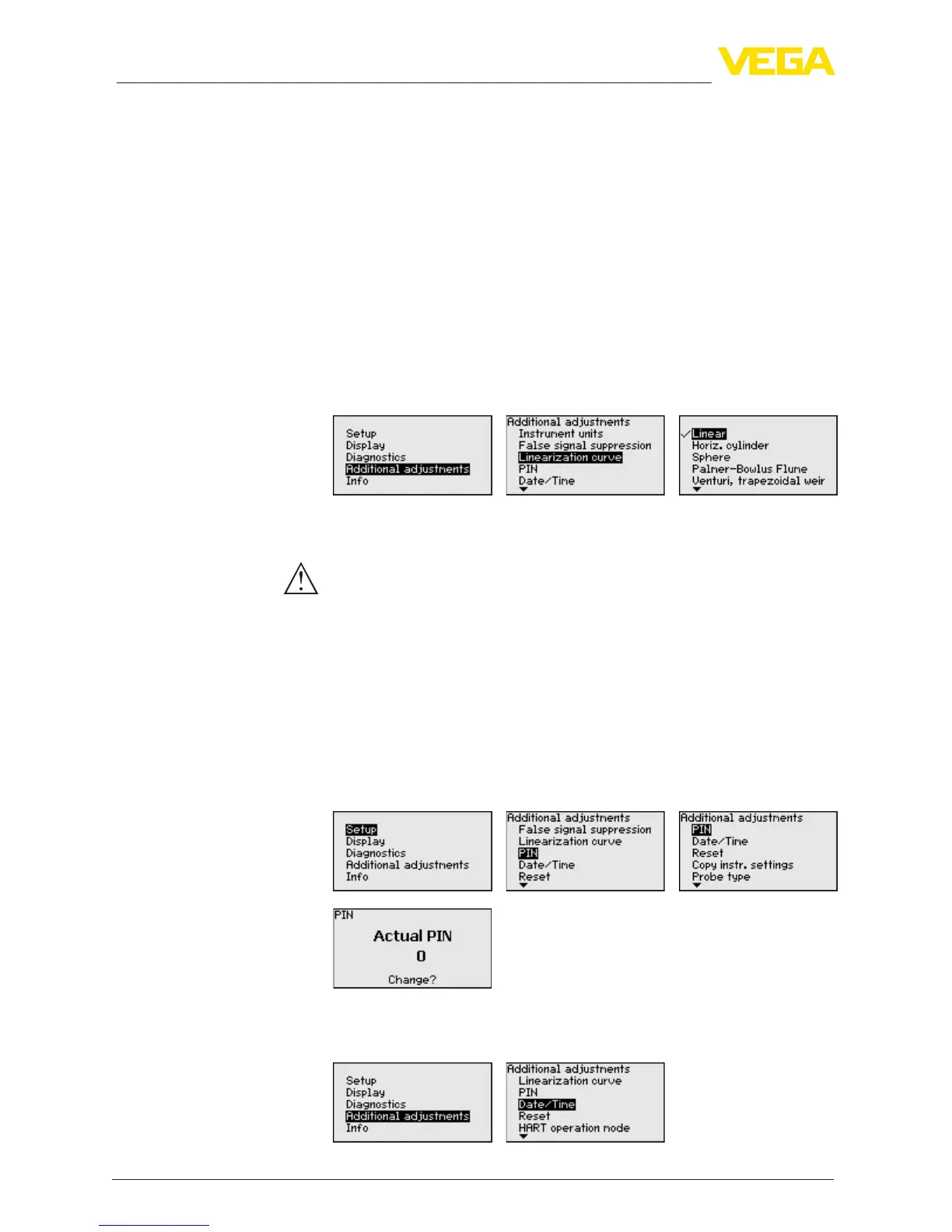
Alinearizationisnecessaryforallvesselsinwhichthevesselvolume
doesnotincreaselinearlywiththelevel-e.g.ahorizontalcylindri-
cal or spherical tank - and the indication or output of the volume is
required.Correspondinglinearizationcurvesarepreprogrammed
for these vessels. They represent the correlation between the level
percentage and vessel volume.
By activating the appropriate curve, the volume percentage of the
vessel is displayed correctly. If the volume should not be displayed in
percent but e.g. in l or kg, a scaling can be also set in the menu item
"Display".
Enter the requested parameters via the appropriate keys, save your
settings and jump to the next menu item with the [ESC] and [->] key.
Caution:
Note the following if instruments with appropriate approval are used
aspartofanoverllprotectionsystemaccordingtoWHG:
If a linearisation curve is selected, the measuring signal is no longer
necessarilylineartothellingheight.Thismustbeconsideredbythe
user especially when setting the switching point on the limit signal
transmitter.
Enteringa4-digitPINprotectsthesensordataagainstunauthorized
accessandunintentionalmodication.Inthismenuitem,thePINis
displayed or edited and changed. However, this menu item is only
available if adjustment is enabled in the menu "Setup".
In delivery status, the PIN is "0000".
In this menu item, the internal clock of the sensor is set.
Additional settings - Lin-
earization
Additional settings - PIN
Additional settings - Date/
Time





 To Next Page