38
6 Set up with the display and adjustment module
VEGAPULS 64 • Two-wire 4 … 20 mA/HART
51141-EN-210219
– Change value of the parameter
•
[ESC] key:
– Interrupt input
– Jump to next higher menu
The instrument is operated via the four keys of the display and
adjustment module. The individual menu items are shown on the LC
display.Youcanndthefunctionoftheindividualkeysintheprevious
illustration.
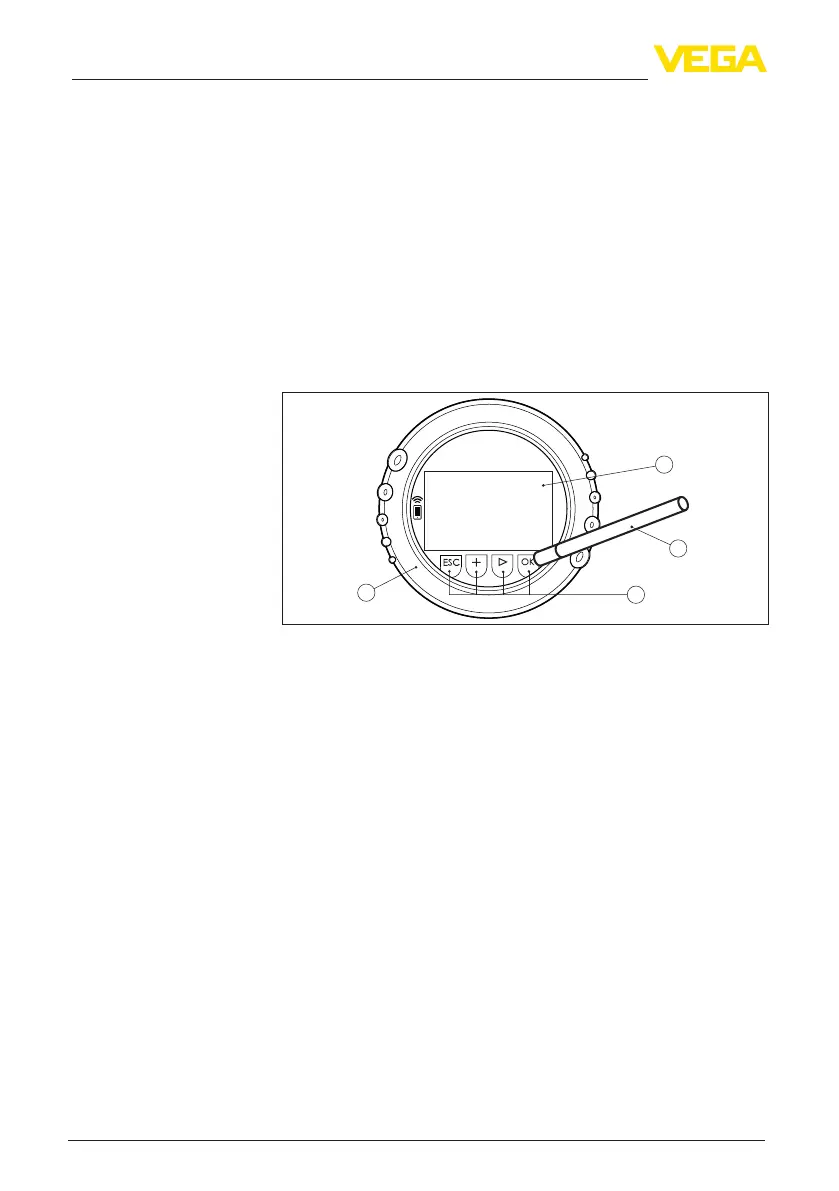
With the Bluetooth version of the display and adjustment module you
can also adjust the instrument with the magnetic pen. The pen oper-
ates the four keys of the display and adjustment module right through
the closed lid (with inspection window) of the sensor housing.
1
2
4
3
Fig. 40: Display and adjustment elements - with adjustment via magnetic pen
1 LC display
2 Magnetic pen
3 Adjustment keys
4 Lid with inspection window
When the [+] and [->] keys are pressed quickly, the edited value,
or the cursor, changes one value or position at a time. If the key is
pressed longer than 1 s, the value or position changes continuously.
When the [OK] and [ESC] keys are pressed simultaneously for more
than 5 s, the display returns to the main menu. The menu language is
then switched over to " English".
Approx. 60 minutes after the last pressing of a key, an automatic reset
tomeasuredvalueindicationistriggered.Anyvaluesnotconrmed
with [OK] will not be saved.
6.3 Measured value indication - Selection of
national language
With the [->]keyyoumovebetweenthreedierentindicationmodes.
Intherstview,theselectedmeasuredvalueisdisplayedinlarge
digits.
In the second view, the selected measured value and a respective
bargraph presentation are displayed.
Operating system - Keys
direct
Adjustment system - keys
via magnetic pen
Time functions
Measured value indica-
tion



 To Next Page