40
6 Set up with the display and adjustment module
VEGAPULS 64 • Two-wire 4 … 20 mA/HART
51141-EN-210219
Diagnosis: Information, for example, on device status, peak value,
simulation, echo curve
Additional adjustments: Date/Time, reset, copy function, scaling,
currentoutput,falsesignalsuppression,linearization,HARTmode,
special parameters
Info: Instrument name, hardware and software version, calibration
date, instrument features
In the main menu item " Setup", the individual submenu items should
be selected one after the other and provided with the correct param-
eters to ensure optimum setting of the measurement. The procedure
is described in the following.
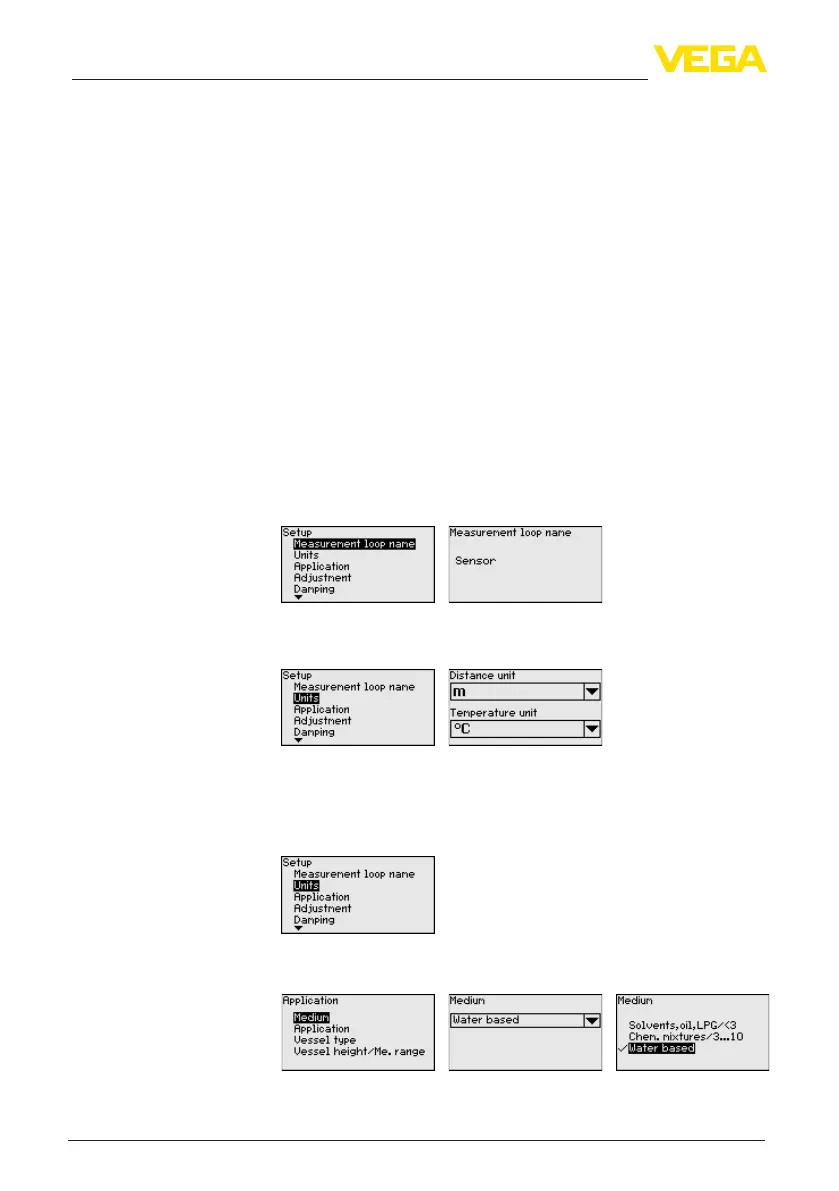
Here you can assign a suitable measurement loop name. Push the "
OK" key to start the editing. With the " +" key you change the sign and
with the " ->" key you jump to the next position.
You can enter names with max. 19 characters. The character set
comprises:
•
Capital letters from A … Z
•
Numbers from 0 … 9
•
Special characters + - / _ blanks
In this menu item you select the distance unit and the temperature
unit.
For the distance units you can choose between m, in and ft and for
the temperature units °C, °F and K.
This menu item allows you to adapt the sensor to the measuring
conditions.
Medium
The following options are available:
Setup - Measurement
loop name
Setup - Units
Setup - Application



 To Next Page