186 Firmware Version 5.4
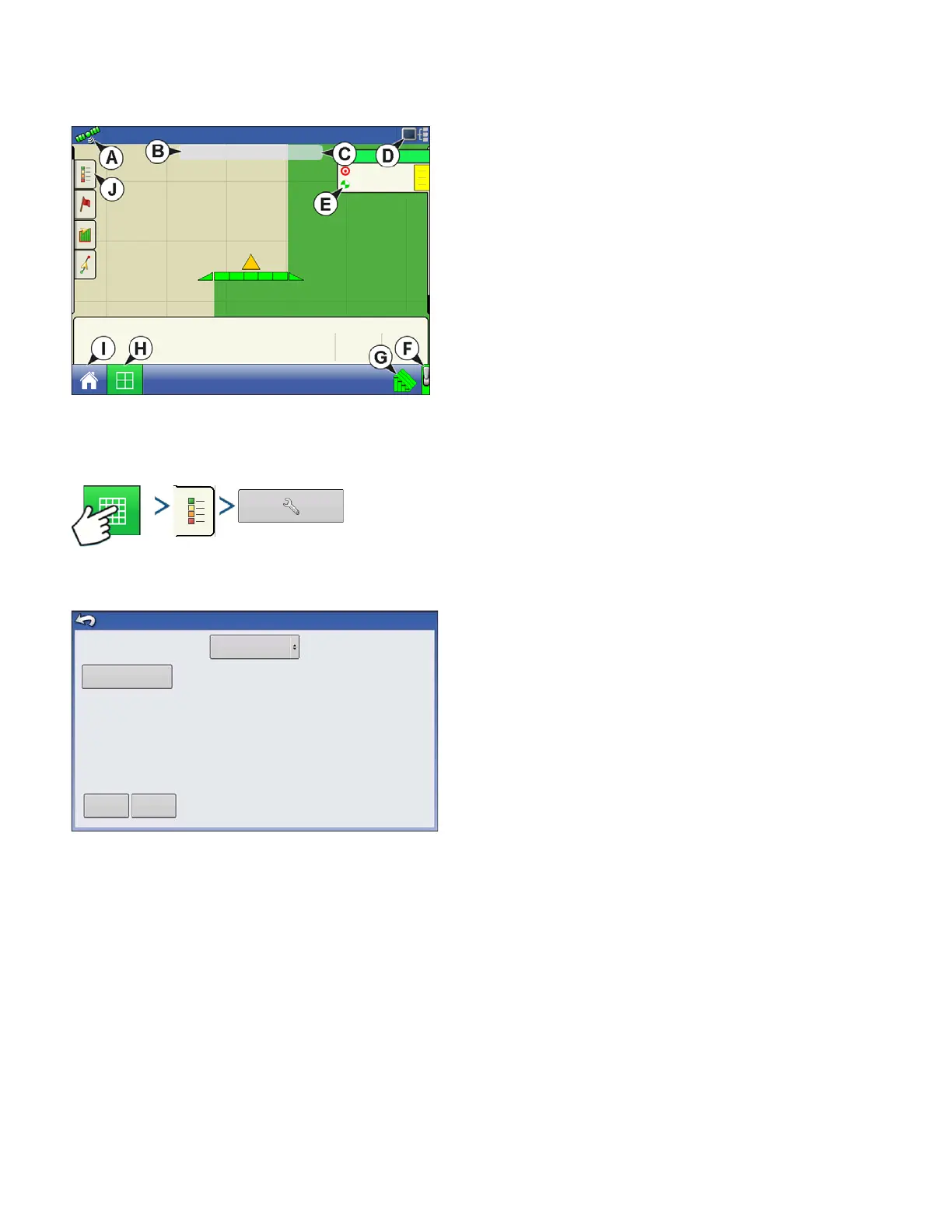
APPLICATION MAP SCREEN - ZOOM TO DETAIL
• (A) GPS Status
• (B) Ground Covered
• (C) Ground Speed
• (D) Diagnostics button
• (E) Product tab
• (F) Master Switch
• (G) AutoSwath
• (H) Map View button
• (I) Home button
• (J) Display Legend
LEGEND SELECT
Press: Home button > Legend tab (of the Mapping Toolbox) > Setup (wrench) button
During Area Logging Application operations, the Map screen displays coverage in the Legend.
Use the drop-down menu at the top to select your
product. Other items at this screen include:
• Press
Coverage
to show the area where you have
already applied a product.
• If using a DirectCommand or rate logging configuration,
press
Rate
to show the Rate Legend in the Mapping
Toolbox. The rate map displays the actual rate being
applied. This legend is editable. For more information,
see
“Legend Settings” on page 52
.
• Press
Clear Map
to permanently remove all map data
from the active field operation.
• Press
Load Reference
to load a map from a previous operation performed in that field to view as a
background map.
38.4 ac
20
20
41
43
Pressure (PSI)
f
5.0 mph
Main
Auxiliary
Agitation
Load
Reference
Coverage
NH3
Clear Map
Legend Select



 To Next Page