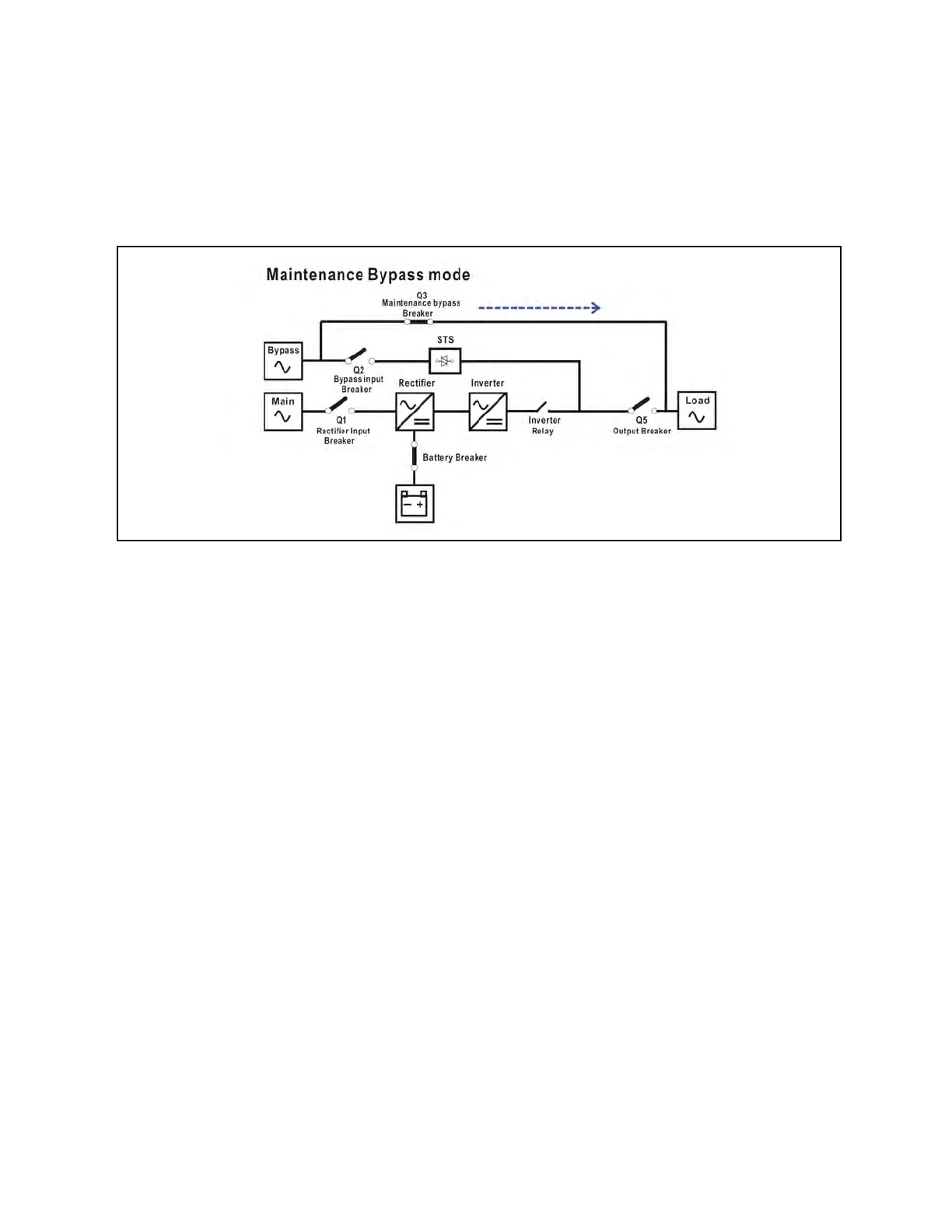
3.1.7 Maintenance bypass mode
When the UPS is unable to supply power during the maintenance process, a manual bypass switch is available to ensure
continuous supply of power to the critical load. Ensure that the bypass power source is normal, before enabling the
maintenance bypass mode.
Figure 3.7 Maintenance Bypass Mode Diagram
3.2 Button Operation
1. Press the “COLD START” button to power on the power supply for the UPS to turn on the LCD display. UPS will
enter initialization mode. After initialization, follow the “CONTROL” menu to operate the UPS. This button only
works when UPS is completed off with battery connected but without AC input. When the UPS is with AC grid
connected, just follow the “CONTROL” menu to operate the UPS after LCD initialization.
3.3 Screen Description
After initialization, the LCD will display main screen. There are five sub-menus: Control, measure, setting, information and data
log. Touch any sub-menu icon to enter into the sub-screen.
3 Operations Proprietary and Confidential ©2024 Vertiv Group Corp. 33
Vertiv™ Liebert® MTP Online UPS User Manual 20-40-80kVA






 To Next Page