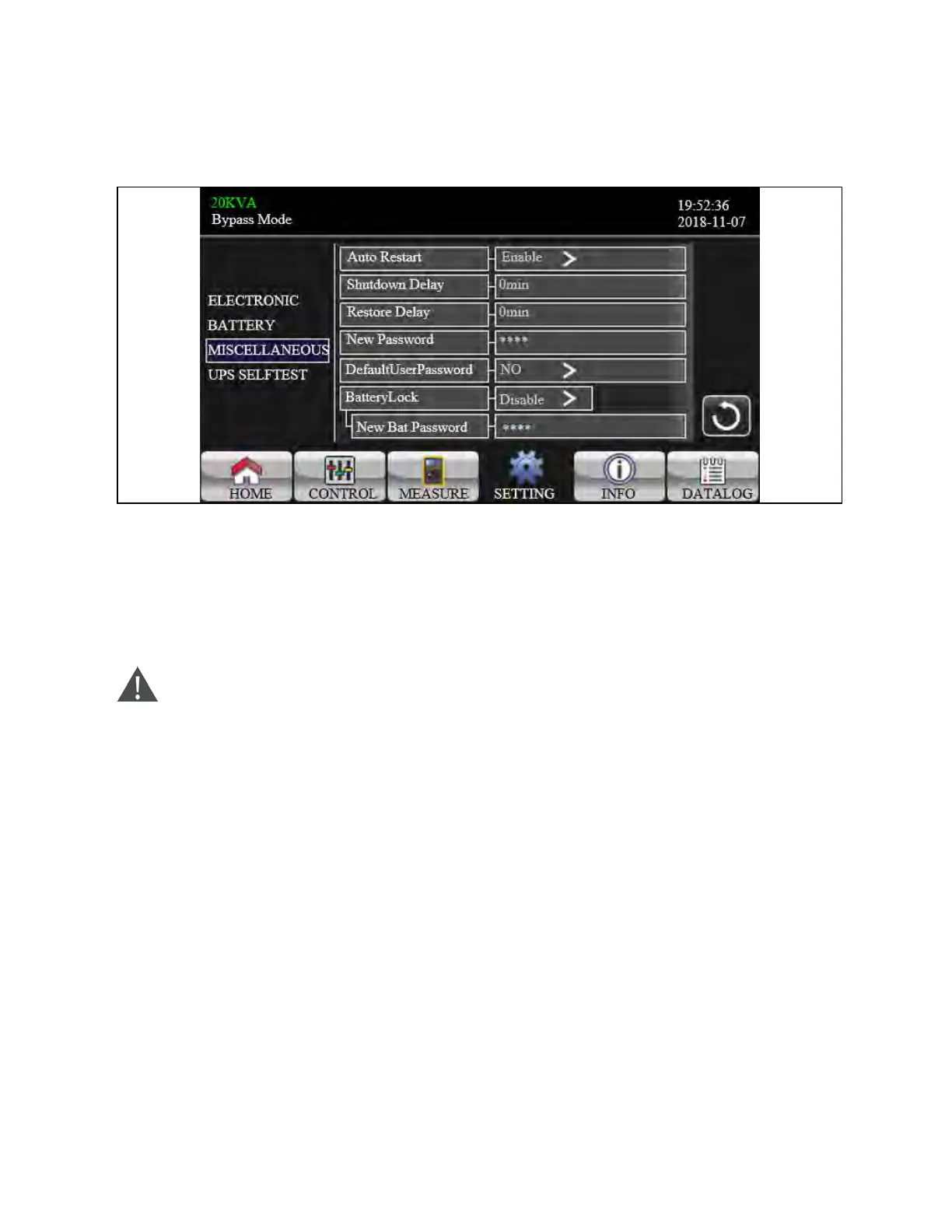
Miscellaneous
Figure 3.54 Miscellaneous Setting Screen
1. Auto Restart:
a. Enable: After “Enable” is set, no matter what the UPS previous status is, the UPS will restart to Online mode
automatically after utility restores.
b. Disable: After “Disable” is set, the UPS will operate normally. If the UPS shuts down due to low battery, the
UPS will still restart to online mode after utility restores. If the UPS was turned OFF manually and the utility
restores, the UPS will switch to standby mode or bypass mode depends on the UPS configuration.
WARNING! The default setting is Disable. Setting to Enable exposes personnel to risk of injury or death.
2. Shutdown Delay: UPS will shut down in setting minutes. The countdown will start after confirming the pop-up
screen.
3. Restore Delay: UPS will automatically restart in setting minutes after the UPS shuts down.
4. New Password: Set up new password to enter “ADVANCE ÚUser” menu page.
5. Default User Password:
a. YES: After “YES” is set, User password will restore default setting value.
b. NO: After “NO” is set, the UPS will cancel this operation.
6. Battery Lock: Currently, this setting is not available.
3 Operations Proprietary and Confidential ©2024 Vertiv Group Corp. 63
Vertiv™ Liebert® MTP Online UPS User Manual 20-40-80kVA






 To Next Page