Tandem 2 Pumpdown Fail—Enables or disables the Tandem 2 Pumdown event, which occurs when the
Tandem Compressor Bank 2 suction pressure cannot be pumped down below the threshold during
compressor shutdown. Sets how the event is reported: as an alarm, a warning or a message. Specifies how
long the control waits before reporting the event.
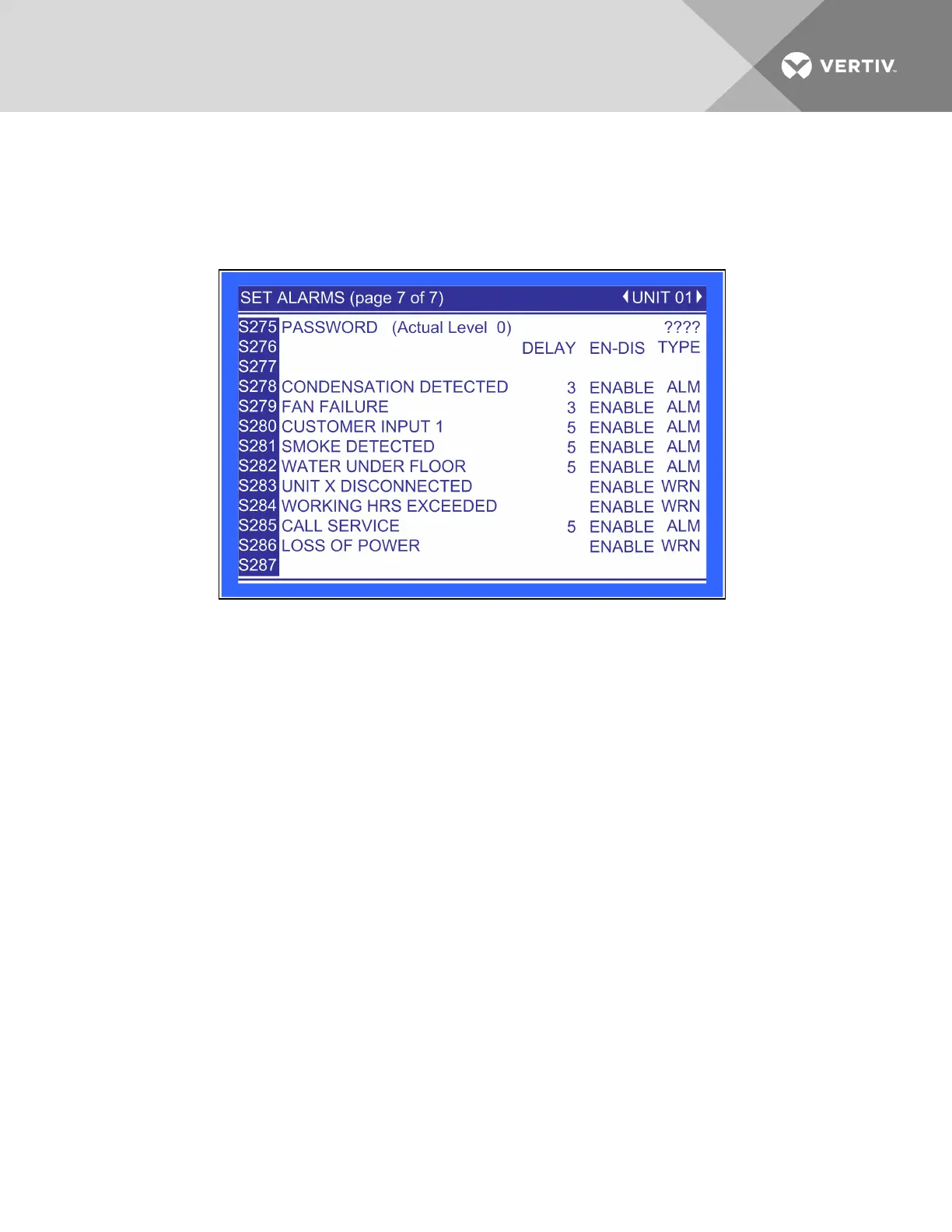
Figure 6.38 Set alarms, page 7 of 7
Condensation Detection—Enables or disables the Condensation Detected event, which occurs when
water is detected at the Liebert XD cooling module. Sets how the event is reported: as an alarm, a warning
or a message. Specifies how long the control waits before reporting the event.
Fan Failure—Enables or disables the Fan Failure event, which occurs when a fan failure occurs at the
Liebert XD cooling module. Sets how the event is reported: as an alarm, a warning or a message. Specifies
how long the control waits before reporting the event.
Customer Input 1—Enable or disables the Customer Input 1 event, which occurs when 24VAC is applied to
the input. Sets how the event is reported: as an alarm, a warning or a message. Specifies how long the
control waits before reporting the event.
Smoke Detected—Enable or disables the Smoke Detected event, which occurs when the Customer Input 1
is configured for “Smoke Detected” and 24VAC is applied to the input. Sets how the event is reported: as
an alarm, a warning or a message. Specifies how long the control waits before reporting the event.
Water Under Floor—Enable or disables the Water Under Floor event, which occurs when the Customer
Input 1 is configured for “Water Under Floor” and 24VAC is applied to the input. Sets how the event is
reported: as an alarm, a warning or a message. Specifies how long the control waits before reporting the
event.
Unit X disconnected—Not currently used.
Working Hours Exceeded—Enables or disables the Working Hrs Exceeded event, which occurs when a
component has exceeded the user-specified limit. Sets how the event is reported: as an alarm, a warning
or a message. Specifies how long the control waits before reporting the event.
Vertiv | Liebert® XDC™ User Manual | 100




 To Next Page