Call Service—Enable or disables the Call Service event, which occurs when the Customer Input 1 is
configured for “Call Service” and 24VAC is applied to the input. Sets how the event is reported: as an
alarm, a warning or a message. Specifies how long the control waits before reporting the event.
Loss of Power—Enables or disables the Loss of Power event, which occurs when the unit is On and
operational and the 24VAC power to the control is lost. Sets how the event is reported: as an alarm, a
warning or a message. Specifies how long the control waits before reporting the event.
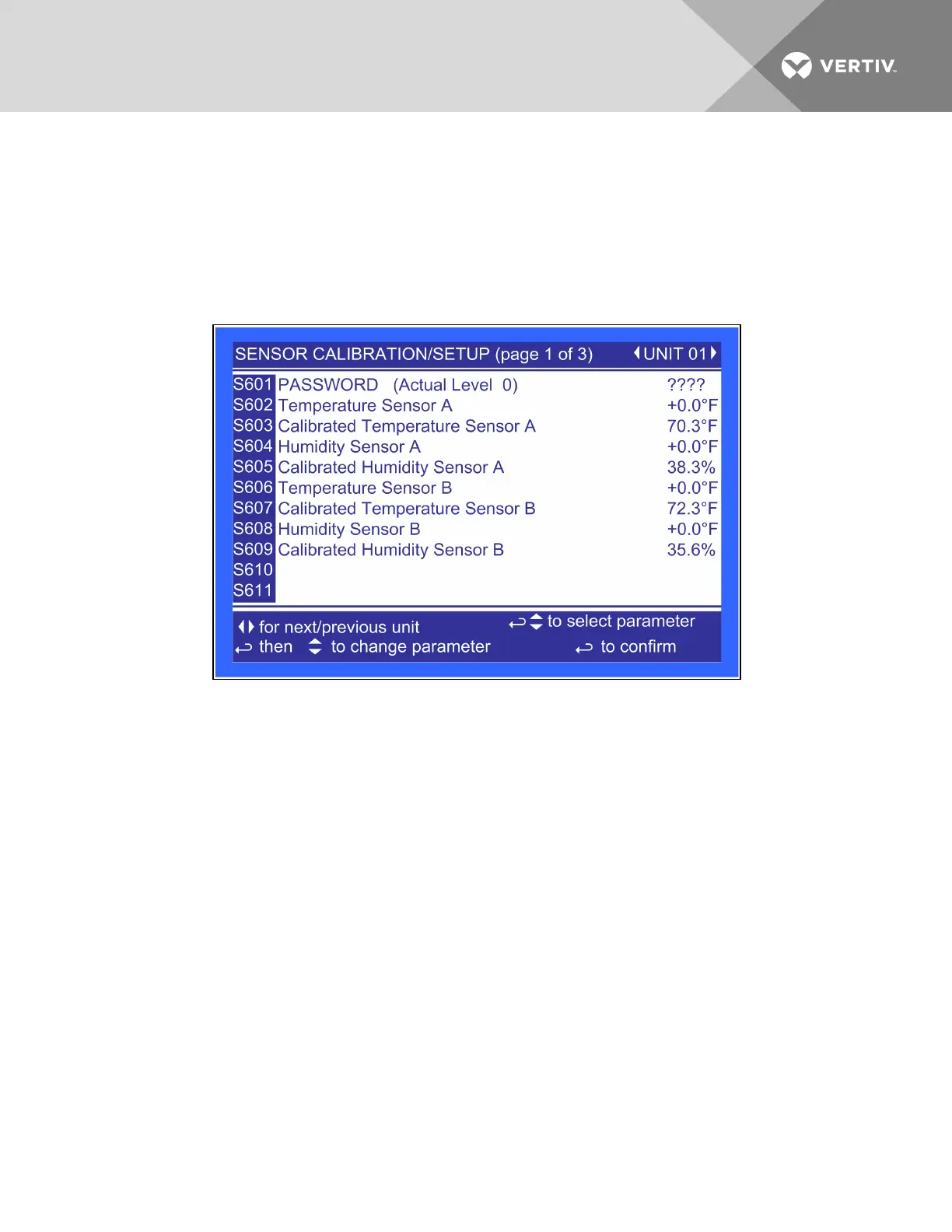
Figure 6.39 Sensor calibration/Setup, page 1 of 3
Temperature Sensor A—Adjusts the temperature reading from the actual remote CAN Temp Humidity
sensor designated as Sensor A to compensate for any error of the sensor or to match other sensors in the
room.
Calibrated Temperature Sensor A—Displays the adjusted temperature value of the remote CAN Temp
Humidity sensor designated as Senor A. This value is the actual sensor reading plus or minus the offset
Temperature Sensor A.
Humidity Sensor A—Adjusts the humidity reading from the actual remote CAN Temp Humidity sensor
designated Sensor A to compensate for any error of the sensor or to match other sensors in the room
Calibrated Humidity Sensor A—Displays the adjusted humidity value of the remote CAN Temp Humidity
sensor designated as Sensor A. This value is the actual sensor reading plus or minus the offset Humidity
Sensor A.
Temperature Sensor B—Adjusts the temperature reading from the actual remote CAN Temp Humidity
sensor designated as Sensor B to compensate for any error of the sensor or to match other sensors in the
room.
Calibrated Temperature Sensor B—Displays the adjusted temperature value of the remote CAN Temp
Humidity sensor designated as Senor B. This value is the actual sensor reading plus or minus the offset
Temperature Sensor B.
Vertiv | Liebert® XDC™ User Manual | 101




 To Next Page