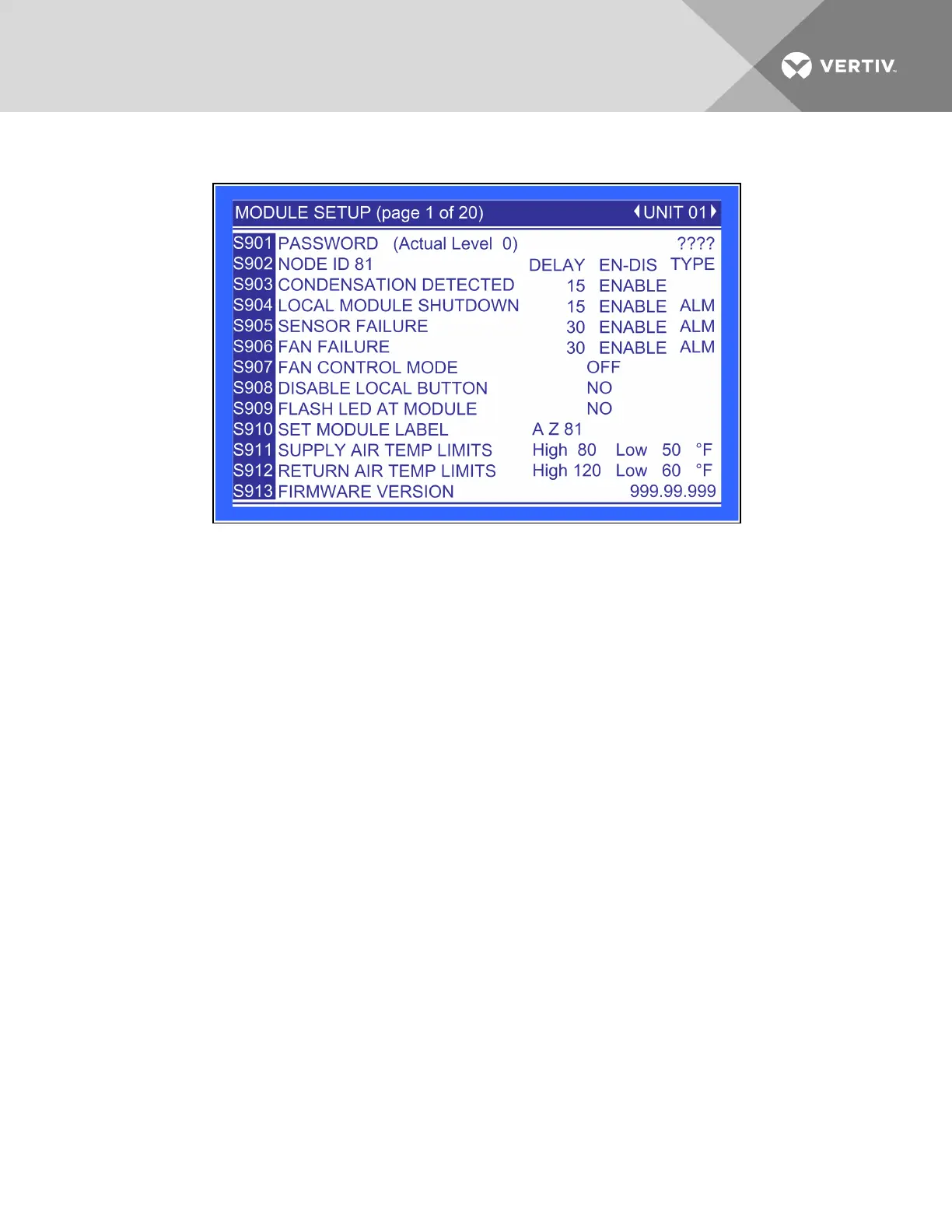
Figure 6.48 Module setup, page 1 of 20
This screen selects the operation of an active alarm for each smart module. Each event can be enabled or
disabled and can be set to operate as an alarm, a warning or a message. The delay is the time the control
waits before reporting the event.
Alarm: Annunciates the buzzer, triggers a monitoring event, triggers the alarm relay and
flashes the red LED on the display.
Warning: Annunciates the buzzer, triggers a monitoring event, shows the event in the event
viewer/front display and flashes the red LED on the display.
Message: Shows the event in the event viewer and on the front display.
Fan Control Type—Sets the fan control mode. Values can be OFF, ON, ON ALL and TEMP CNTL.
Disable Local Button—Disables the push button on the front of the smart module. To disable the push
button, set the parameter to YES. To re-enable the push button, set the parameter to NO.
Flash LED at Module—Flashes the LED on the smart module when set to Yes.
Set Module Label—A four-character label consisting of two letters and two numerals. This is the standard
nomenclature for Data Center Grid assignment of racks. Additionally, the module’s location can be
denoted with 10 characters, either letters or non-alphanumeric characters from a built-in list. Either or
both labels can be used and are entered using this screen.
Supply Air Temp Limit—Sets the high and low supply air temperature to from the module. An alarm will
occur if the temperature falls outside the limits.
Return Air Temp Limit—Sets the high and low return air temperature to from the module. An alarm will
occur if the temperature falls outside the limits.
Firmware Version—Displays the firmware version installed on the smart module.
Vertiv | Liebert® XDC™ User Manual | 109




 To Next Page