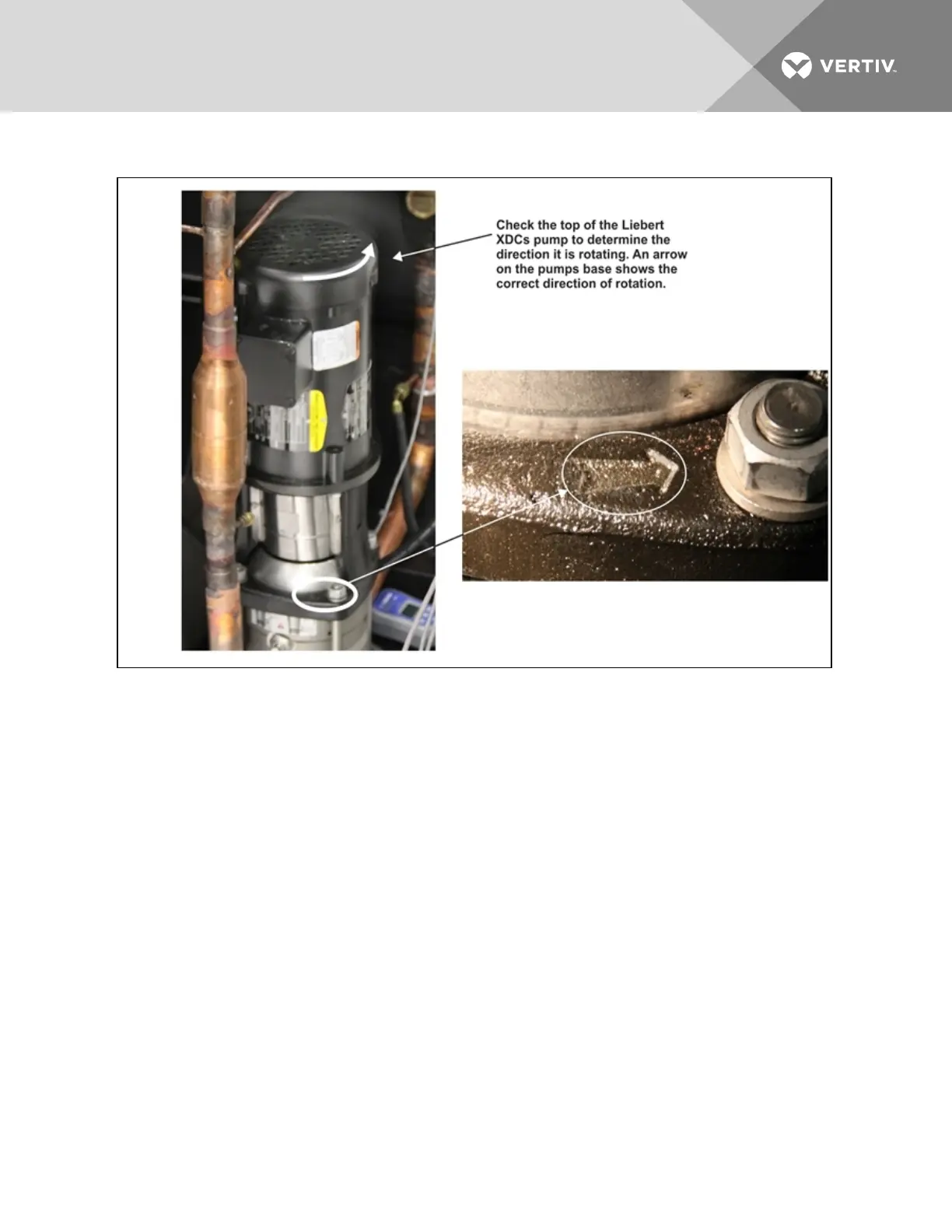
Figure 7.1 Liebert XDC pump rotation determination
4. Check rotation of fans on Liebert XD cooling modules.
5. Verify that air is being discharged in the “cold aisle.”
6. Check rotation of fans on condenser(s) of Liebert XDC (air-cooled units only)—Verify that air is
being discharged out to the atmosphere.
7. Confirm that the total calculated refrigerant R-134a amount has been properly charged into
the system [see Filling the Pumped Circuit—R-134a on page41].
8. Confirm that the total calculated refrigerant R-407C amount has been properly charged into
the system (see Filling the Direct Expansion (DX) Circuit—R-407C on page55).
9. Confirm that the remote temperature/humidity sensor provided has been installed in the
correct location.
The correct location is near the return side of a main air mover such as a Liebert DS. If more
than one Liebert XDC is installed, use a different location for each remote sensor for best
temperature/humidity calculation.
The Liebert XDC system is now ready to be turned ON.
1. Turn the Liebert XDC On via the user interface (I/O button). The factory-setting defaults
Liebert XD module fans to On. When the unit is turned On, the modules’ fans will turn On. Allow
the system to attempt to start for at least 2minutes.
Vertiv | Liebert® XDC™ User Manual | 112




 To Next Page