If the Liebert XDC pump cannot maintain flow and continues to switch over due to starting
difficulties, proceed to Check pressure differential functionality: below and refer to
Troubleshooting on page121.
2. If constant flow is established, wait until the Liebert XDC has been operating 10-15 minutes,
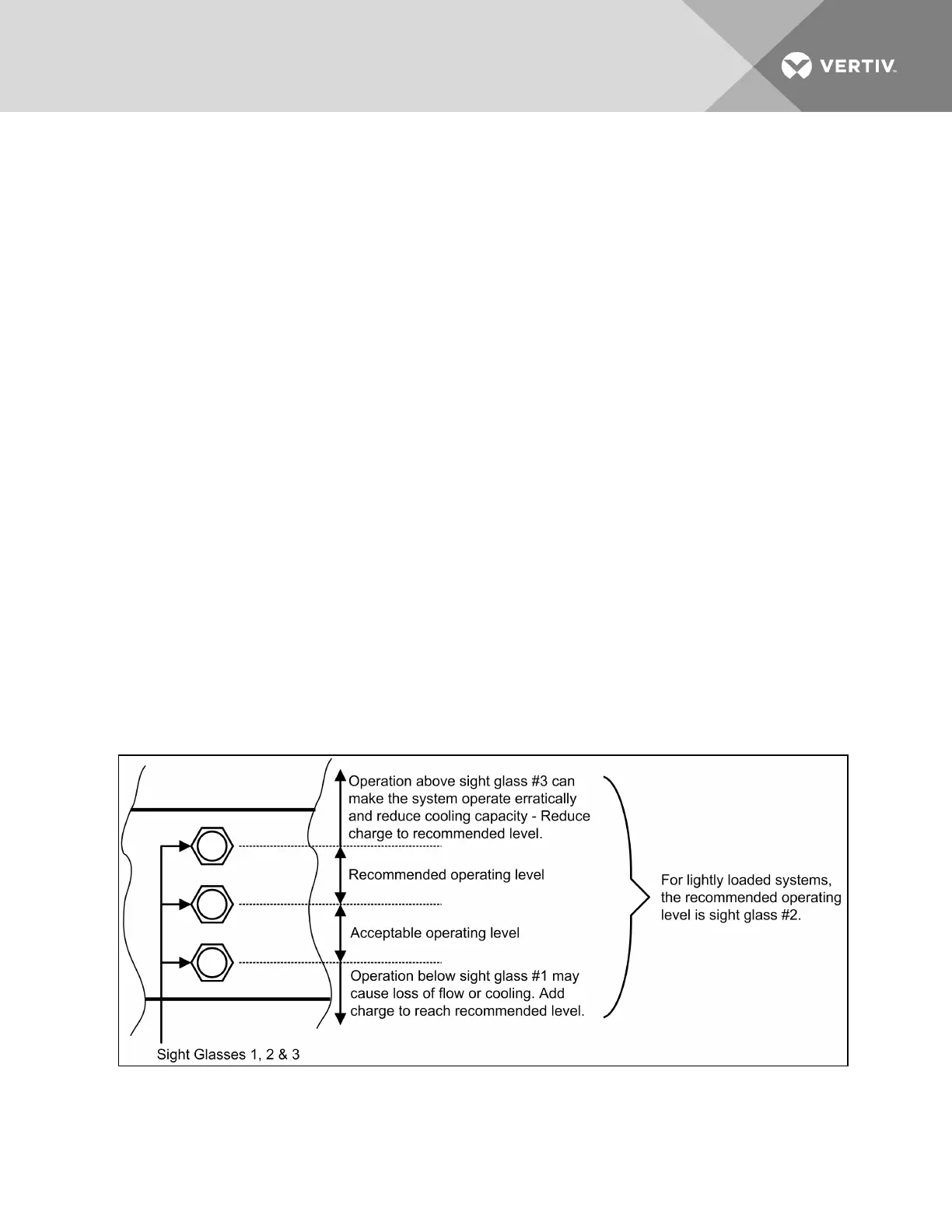
then verify that the refrigerant level in the receiver sight glass is between the second and third
level (see Figure 7.2 below). Add or remove charge as indicated by sight glass level.
3. Check pressure differential functionality:
The Liebert XDC system should be On. If it is Off:
a. Turn the Liebert XDC On via user interface (I/O button). The factory-setting defaults
Liebert XD module fans to ON. When the unit is turned ON, the modules fans will turn On.
If there is no “Loss of Flow” alarm present—This suggests that there is flow. Test the
pressure differential by closing the ball valve on either the suction line or discharge line
to stop the flow.
This should prompt an alarm for “loss of flow on P1.” This alarm confirms that the switch
has opened on low pressure (below 6 psi; 41 kPa; 0.41 bars).
If there is a “Loss of Flow” alarm present—This suggests that there is no flow. Verify that
this is correctly annunciated by looking at the sight glass in the receiver. If a true no-flow
condition exists, the level will not move.
However, if there is flow, but the differential reading is faulty, the level will slowly drop,
indicating flow, while the loss of flow alarm is annunciated.
Check the pressure differential physically by making sure that the electrical connections
are properly connected. Then check the pressure differential electrically by making sure
that the unit has 24VAC across it.
Figure 7.2 System R-134a liquid level
Vertiv | Liebert® XDC™ User Manual | 113




 To Next Page