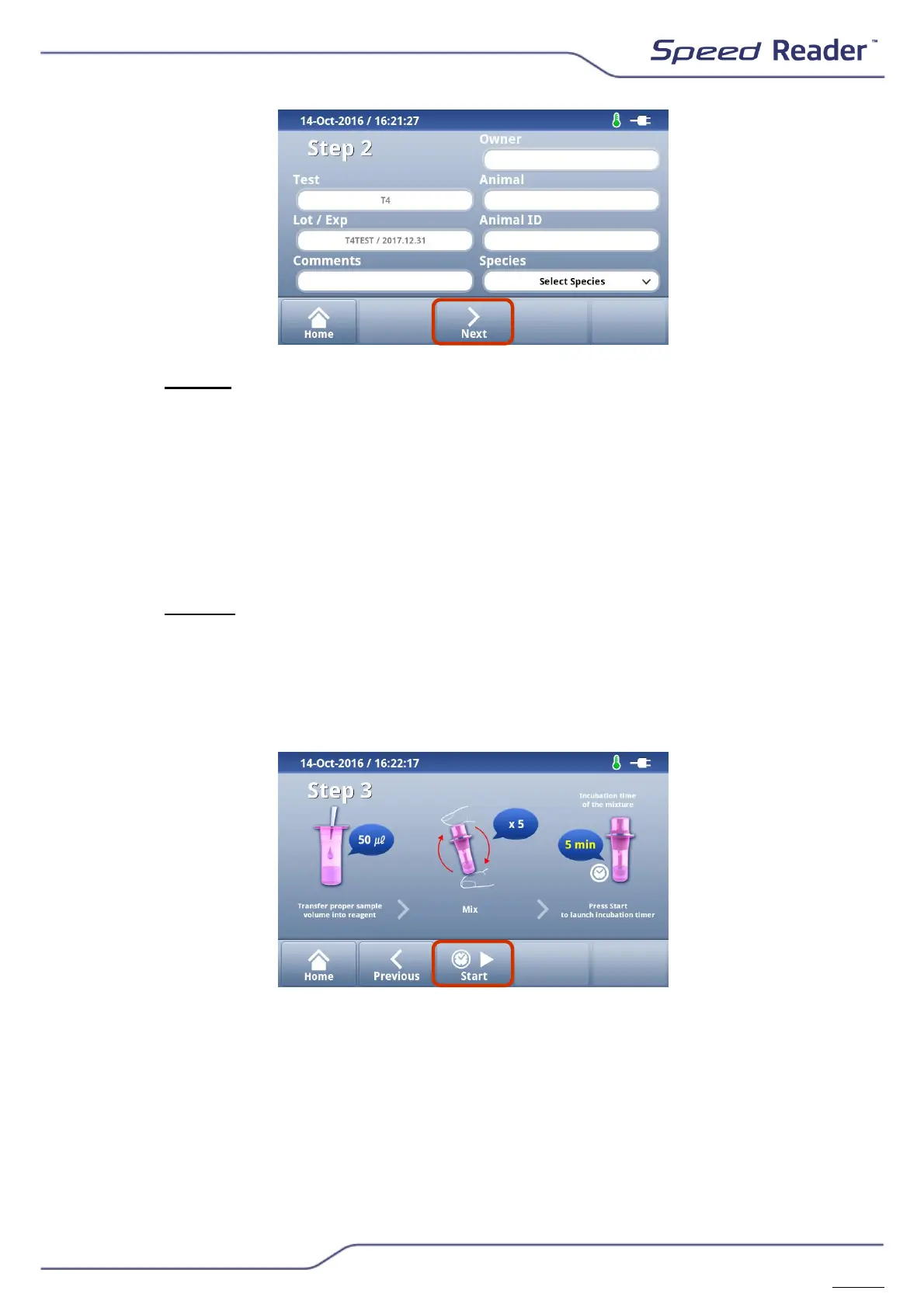
o Step 2: Check the test, the batch number and the expiration date
If necessary, you can add the name of the owner, the name of the
animal, its identifier (chip number, tattoo...), its species and any
comments (max. 25 characters).
NB: You can edit the various fields throughout the testing procedure.
Once the result is being processed, it will not be possible to change
these data, with the exception of the “Comments” field in the “Results”
menu.
o Then press “Next”.
o Step 3: Follow the directions on the screen for the sampling volume
and the incubation time for the steps for transferring the sample. Once
the mixture is complete, if an incubation time is required, press “Start”
to start the Timer. A beep will indicate the end of the incubation
period. Press “Next”. If there is no incubation time required for the
dosed valency, press “Next”.
If the waiting time for the incubation has already been observed, you can
skip this step by pressing “Skip” once the Timer has started. You can also
stop the Timer and restart it if it is started accidentally. To do this, press
“Pause”, “Reset”, and then “Start”.


 To Next Page