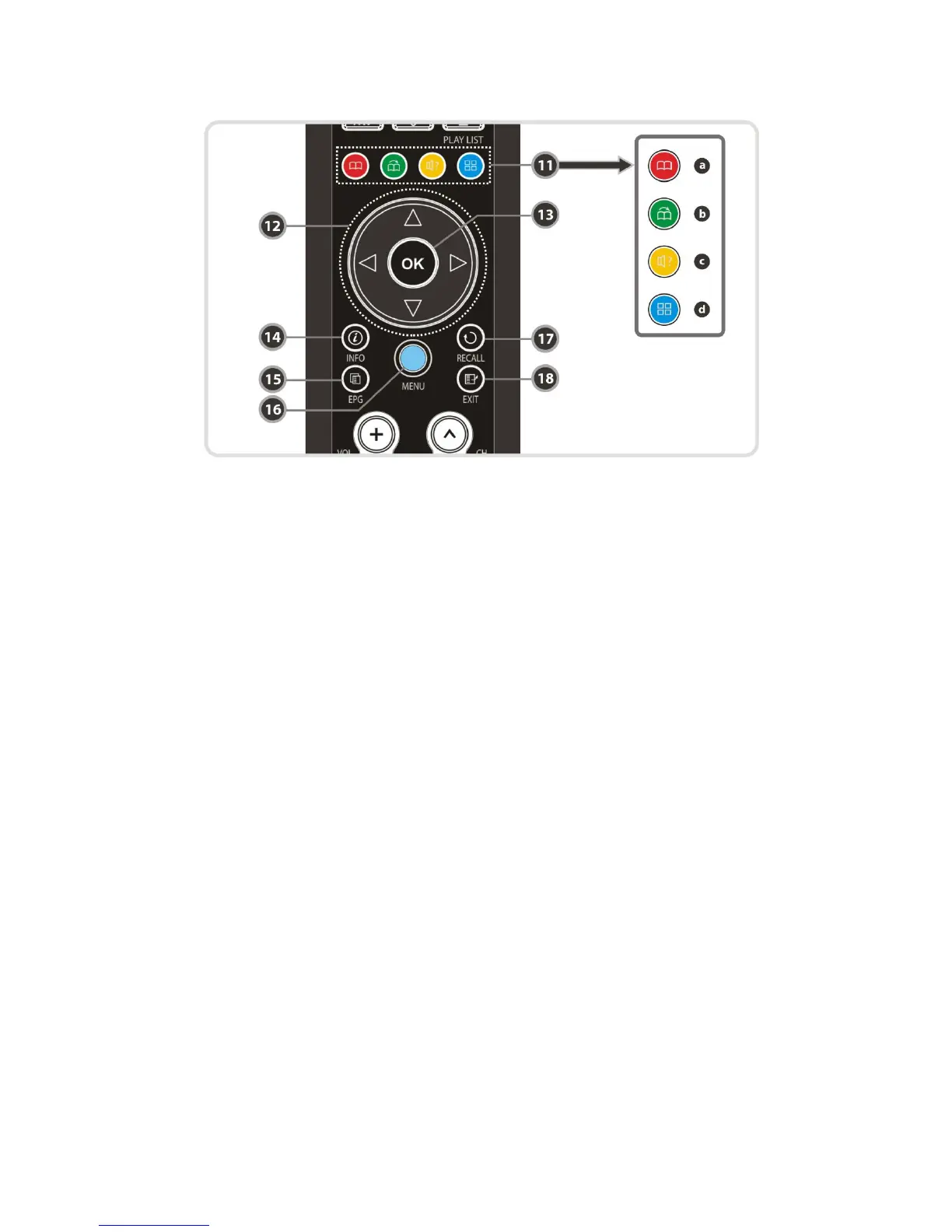
11. Color Buttons
a. RED : Used for special function in menu. RED key is used to sort lists in service list or go to
previous day search in EPG or make/delete the current position as a bookmark.
b. GREEN : Used for special function in menu. Green key is used to set favorites setting in
service list or go to the next bookmark position.
c. YELLOW : Used for special function in menu. Yellow key is used to find service in service list
or change the audio track.
d. BLUE : Used for special function in menu. Blue key is used to set service list option in
service list or display Multi-Picture.(*)
12. ARROW Buttons
a. Up & Down Buttons : To change the value of a selected item with preprogrammed values in
menu.
b. Left & Right Buttons : To move the cursor left and right in menu.
13. OK or Service List : Show the service list in non-menu mode and select an item or confirm
in menu mode.
14. Information : Shows the information of the current program. If you press one more, detail
information box will be shown.
15. EPG(Electronic Program Guide) : Show the TV/Radio program guide.
16. Menu : To enter the main menu or to move to the previous menu.
17. Recall : Moves to previous service.
18. EXIT : Exit from the menu or pop-up window.
NOTE : (*) This Feature(Multi-Picture) will be supported later, by new s/w version by upgrading.
Please refer to your local dealer / distributor.
13


 To Next Page