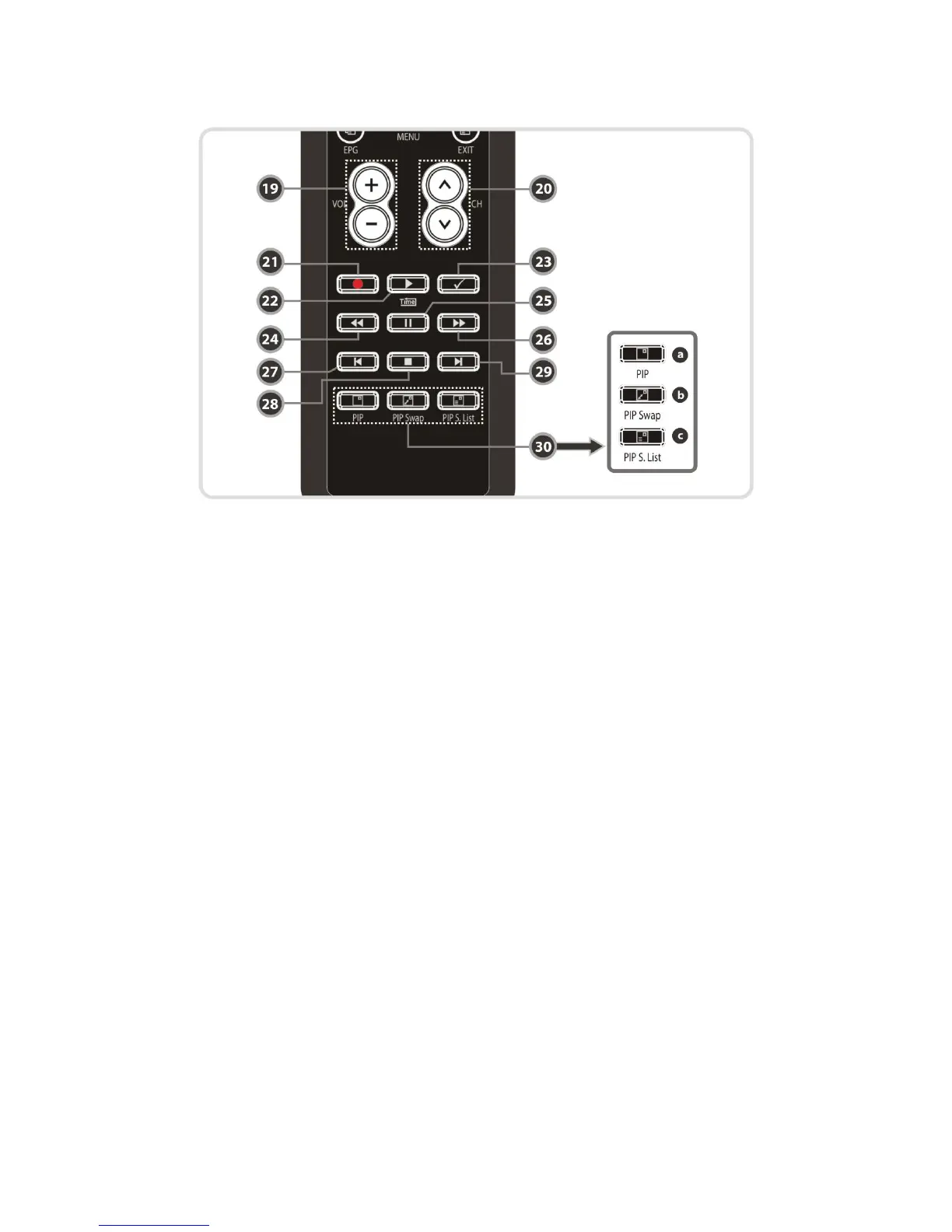
19. Volume Up & Down : To change the Volume.
20. Channel Up & Down: To change service channel.
21. Recording : To start Recording.
22. Play / Time shift : Display the progress bar of playback when no progress bar is displayed.
Start playback with normal speed. Return to normal speed from trick mode..
23. Repetition (*): This key is used to play back a recording repeatedly.
24. Rewind : Rewinds at high speed. Each time you press this button the rewind speed is
increased.
25. Pause : This key is used to pause the video. Press once more to resume the video.
26. Fast Forward : Fasts forward at high speed. Each time you press this button the speed is
increased.
27. Previous File : To play the previous MP3 file in MP3 play mode. This button is also used to
jump back to beginning of recording during a playback.
28. STOP : To stop time shifting, play back or recording.
29. Next File : To play the next file. This button is also used to jump to end of recording during a
playback.
30. PIP Buttons
a. PIP(Picture in Picture) : To set PIP window.
b. PIP Swap : Switching between main-picture and sub-picture
c. PIP(Picture in Picture) Service List : To shown the sub-picture service list.
NOTE : (*) This Feature(Repetition) will be supported later, by new s/w version by upgrading.
Please refer to your local dealer / distributor.
14


 To Next Page