EasyManua.ls Logo

VISUAL 100 - Page 76

VISUAL 100
80 pages
Print Icon
To Next Page IconTo Next Page
To Previous Page IconTo Previous Page
Loading...
VISUAL
TECHNOLOGY
INCORPORATED, 540
MAIN
STREET, TEWKSBURY,
MA
01876
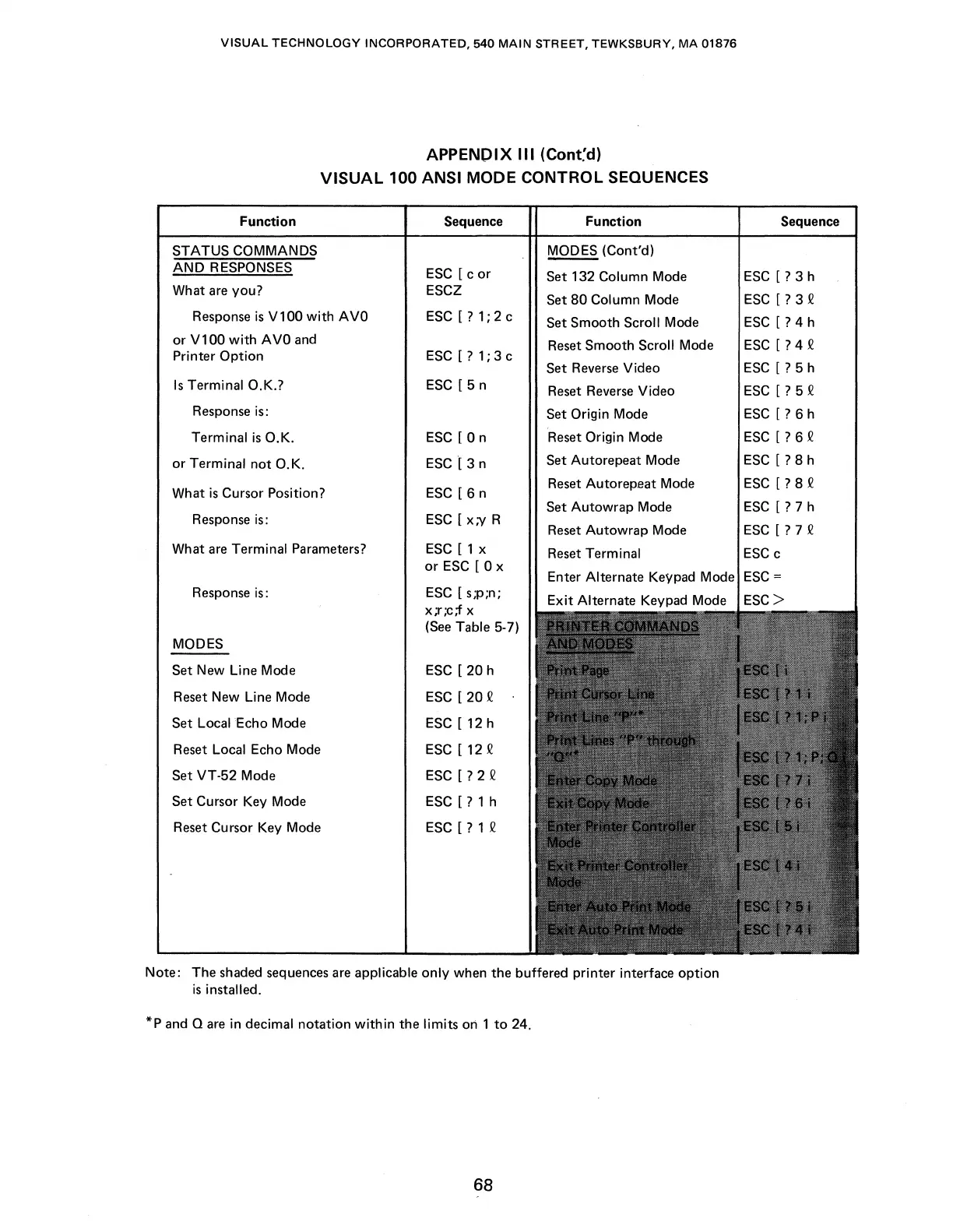
APPENDIX
Ill
(Cont:d)
VISUAL
100 ANSI MODE CONTROL SEQUENCES
Function Sequence Function
STATUS COMMANDS
MODES (Cont'd)
AND
RESPONSES
ESC
[ c
or
Set 132 Column Mode
What
are
you? ESCZ
Set
80
Column Mode
Response
is
V 100
with
A
VO
ESC
[?
1; 2 c
Set Smooth Scroll Mode
or
V100
with
AVO
and
Reset
Smooth Scroll Mode
Printer
Option
ESC
[?
1; 3 c
Set
Reverse
Video
Is
Terminal O.K.?
ESC
[ 5 n
Reset
Reverse
Video
Response
is:
Set Origin Mode
Terminal
is
O.K.
ESC
[ 0 n
Reset
Origin Mode
or
Terminal
not
0.K.
ESC
[ 3 n
Set Autorepeat Mode
What
is
Cursor Position?
ESC
[ 6 n
Reset
Autorepeat Mode
Set
Autowrap
Mode
Response
is:
ESC
[Xi'/
R
Reset
Autowrap
Mode
What
are
Terminal Parameters?
ESC
[ 1 x
Reset
Terminal
or
ESC
[ 0 x
Enter Alternate Keypad Mode
Response
is:
ESC
[ s;p;n;
Exit
Alternate Keypad Mode
x;r
;c;f x
(See
Table 5-7)
MODES
Set New Line Mode
ESC
[ 20 h
Reset New Line Mode
ESC
[ 20 Q
Set Local Echo Mode
ESC
[ 12 h
Reset
Local Echo Mode
ESC
[ 12 Q
Set VT-52 Mode
ESC
[?
2 Q
Set Cursor Key Mode
ESC
[?
1 h
Reset
Cursor Key Mode
ESC
[?
1 Q
Note: The shaded
sequences
are
applicable
only
when the buffered printer interface option
is
installed.
*p
and
Qare
in decimal notation
within
the limits ori 1
to
24.
68
Sequence
ESC
[?
3 h
ESC
[?
3 Q
ESC
[?
4 h
ESC
[?
4 Q
ESC
[?
5 h
ESC
[?
5 Q
ESC
[?
6 h
ESC
[?
6 Q
ESC
[?
8 h
ESC
[?
8 Q
ESC
[?
7 h
ESC
[?
7 Q
ESC
c
ESC=
ESC>

Table of Contents

Related product manuals