TROUBLE SHOOTING
2 CHAPTER 3
3.2 UPS SYSTEM
In the following table a list of troubleshooting is shown of the UPS.
When more information is needed of the UPS, please refer to the documentation
that comes with the UPS.
3.2.1 FRONT PANEL UPS SYSTEM
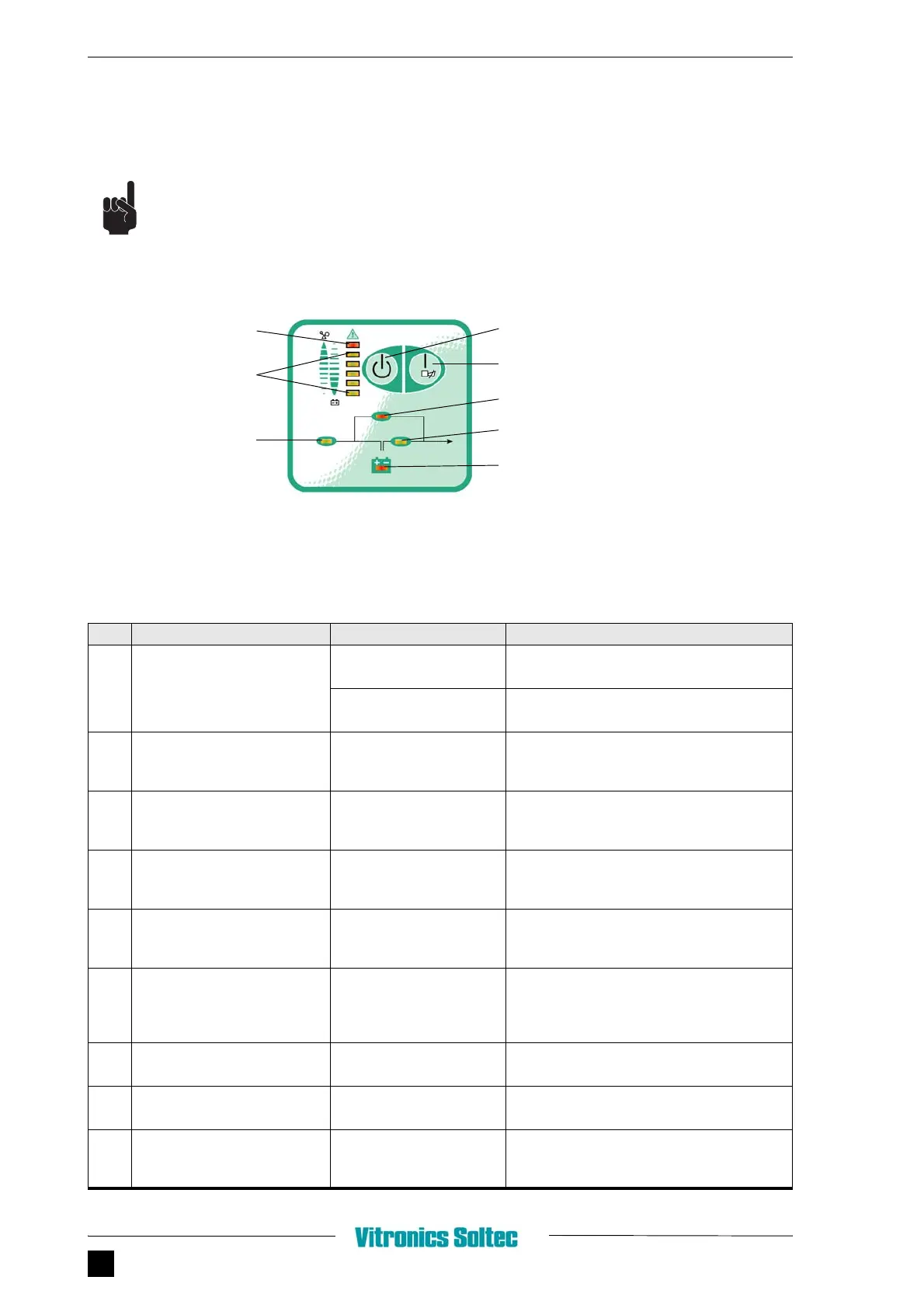
FIGURE 3.1 FRONT PANEL UPS SYSTEM
TABLE 3.1 TROUBLESHOOTING UPS
PROBLEM POSSIBLE CAUSE SOLUTION
1 No indication, no warning tone
even though system is
connected to mains power
supply
No input voltage Check building wiring socket outlet, check input
cable
Input protection switch has
disconnected
Reset input protection switch
2 LINE LED blinks Phase and neutral
conductor at input of UPS
system are reversed
Turn mains power socket by 180° or connect UPS
system
3 LINE-LED blinks and BATTERY-
LED lights up
Input power and/or
frequency are out of
tolerance
Check input power source and contact Vitronics
Soltec if necessary
4 LINE and BYPASS LED light up
even though the power supply is
available
Inverter not switched on Press On button “I”
5 INVERTER LED lights up,
warning tone at intervals (every
1 or 4 seconds)
Mains power supply has
failed
Not necessary, battery operation;
warning tone at intervals of 1 second means
battery is almost empty
6 INVERTER-LED lights up,
warning tone in intervals (1 or 4
seconds), mains power supply
available
Input protection switch
disconnected
Reset input protection switch. If the problem
persists, please contact Vitronics Soltec
7 FAULT LED lights warning tone
once a second
Overload Reduce number of users at UPS output
8 FAULT-LED lights up, permanent
warning tone
UPS-mistake Contact Vitronics Soltec
9 Emergency supply period
shorter than nominal value
Batteries not fully charged /
batteries defective
Charge the batteries for at least 1 - 2 hours.
Check capacity. If the problem still persists,
contact Vitronics Soltec
FAULT LED
Load and battery
capacity LEDs
LINE LED
STANDBY SWITCH
ON SWITCH
BYPASS LED
INVERTER LED
BATTERY LED


 To Next Page