18
Connecting the projector to other devices.
Proceed as follows to connect the D8800/D8900/D8010W to your video sources, external controller(s) - if present - and
AC power. When connecting your equipment: •Use the correct signal cables for each source. •Ensure that the cables are
securely connected. Tighten the thumbscrews on connectors that have them. Connecting Source Components to the
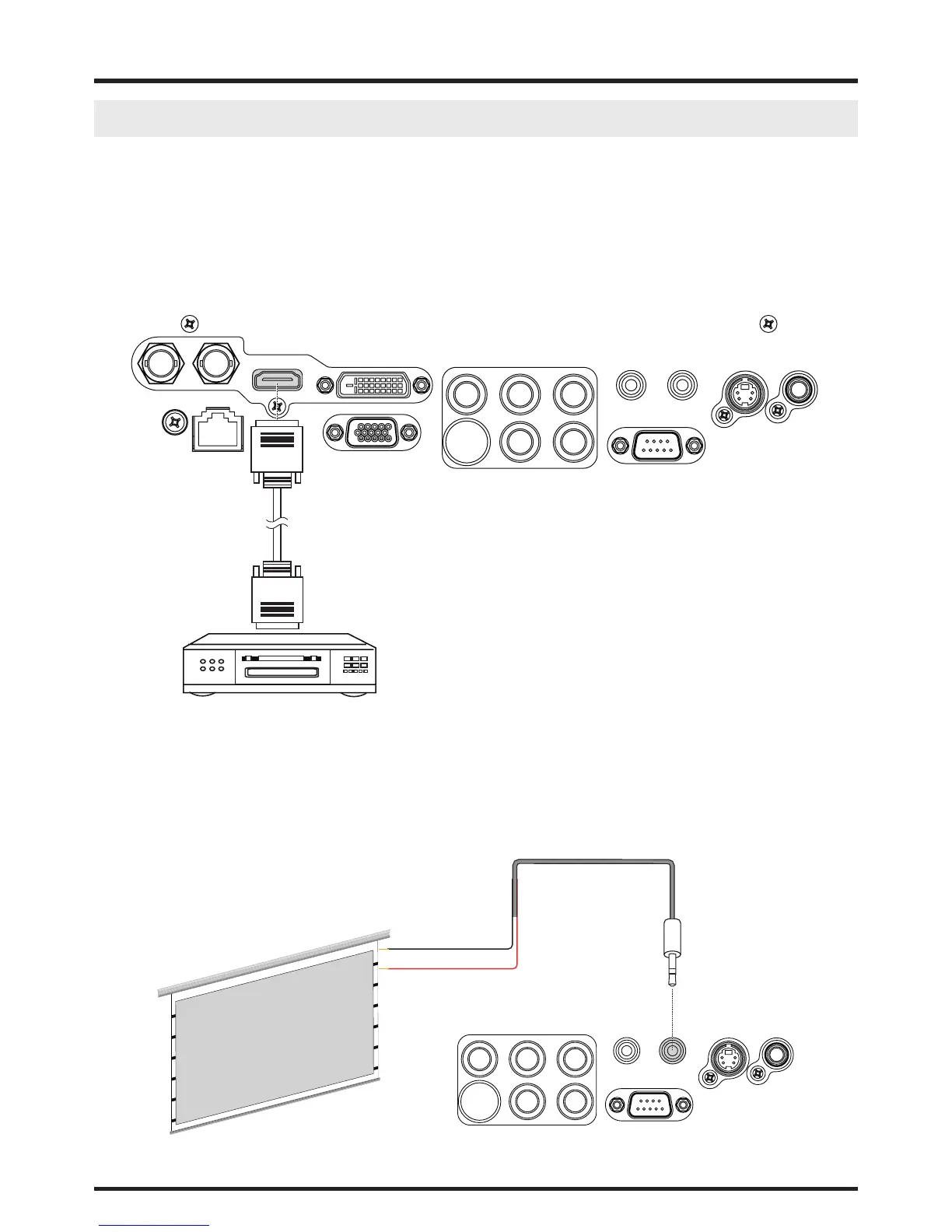
D8800/D8900/D8010W Connect your video sources to the D8800/D8900/D8010W as shown and described in the sec-
tions that follow.
HDMI Connection
IN SDI OUT
LAN
HDMI
DVI-D
RGB
B/Pb G/YR/Pr
VH
WIRED REMOTE TRIGGER
RS-232
S-VIEDOVIEDO
DVI Source(s)
(BD/HD-DVD/DVD Player, HD SetTop Box, Game Console etc.)
Trigger connection
If your home theatre system includes a projector screen, screen cover or other 12V Trigger equipment, please connect
such device/equipment to the projector’s 12V Trigger output as illustrated. After you have done so, your screen will lower
automatically whenever you turn on your projector for your convenience.
Tip = +12V
Sleeve = Ground
Retractable screen or other
12V device
Projector Screen
B/Pb G/YR/Pr
VH
WIRED REMOTE TRIGGER
RS-232
S-VIEDOVIEDO



 To Next Page