Chapter 4 AUTOMATIC GOTO SLEWING
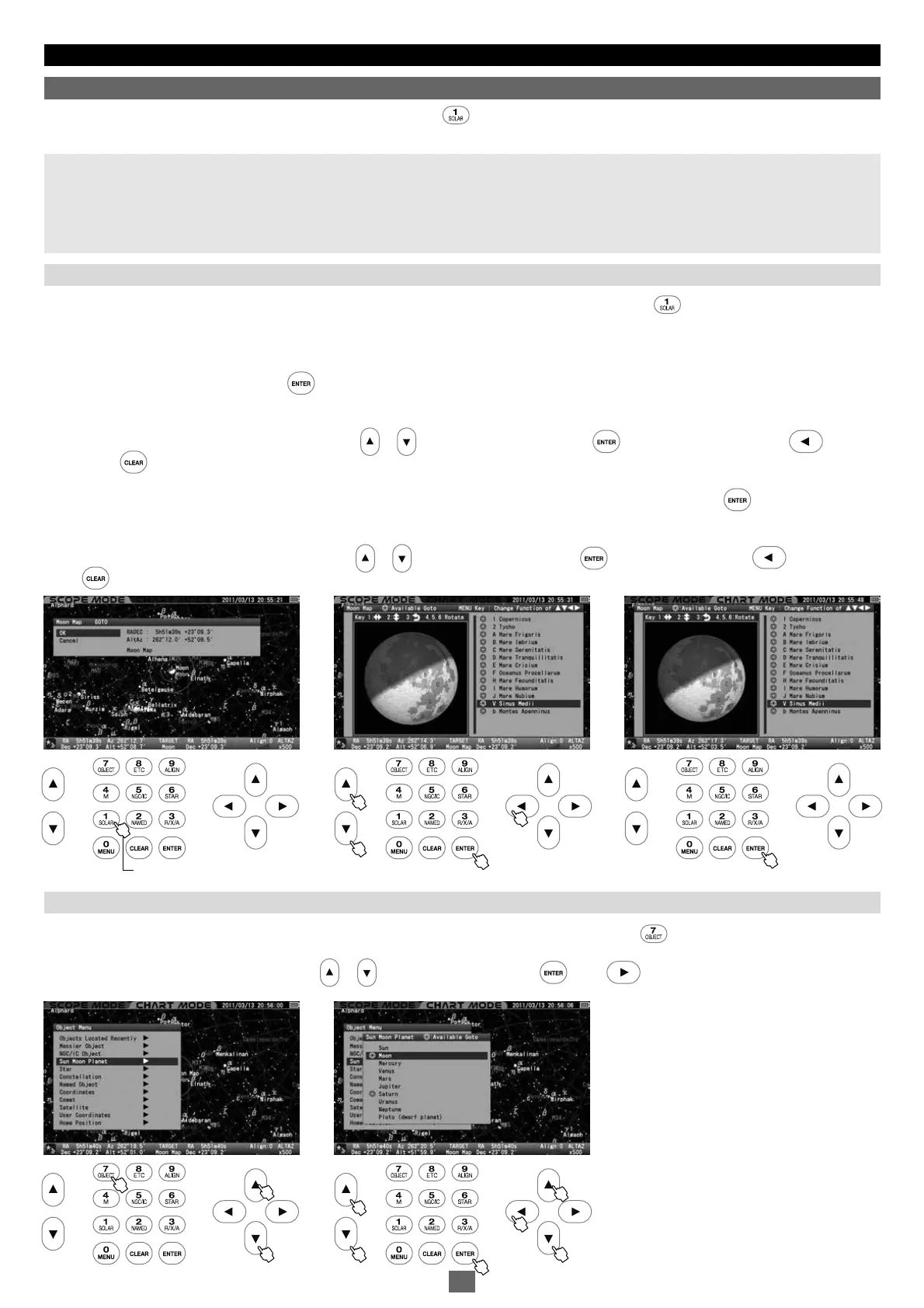
The “Moon Map“ dialog box appears on the screen if you press the key a little longer. The telescope can be pointed at the major "seas"
and geographical formations on the surface of the moon.
Note:
• The moon is displayed based on a simplified description of the age and map of the moon, but the moon seen on the screen may differ slightly
from the real one.
• The moon is relatively a very shining object and it may be so bright that your eye will tire with long observation. Therefore, it is advisable to
use a moon filter and the like for observing to reduce the brightness.
1
2
Instant Display of the Moon Map: The “Moon Map“ dialog box appears on the screen if you press the key a little longer in both
SCOPE
MODE
and
CHART MODE
.
The “GOTO” dialog box will appear if the screen is in
SCOPE MODE
. The dialog box is displayed regardless of the setting of “GOTO
Message”. Choose OK and press the key to start the automatic Go-To slewing. The “Moon Map” dialog box appears on the screen
when the automatic slewing is completed. Be aware of the motion of your telescope.
To leave the dialog box, choose CANCEL with the or direction keys and press the key, or pressing either the direction
key or the key to return to the previous screen.
If you use
CHART MODE
on the screen, the “SELECT?” dialog box will be displayed. Choose OK and press the key to advance. The
“Moon Map” dialog box appears.
To leave the dialog box, choose CANCEL with the or direction key and press the key, or press either the direction key or
the key to return to the previous screen.
1
2
Before you begin, confirm that the “GOTO Message” is set to ON with the use of
SCOPE MODE
. Press the key to call up the “Object Menu".
Select “Sun Moon Planet” from the list with the or direction keys and press the (or the ) key to move down to the subsidiary dialog
box.
Moon Map
Calling up the Moon Map from "Object Menu"
Calling up the Moon Map directly
北
11 22
11 22
Press a Little Longer.
35


 To Next Page