Chapter 5 APPLICATION
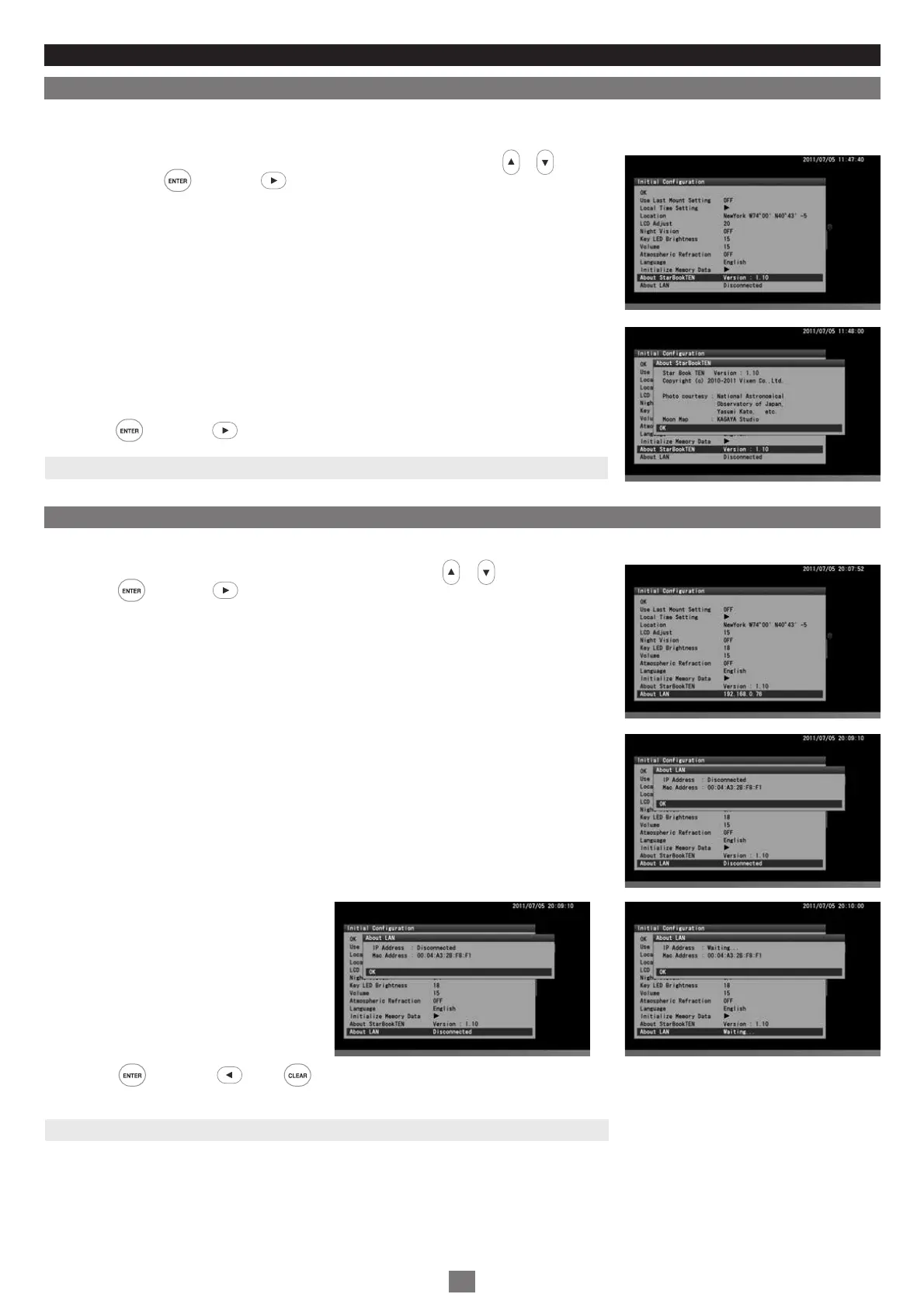
About StarBook TEN
1
2
3
This allows you to access the program version, IP address and MAC address of your STAR BOOK TEN controller. This information is required
for program updates and downloads from a PC through a local area network.
About LAN
You can confirm “IP address” and “MAC address” either on the “Initial Configuration” screen or from “System Menu”.
In the “Initial Configuration” menu, choose “About StarBook TEN” with the or direction
key and press the key (or the key) to display the information screen of “About STAR
BOOK TEN”.
“About STAR BOOK TEN” screen is displayed.
Press the key (or the key) to close the information screen.
1
2
3
In the “Initial Configuration” menu, choose “About LAN” with the or direction keys and
press the key (or the key) to display the information screen of “About LAN”.
“About LAN” screen is displayed.
On the information screen, IP address does not appear until a connection to LAN is
completed, or if the LAN is disconnected.
Press the key (or the key or key) to close the information screen.
Note: You can also access the “About LAN” dialog box from “System Menu”.
Note: You can also access the "About StarBook TEN" dialog box from "System Menu".
74


 To Next Page