Chapter 4 AUTOMATIC GOTO SLEWING
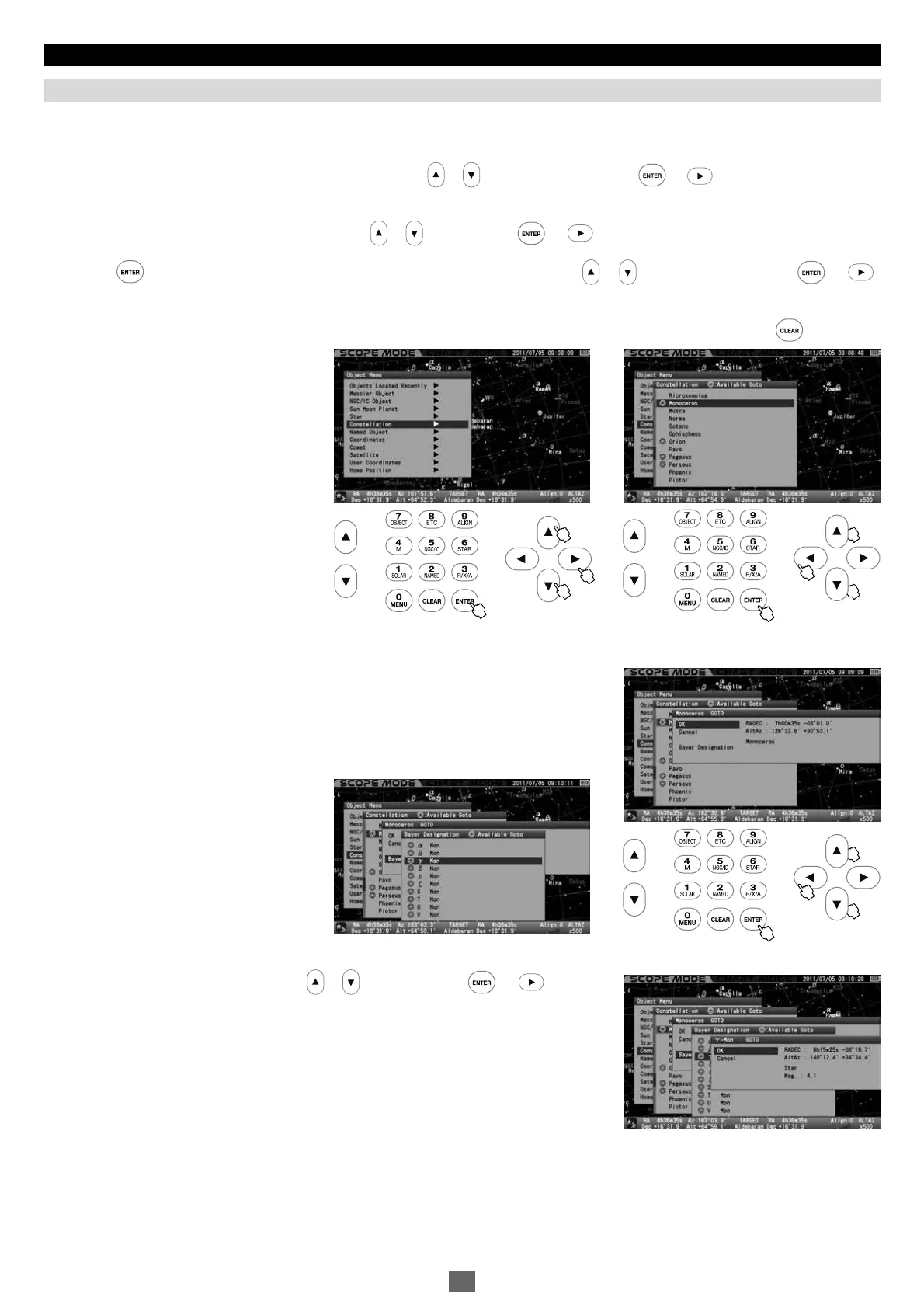
This identifies locations of all 88 constellations. Additionally, it allows you to slew to any stars labeled with a Bayer designation (the
letters of Greek alphabet) in the constellation.
北
Call up “Object Menu” and choose “Constellation” with the or direction key. Press the (or )key to access a list of 88
constellations.
Choose the constellation you want to view with the or key and press (or ) key.
Press the key to start the Go-To slewing. To stop, shift the cursor to Cancel with the or direction key and press the (or )
key.
The dialog box disappears and you are ready to choose another. If you discontinue the Go-To slewing itself, press the key.
Constellation
1
Stars shown in constellations can be identified by a Bayer designation which is assigned to
a star.
Here, Gamma Monoceros (the Unicorn) is chosen as an example.
Choose a star you want to slew to with the or key and press the (or )key.
4
5
2
3
11 22
44
55
44


 To Next Page