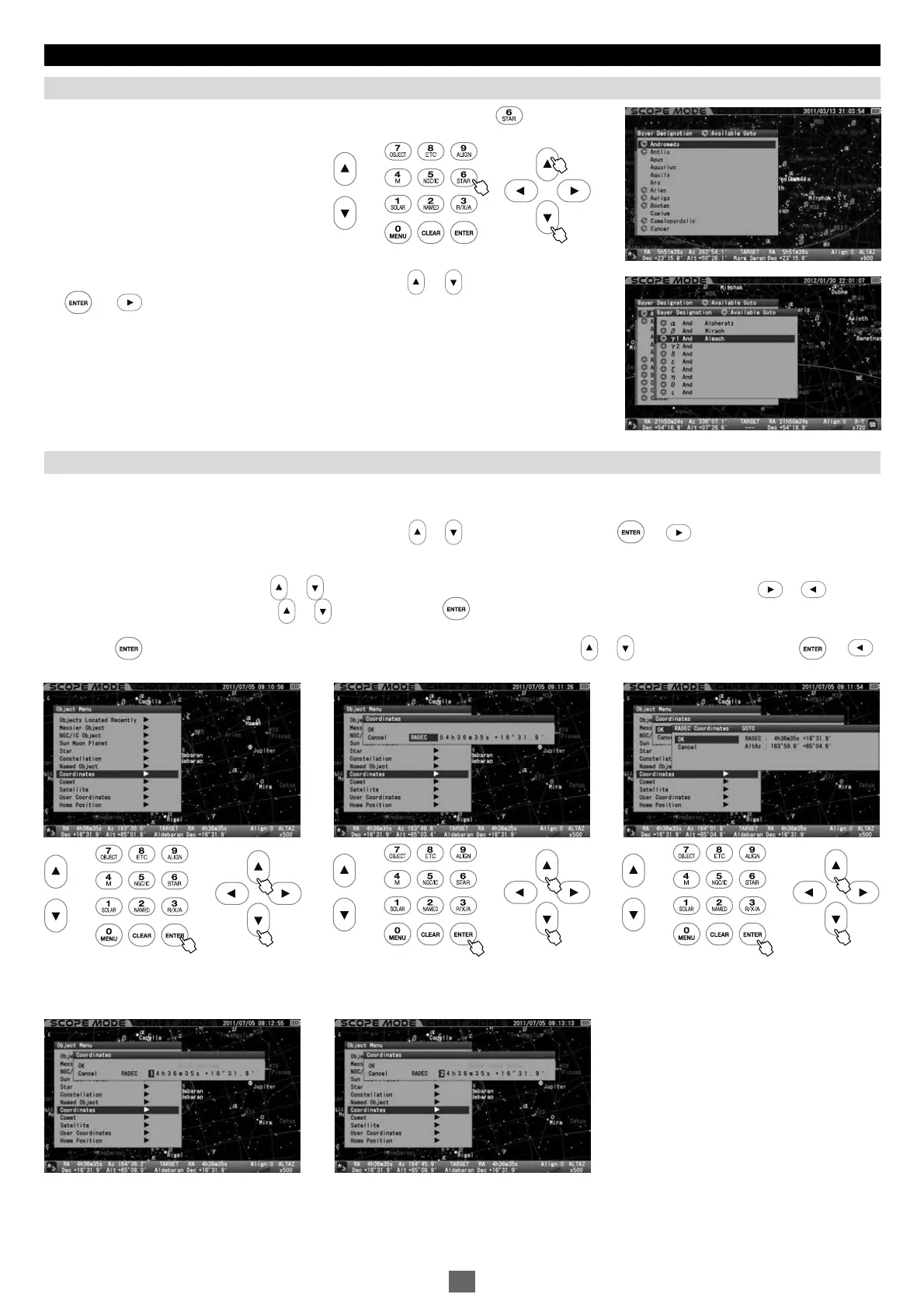
The wrong umber is entered. The target is below the horizon.
Chapter 4 AUTOMATIC GOTO SLEWING
The list of the Bayer designation appears on the screen if you press the key a little
longer.
Choose a Bayer designation in the entry dialog box with the or direction key. Press
the (or )key to display a star which have a Greek-letter designation.
Call up “Object Menu” and choose “Coordinates” with the or direction key. Press the (or )key to access the entry dialog
box.
Choose “RADEC” or “AltAz” with the or direction key and advance the cursor to an available entry space with the or direction
key. Enter a numerical value with the or key and press the key.
Press the key to start the Go-To slewing. To stop, shift the cursor to Cancel with the or direction key and press the (or )
key. The entry dialog box disappears.
Calling up Bayer Designation Directly
This allows slewing to objects by entering celestial coordinates or altitude/azimuth directions.
If you enter a wrong number or your target is below the horizon, you will be alerted by a message on the screen.
Coordinates
1
2
3
11 22 33
45


 To Next Page