① ② ③ ④ ⑤ ⑥ ⑦ ⑧ ⑨
NOAA1
104793U70106A10136.02215887-.0000003100000-010000-305176
204793102.0931137.93630031946163.7080196.502712.53938386804630
② ⑩ ⑪ ⑫ ⑬ ⑭ ⑮ ⑯
①
②
③
④
⑤
⑥
⑦
⑧
⑨
⑩
⑪
⑫
⑬
⑭
⑮
⑯
Nam e o f Sa tel l ite
Sat e ll i te Num b er
Int e rna tio nal Des ign ati o n
Epo c h Y ear & D ay Fra c ti o n
1st der iva tiv e of Me a n M oti on
2nd de r iva tiv e of Me a n M oti on
Rad i at i on Pre s sur e C oef f ici ent
Eph e me r is Typ e
Ele m en t Nu mbe r & Che c ks u m
Inc l in a tio n
Rig h t A sce nsi o n o f t h e A sce ndi n g N ode
Ecc e ntr ici ty ( dec ima l p l ace )
Arg u me n t o f P e rig ee
Mea n An oma ly
Mea n Mo tio n
Rev o lu t ion Nu m ber at Ep o ch & C h eck sum
Chapter 4 AUTOMATIC GOTO SLEWING
This allows observing a satellite pass.
Entering the Orbital Elements of the Satellite
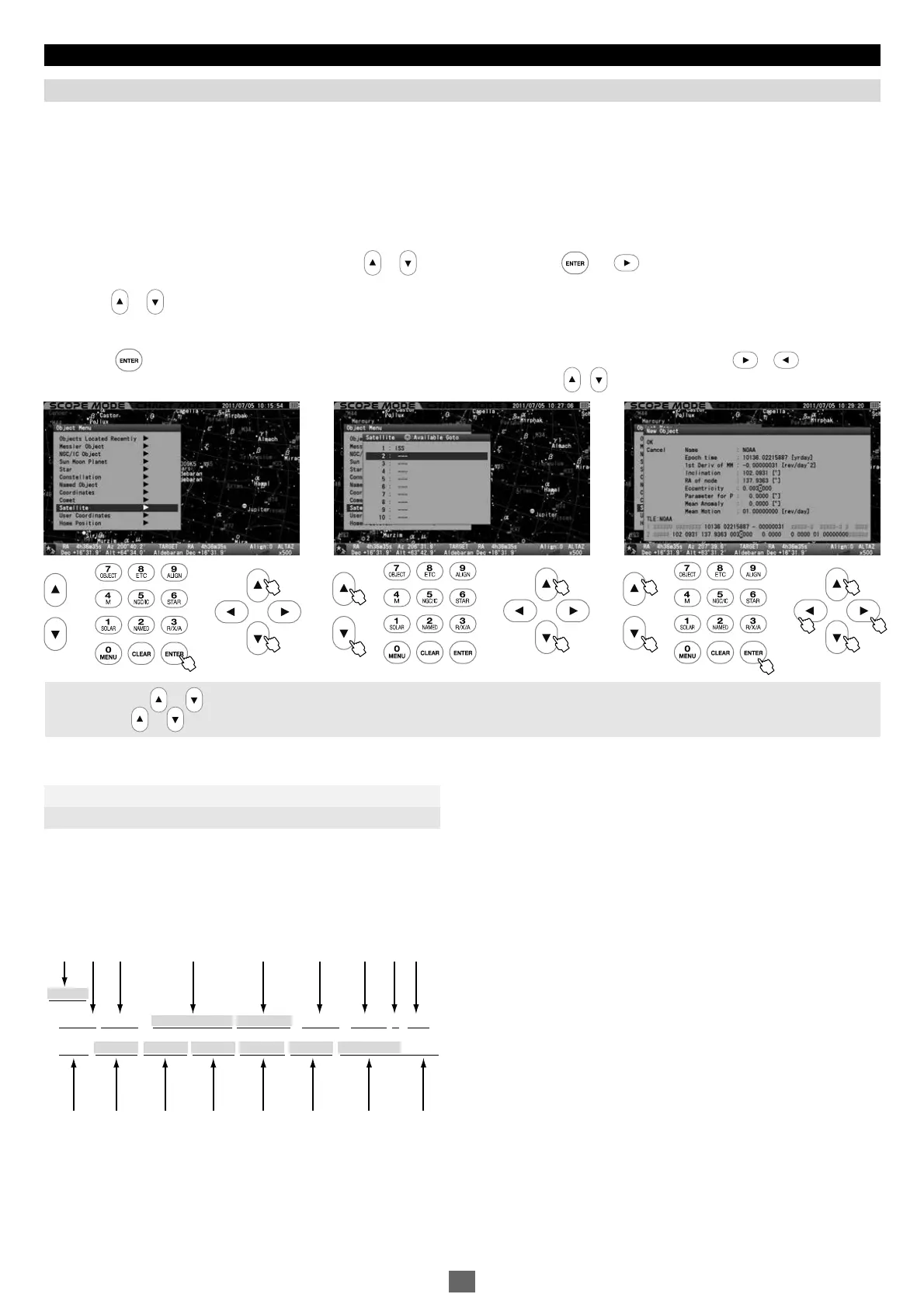
STAR BOOK TEN allows you to enter orbital elements of up to 10 satellites for Go-To slewing. You can access the orbital elements of satellites
from commercially available astronomy magazines and internet websites. Use the most recent ones to prevent inaccurate slewing to the satellite
and to diminish tracking errors. Besides, it is very important to set your STAR BOOK TEN to be punctual to the second.
The orbital elements of the satellites are typically represented in a format that is called “Two Line Elements”. Sampling parameters related
to the orbital elements of the satellite and its name only from the TLE format and enter them into the STAR BOOK TEN.
Of the above parameters in TLE format, are utilized for determining orbital elements. (The parameters
are not necessary for the STAR BOOK TEN.) The number after the decimal is determined by the number of spaces available and round off
at that point.
Note : Use the or zoom key to shift the cursor in the vertical direction while you enter alphabets and numbers.
(The • direction keys are not allocated for moving the cursor.)
Call up “Object Menu” and choose “Satellite” with the or direction key. Press the (or )key to access the entry dialog box.
With the or direction key, move the cursor to an entry space where no satellite names are set. (The second line is chosen here.)
Press the key to display the “New Object” dialog box and move the cursor to an available entry space with the or direction key.
Enter the name of the satellite and its orbital elements by alphabet and number with the • direction key.
.
Satellite (Artificial Satellite)
1
2
3
11 22 33
The orbital elements of the weather satellite NOAA is shown in TLE format as an example.
104793U70106A10136.02215887-.0000003100000-010000-305176
204793102.0931137.93630031946163.7080196.502712.53938386804630
① ④ ⑤ ⑩ ⑪ ⑫ ⑬ ⑭ ⑮
② ③ ⑥ ⑦ ⑧ ⑨ ⑯
The TLE format consists of the following structure.
48


 To Next Page