Chapter 5 APPLICATION
Key LED Brightness
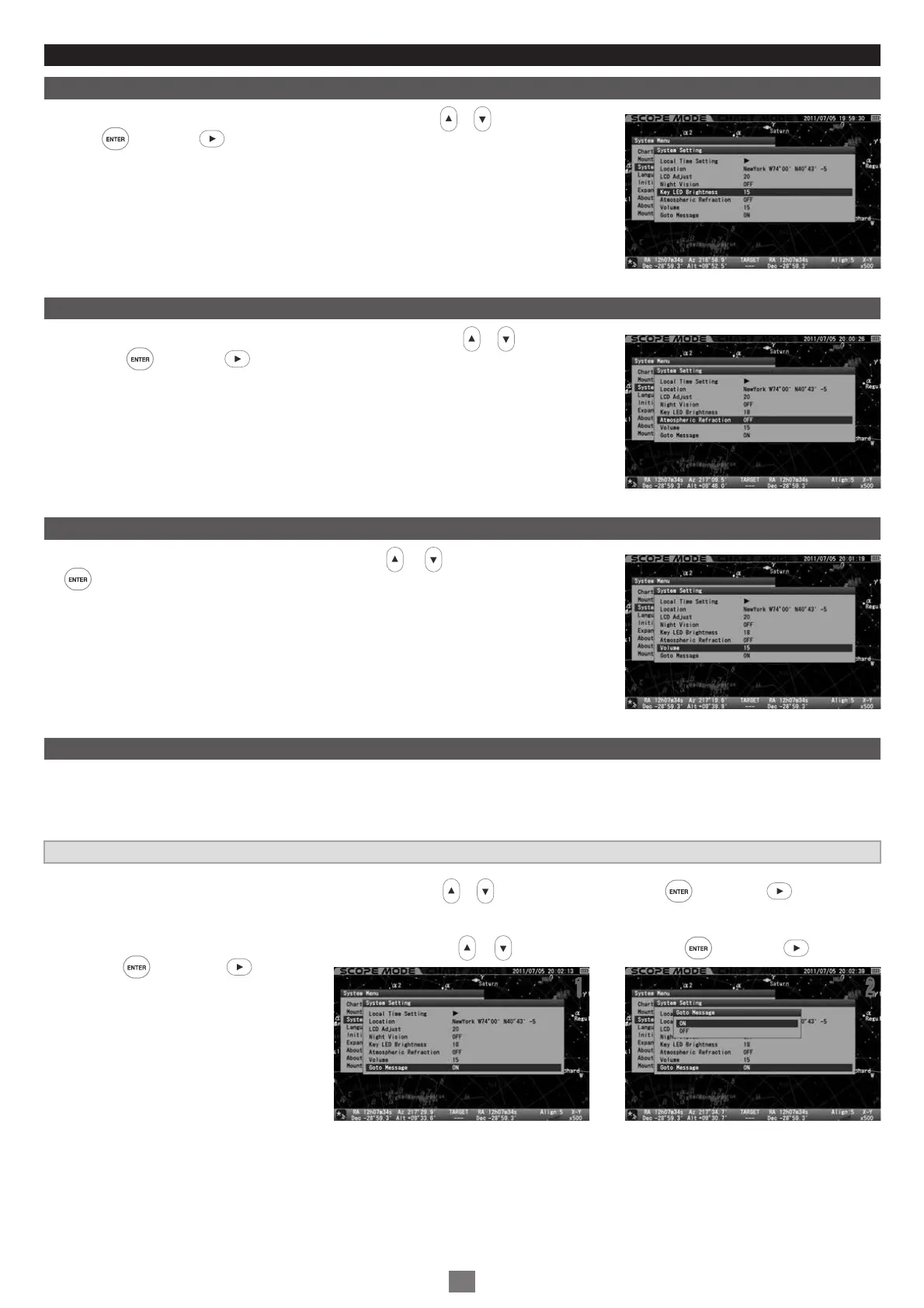
In the “System Setting” menu, choose “Key LED Brightness” with the or direction key and
press the key (or the key) to call up the dialog box. Refer to page 71.
Atmospheric Refraction
In the “System Setting” menu, choose “Atmospheric Refraction” with the or direction key
and press the key (or the key) to call up the dialog box. Refer to page 72.
Volume
In the “System Setting” menu, choose “Volume” with the or direction key and press
the key. Refer to page 72.
In the “System Setting” menu, choose “GoTo Message“ with the or direction key and press the key (or the key) to call up
the dialog box.
In the “GoTo Message” dialog box, choose your desired option the or direction key and press the key (or the key).
Press the key (or the key) to
save and leave the dialog box.
GoTo Message
This allows you to switch OFF or ON the dialog box that confirms Go-To slewing. If the setting is OFF, the telescope will start the Go-To
slewing to your target object as soon as you enter the command. The mount will carry out the Go-To slewing at the same time you call up and
enter the object by the command key in the Chart Mode.
The setting is defaulted to “ON”
1
2
11 22
98


 To Next Page