Display
Select the GAUGES menu from the display to view
information on
Powertronic
(applies to both a
stationary vehicle and one in motion). The display
provides information on the gear currently selected
and which gears are available.
See “Driver Instruction Display” for information about
how to set information about the gearbox as favourite
display.
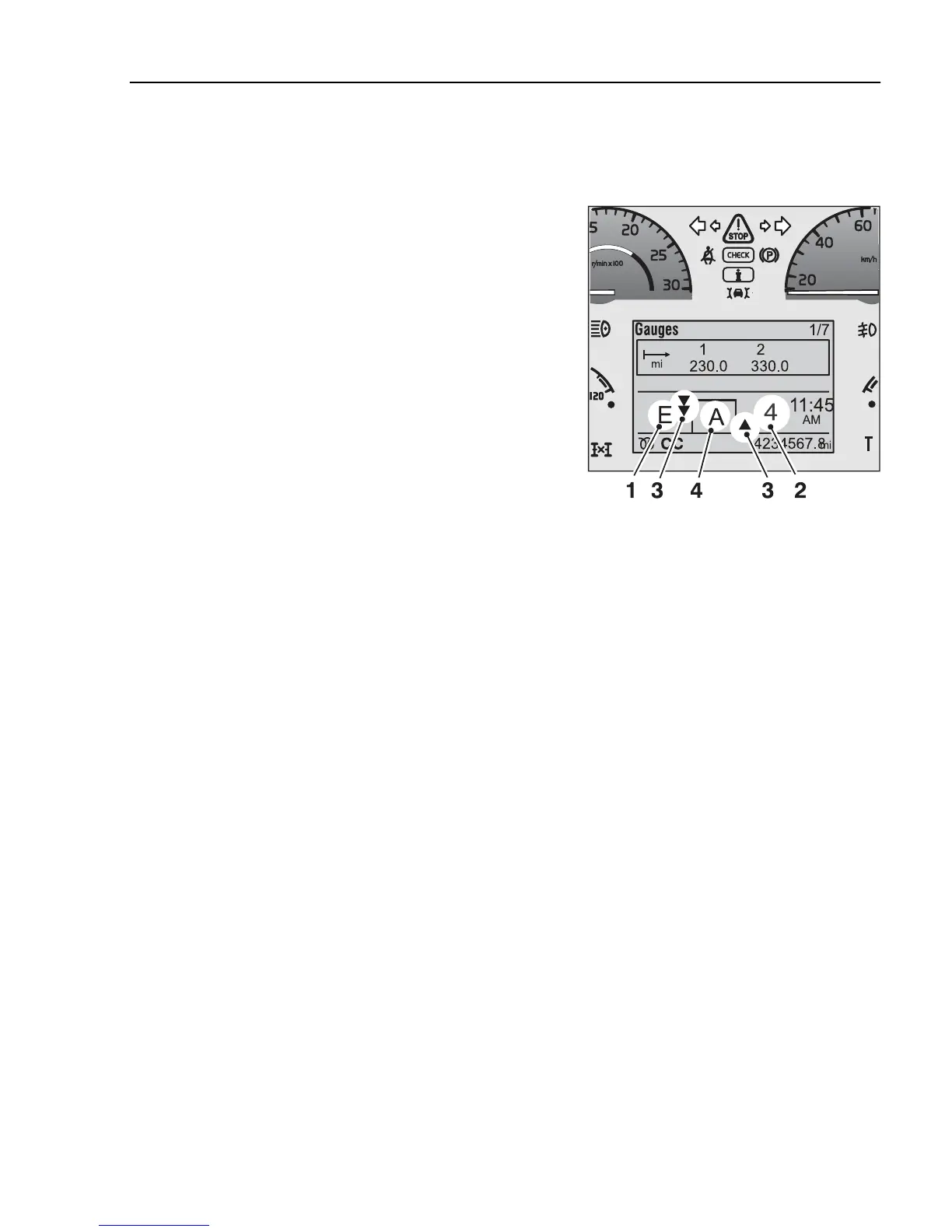
The gearbox section in the display is divided into
smaller sections showing:
1 Drive program
2 Current gear
3 Available gears (up/down)
4 Lever position
J3018211
1. Driving program
The section to the far left of the display shows the
driving program. The following programs are
available:
E = economy
P = power
B = brake program (requires VEB/VEB+ or retarder)
K = kick-down
L = Limp home
1 = start in 1st forward and 1st reverse
(see “Selecting starting gear”)
Z = engine speed too high to move from neutral
HR = High Range lock-up (option)
2. Current gear
The section to the right shows the current gear and if
the torque converter is engaged.
Forward gear no. 1–6
Reverse gear no. 1–2
C = converter (torque converter)
EN = Emergency Neutral
Powertronic
207



 To Next Page